

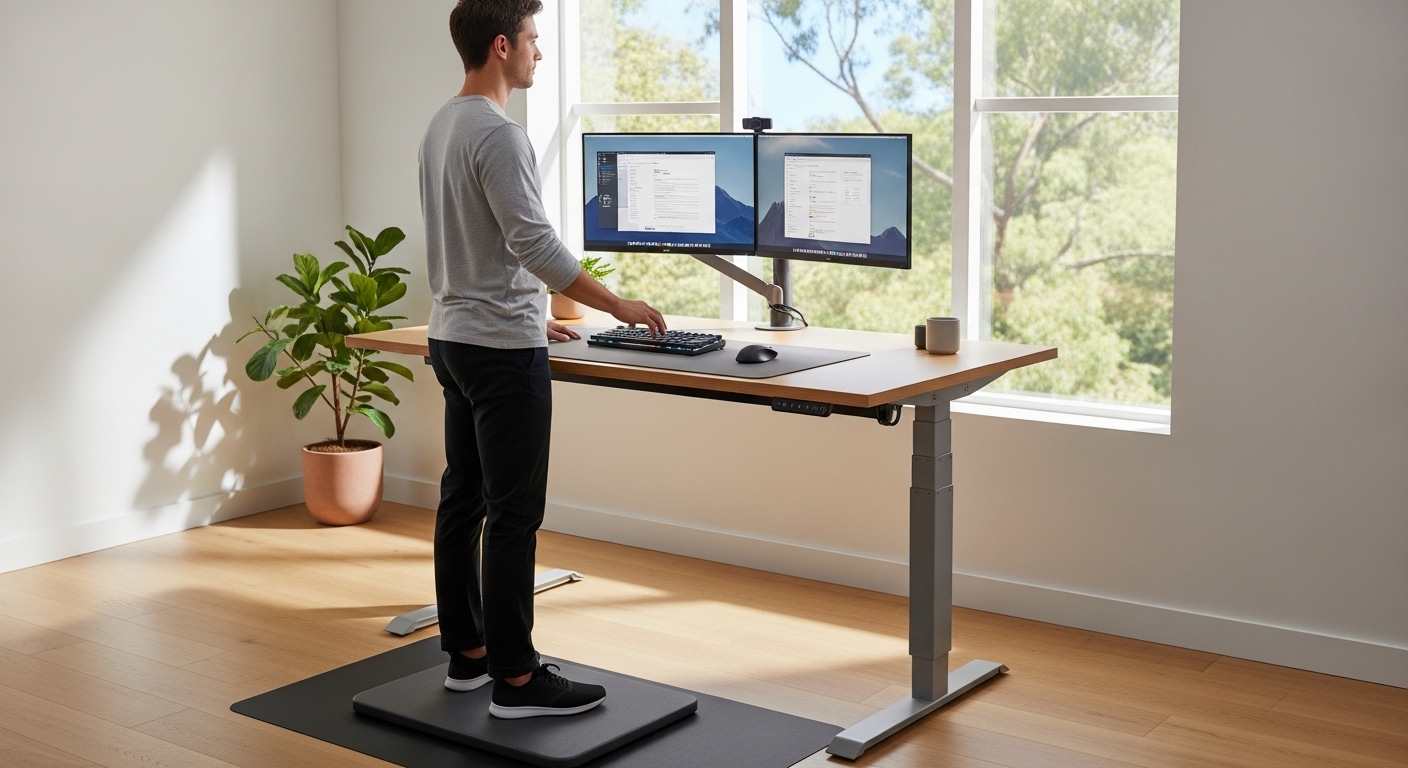
The Evolution of the Modern Workspace
Transitioning to a standing desk is one of the most impactful changes you can make for your home office. Many professionals are moving away from traditional seating to combat the effects of a sedentary lifestyle.
However, simply buying a new desk is not enough to guarantee success. You must learn how to transition to a standing desk properly to avoid physical strain.
Standing for long periods is a physical skill that requires gradual conditioning. If you rush into standing all day, you may experience foot pain or back fatigue.
At The Home Office Lab, we view the desk as a tool for dynamic movement. This guide will provide the educational foundation you need for a healthy transition.
We will explore the physiological changes your body undergoes during this shift. Understanding these mechanics helps you make informed decisions about your daily routine.
Understanding the Physiology of Standing
Standing engages your muscles in a way that sitting does not. It activates your core, glutes, and leg muscles to maintain an upright position.
This increased activity boosts your metabolic rate and improves blood circulation throughout the body. When you stand, your venous pump mechanism works more efficiently to move blood back to your heart.
Sitting for too long can lead to muscle shortening and joint stiffness. Specifically, the hip flexors often become tight after years of traditional office work.
Standing helps to lengthen these muscles and encourages a more neutral spine. However, static standing can also be taxing if your posture is incorrect.
The goal is to move between positions rather than remaining frozen in one place. By the time 2026 arrives, dynamic movement will likely be the standard for all ergonomic experts.
The Impact on Spinal Alignment
Your spine has a natural curve that is often compressed while sitting. Standing allows the vertebrae to stack in a way that distributes weight more evenly.
Proper alignment reduces the pressure on individual discs in your lower back. This is why many users report a reduction in lumbar pain after making the switch.
You must ensure that your head is balanced directly over your shoulders. Leaning forward to look at a monitor can negate the benefits of standing.
Focus on keeping your ears in line with your shoulders at all times. This simple check ensures that your neck muscles are not overworked during the day.
Setting the Foundation for Ergonomics
Before you begin standing, you must configure your equipment correctly. Ergonomics is the science of fitting the workspace to the human body.
The height of your desk is the most critical factor in this setup. If the desk is too high, your shoulders will shrug and cause tension.
Conversely, a desk that is too low will cause you to lean forward and hunch. Your elbows should be at a ninety degree angle when typing on your keyboard.
Your wrists should remain in a neutral, flat position rather than tilting up or down. This positioning prevents the development of strain in your forearms and hands.
Check that your monitor is positioned at eye level to prevent neck tilting. The top third of the screen should align with your horizontal line of sight.
Optimizing Monitor and Keyboard Placement
The distance between your eyes and the screen should be about an arm length. This distance helps to reduce eye strain and prevents leaning.
If you use multiple monitors, ensure they are angled to minimize head rotation. Constant twisting of the neck can lead to cervical muscle fatigue over several hours.
Keep your mouse and keyboard close to your body to avoid overreaching. Overreaching puts unnecessary stress on the rotator cuff and shoulder blades.
Consider using a keyboard that allows your hands to rest naturally. A relaxed grip on the mouse is also essential for preventing repetitive strain.
- Adjust the desk height while wearing your typical office shoes
- Ensure your monitor is centered directly in front of your face
- Keep your most used items within easy reach
- Check that your elbows are tucked close to your torso
The Phased Transition Schedule
The biggest mistake people make is trying to stand for the entire day immediately. This often leads to overuse injuries and a quick return to sitting.
Think of standing as a new exercise program for your cardiovascular system. You would not run a marathon without training your legs first.
During the first week, aim for only thirty minutes of standing at a time. Repeat this two or three times throughout your workday to build tolerance.
The rest of your time should be spent in a high quality ergonomic chair. This balance allows your joints to recover between standing sessions.
By the second week, you can increase these sessions to forty five minutes. Listen to your body and sit down if you feel any sharp pains.
Building Endurance Over Four Weeks
In the third week, try to achieve a one to one ratio between sitting and standing. For every hour you sit, try to stand for the following hour.
This alternating pattern keeps your metabolism active and prevents muscle stiffness. You will likely notice that your energy levels remain more consistent.
By the fourth week, many users find they can stand for several hours comfortably. However, you should still incorporate regular sitting breaks to rest your feet.
The objective is to find a rhythm that feels natural for your unique physiology. Some people prefer standing in the morning and sitting in the afternoon.
Others find that standing after lunch helps them avoid the common mid afternoon energy crash. Experiment with different schedules to see what boosts your productivity.
The Importance of Footwear and Surfaces
Standing on a hard floor for hours can be damaging to your joints. The impact on your heels and knees can cause long term discomfort if not addressed.
You must consider what is between your feet and the ground during the transition. Wearing supportive shoes is much better than working in flat socks or bare feet.
Look for shoes that offer significant arch support and cushioning in the heel. This support helps to distribute your body weight across the entire foot.
Avoid wearing high heels or completely flat flip flops while using a standing desk. These types of footwear can misalign your ankles and lead to calf tightness.
An anti fatigue mat is another essential component for a successful transition. These mats provide a subtle instability that encourages small muscle movements.
Benefits of Anti Fatigue Mats
A soft mat reduces the pressure on your lower back and legs significantly. The slight movement required to balance on the mat promotes healthy circulation in the lower extremities.
This prevents blood from pooling in your feet, which can cause swelling and discomfort. Even a few millimeters of high density foam can make a massive difference.
Ensure the mat is large enough for you to shift your stance comfortably. You should be able to move your feet apart or rotate them slightly.
If you prefer to work without shoes, a high quality mat becomes even more vital. It acts as a protective barrier against the rigid surface of the office floor.
- Choose shoes with excellent shock absorption properties
- Replace worn out shoes that have lost their internal support
- Use a beveled edge mat to prevent tripping hazards
- Keep the mat clean to maintain its grip and safety
Movement Strategies: The 20 8 2 Rule
Ergonomics experts often recommend the twenty eight two rule for office workers. This rule provides a structured way to manage your physical activity levels.
The rule suggests sitting for twenty minutes and then standing for eight minutes. The final two minutes should be dedicated to walking or stretching.
Following this cycle ensures that you are never in one position for too long. It prevents the negative effects of both static sitting and static standing.
The two minutes of movement are perhaps the most important part of the equation. Walking helps to reset your posture and clear your mind for the next task.
You can use this time to grab a glass of water or perform light lunges. These small bursts of activity keep your joints lubricated and your blood flowing.
Incorporating Micro Movements
While standing, you should avoid staying perfectly still for long periods. Incorporate micro movements like shifting your weight from one leg to the other.
You can also perform calf raises or gentle leg swings while reading emails. These movements prevent your muscles from locking up and becoming fatigued.
Try placing one foot on a small footrest or stool while standing at your desk. This position tilts the pelvis and can relieve pressure on the lower lumbar region.
Alternate which foot is raised every few minutes to maintain a balance. This variety is key to maintaining comfort during a long working day.
Common Pitfalls and How to Avoid Them
One frequent mistake is locking the knees while standing at the desk. Locking your joints restricts blood flow and puts stress on the ligaments in your legs.
Always maintain a soft, slight bend in your knees to keep your muscles engaged. This posture allows your legs to act as natural shock absorbers for your body.
Another pitfall is leaning on the desk with your elbows or chest. Leaning creates a slumping posture that leads to shoulder pain and poor breathing.
Keep your weight centered over your midfoot rather than your toes or heels. This central balance point is the most stable position for the human frame.
Do not ignore pain in your body as you learn how to transition to a standing desk properly. Pain is a signal that your postural endurance has been reached for the day.
Managing Cable Length and Workspace Flow
When your desk moves up, your cables must be long enough to reach. Strained cables can damage your computer ports or even pull equipment off the desk.
Invest in longer power strips and display cables to accommodate the height change. This ensures that your workflow remains uninterrupted when you transition positions.
Organize your cables using clips or sleeves to prevent them from getting tangled. A clean workspace reduces mental clutter and improves your overall focus.
Check the clearance around your desk to ensure nothing is crushed during the descent. Safety is a vital part of maintaining a functional home office lab.
Psychological and Cognitive Benefits
Many people find that standing increases their sense of alertness and urgency. It can be particularly effective for tasks that require high levels of focus or creativity.
Standing changes your perspective and can help you feel more engaged with your work. You might find that you are more likely to participate actively in video calls.
The ability to move freely allows for better physical expression during communication. This can lead to a more dynamic and confident professional presence online.
Standing also helps to break the monotony of a long day at the computer. The simple act of changing your physical state can provide a mental reset.
Research suggests that standing can slightly improve cognitive processing speeds in some individuals. This boost in mental clarity is a welcome benefit for tech professionals.
Reducing the Afternoon Slump
The heavy feeling that often occurs after a large lunch is linked to sedentary behavior. Standing encourages better digestion and more stable blood sugar levels after eating.
By staying upright, you avoid the lethargy that comes with slouching in a soft chair. This helps you maintain a high level of productivity throughout the entire afternoon.
If you feel tired, try standing for ten minutes rather than reaching for more caffeine. The natural increase in circulation often provides a more sustainable energy lift.
Creating a routine where you stand during routine tasks can be very helpful. For example, use your standing position for checking emails and your sitting position for deep coding.
Listening to Biofeedback
Your body provides constant feedback about its state of comfort and health. It is vital to develop an awareness of these signals during your transition.
Tingling in the feet or a dull ache in the lower back are signs to sit down. You should never push through significant discomfort in the pursuit of standing goals.
Over time, your body will adapt and these signals will become less frequent. Your muscles will become stronger and your postural stamina will increase naturally.
Keep a journal of how long you stand each day and how you feel afterward. This data helps you refine your schedule and identify any recurring issues.
Be patient with yourself as you navigate this change in your daily habits. It takes several weeks for the body to fully adjust to a new ergonomic paradigm.
Adjusting for Health Conditions
If you have existing joint issues, consult with a professional before changing your desk habits. People with varicose veins should be cautious with static standing for long periods.
In such cases, the movement aspect of the transition becomes even more critical. Compression socks can also be a helpful tool for those with circulatory concerns.
Always prioritize your long term health over any specific office trend. The best desk setup is the one that supports your unique physical requirements.
Ergonomics is not a one size fits all solution for every individual. Use the principles in this guide as a flexible framework for your own setup.
FAQ: Transitioning to a Standing Desk
How long should I stand each day? You should aim for a total of two to four hours of standing spread across your workday. Do not try to reach this goal on the first day of your transition.
Will standing help me lose weight? Standing burns slightly more calories than sitting, but the primary benefit is improved metabolic health and posture. It should be seen as a wellness tool rather than a weight loss program.
What if my feet hurt even with a mat? Check your footwear and ensure you are not locking your knees. If pain persists, reduce your standing time and increase your movement breaks throughout the day.
Should I use a footrest while standing? Yes, a small footrest allows you to shift your weight and change the angle of your pelvis. This is a great way to reduce pressure on your lower back muscles.
Is it better to stand or sit for focused work? This varies by person, but many find sitting better for deep concentration and standing better for active communication and planning. Experiment to see what works for your brain.
Conclusion
Learning how to transition to a standing desk properly is a journey toward better health. It requires a combination of the right equipment, proper ergonomic alignment, and a gradual schedule.
By following the phased approach, you allow your body to build the necessary strength without injury. Remember to invest in supportive footwear and a high quality anti fatigue mat.
The goal of a standing desk is not to stand forever, but to introduce movement into your day. Use the 20 8 2 rule to keep your body active and your mind sharp.
As you become more comfortable, you will likely notice improvements in your energy and posture. Your home office should be a place where your physical well being is a top priority.
Stay consistent with your new habits and listen to the feedback your body provides. With patience and the right strategy, you can master the art of the standing desk transition.