

Understanding the Impact of Digital Screens on Your Vision
In the modern era of professional productivity, the majority of our daily tasks occur in front of a digital display. This shift toward computer centric work has introduced a common physical challenge known as Digital Eye Strain.
As the owner of The Home Office Lab, I have spent years analyzing how workspace configurations affect human physiology. It is essential to recognize that our eyes were not evolutionarily designed to stare at glowing rectangles for eight hours straight.
When you focus on a screen, your eyes must maintain a constant level of muscular tension to keep the image sharp. This process is significantly more demanding than looking at physical paper or viewing objects in the natural world.
By learning how to prevent eye strain at your desk, you can improve your long term comfort and daily focus. Neglecting these symptoms can lead to chronic headaches, blurred vision, and even a decrease in your overall work performance.
The goal of this guide is to provide you with the most comprehensive strategies available today. We will explore everything from physiological mechanics to the environmental adjustments necessary for a healthy office.
The Mechanics of Computer Vision Syndrome
To solve the problem of ocular fatigue, we must first understand what is happening inside the eye. The ciliary muscles are responsible for changing the shape of the lens to focus on near objects.
When you spend hours staring at a fixed distance, these muscles can become fatigued and cramped. This is very similar to how your legs might feel after standing in one position for an extended period.
Furthermore, digital screens are composed of pixels that have blurry edges rather than solid lines. This lack of sharp definition forces the eye to constantly refocus and adjust to maintain clarity.
This micro fluctuation of the lens is a primary contributor to the exhaustion you feel at the end of the day. Understanding this physiological reality helps you appreciate why frequent breaks are non negotiable for health.
We also tend to blink significantly less when we are concentrated on a digital task. Studies show that our blinking rate drops by nearly sixty six percent when using a computer.
This lack of blinking leads to the rapid evaporation of the tear film that protects the eye surface. Without this moisture, you may experience burning sensations and persistent redness by the afternoon.
Addressing the Root Causes of Fatigue
Identifying the symptoms early is crucial for preventing more serious vision issues. Common signs include dry eyes, double vision, and difficulty focusing on distant objects after work.
By implementing a proactive strategy, you can mitigate these risks and create a more sustainable work environment. Let us dive into the specific environmental changes you can make right now.
Optimizing Your Ambient Lighting Environment
Lighting is perhaps the most overlooked factor in workspace ergonomics. The contrast between your screen brightness and the surrounding room is a major source of strain.
Ideally, your ambient light should be roughly equal to the brightness of your monitor. If the room is too dark, the screen acts like a glaring flashlight that shocks the retina.
Conversely, a room that is too bright can wash out the screen and force you to strain to see details. You should aim for balanced illumination that fills the space without creating harsh shadows.
Natural light is wonderful for mood, but it can be problematic for vision if positioned incorrectly. Never place your desk directly in front of or behind a large window.
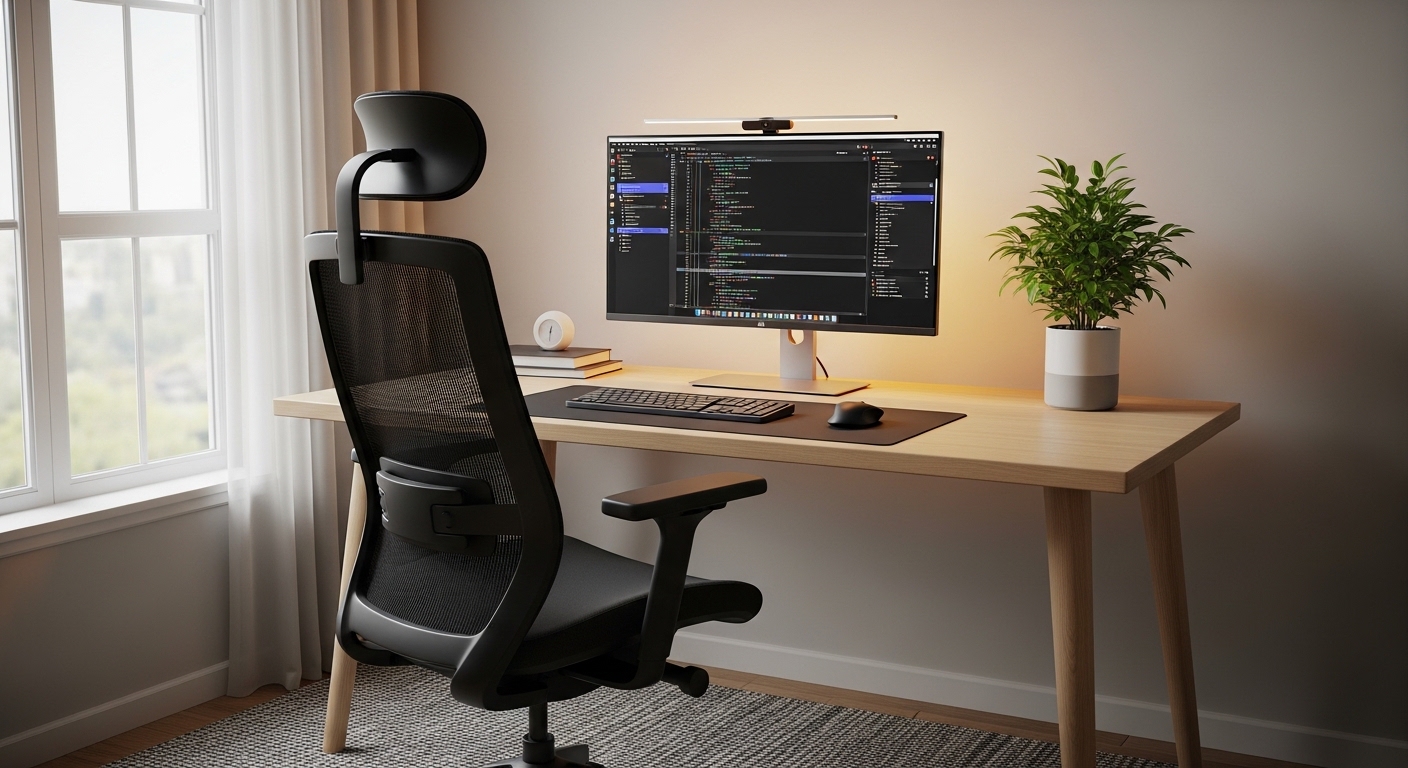
Windows should ideally be located to the side of your workstation. This prevents the sun from shining directly into your eyes or creating distracting reflections on the glass surface.
If you cannot move your desk, consider using sheer curtains or blinds to diffuse the sunlight. Controlling the intensity of light throughout the day is a key component of ocular comfort.
The Benefit of Bias Lighting
One advanced technique for reducing strain is the use of bias lighting behind the monitor. This involves placing a soft light source that glows against the wall behind your screen.
This glow increases the average brightness in your field of view without adding glare to the screen itself. It allows your pupils to stay in a neutral state rather than constantly dilating and contracting.
Eliminating Glare and Surface Reflections
Reflections on your monitor screen can cause a phenomenon called veiling glare. This makes the text appear washed out and much harder to read comfortably.
Your brain must work harder to ignore the reflection of a window or a lamp while focusing on your work. This cognitive load contributes directly to the feeling of mental and physical exhaustion.
To test for glare, turn off your monitor and look at the dark surface. If you can see distinct light sources or your own reflection, your lighting needs adjustment.
Adjust the angle of your screen slightly to deflect these reflections away from your eyes. Using a matte screen protector can also help diffuse harsh light if you have a glossy display.
Be careful with overhead fluorescent lights, which are notorious for causing flicker and glare. If possible, use floor lamps or desk lamps with warm bulbs instead of harsh ceiling fixtures.
Position these lamps so that the light does not bounce directly off the monitor and into your face. Creating a soft light environment is essential for anyone working long hours at a desk.
The Impact of Screen Quality
The quality of your display also plays a significant role in how much strain you experience. High resolution screens with high pixel density make text appear sharper and easier to process.
Lower resolution displays can cause letters to look jagged, which forces the eye to work harder to identify them. If you are still using older hardware, upgrading your monitor could be a wise investment in your health.
Perfecting Your Monitor Placement and Distance
The physical location of your screen determines the angle at which your eyes and neck must work. Improper placement often leads to a slumped posture that further restricts blood flow to the head.
Your monitor should be positioned directly in front of you at roughly an arm’s length away. This distance, usually between twenty and thirty inches, is ideal for most users.
If the screen is too close, your eyes must converge more aggressively, which causes rapid muscle fatigue. If it is too far away, you may lean forward and strain to see small text.
The height of the monitor is equally important for maintaining a neutral gaze. The top of the screen should be at or slightly below your eye level.
When you look at the center of the screen, your gaze should be slightly downward. This position allows your upper eyelids to cover more of the eye surface, which reduces dryness.
Looking upward at a screen forces the eyes to open wider, which increases the rate of tear evaporation. Always prioritize a downward viewing angle to keep your eyes hydrated and comfortable.
Using Monitor Arms for Precision
Using a monitor arm can help you achieve the exact height and tilt required for your specific height. These tools allow for fluid adjustments throughout the day as your posture naturally shifts.
By maintaining a flexible setup, you can ensure that you are never locked into a stagnant position. Movement and adjustment are the enemies of chronic strain and physical stiffness.
Mastering Display Settings for Eye Comfort
Most monitors come from the factory with brightness and contrast levels that are far too high for office work. These settings are designed to look vibrant in stores but are punishing for daily productivity.
You should adjust your brightness so that it matches the white paper on your desk. If the screen looks like a source of light, it is too bright for your environment.
Contrast should be high enough to make text stand out clearly from the background. A high contrast ratio prevents your eyes from having to squint to distinguish between shades.
Color temperature is another critical setting that affects how your brain processes screen time. Cooler, blue light settings are highly stimulating and can cause more strain during evening hours.
Warmer tones are much gentler on the eyes and can help maintain your natural circadian rhythm. Many operating systems now include automatic night modes that shift colors as the sun sets.
Take advantage of these software features to reduce the amount of blue light hitting your retinas. In 2026, we expect these intelligent display features to become even more sophisticated and standard.
Text Size and Readability
Never feel like you have to stick with the default font size on your computer. If you find yourself leaning in to read emails, it is time to increase the scaling.
Most web browsers and operating systems allow you to increase text size to one hundred and twenty five percent or more. Larger text allows your eye muscles to stay relaxed while you consume information.
Implementing the 20 20 20 Rule Effectively
The most famous advice for office workers is the 20 20 20 rule. Every twenty minutes, you should look at something twenty feet away for at least twenty seconds.
This simple habit allows the ciliary muscles to fully relax and reset their focus. It is the equivalent of a quick stretch for your eyes after a period of intense labor.
Looking into the distance forces your eyes to change their focal point. This prevents the muscles from becoming temporarily frozen in a near vision state.
To make this habit stick, you can use digital timers or specialized apps. Many professionals find that a physical reminder on their desk helps them remember to look away.
During these twenty seconds, try to blink several times quite deliberately. This helps redistribute the natural moisture across your cornea and prevents that gritty feeling.
Consistency is more important than the duration of the break itself. Short, frequent breaks are far more effective than one long break taken after hours of continuous work.
Expanding the Break Habit
While looking away is great, standing up and moving is even better for your visual health. Physical movement increases blood circulation to the entire head and neck area.
Better circulation means more oxygen and nutrients reach the delicate tissues of your eyes. Use your break time to walk to a window and look at the horizon if possible.
The Role of Blinking and Hydration
As mentioned earlier, our blinking rate drops significantly when we use digital devices. Blinking is the body’s natural mechanism for cleaning and lubricating the surface of the eye.
Every time you blink, a fresh layer of tears is spread across the eye. This layer contains essential oils that prevent moisture from evaporating too quickly into the air.
When you forget to blink, dry spots develop on the cornea, which causes irritation. You must make a conscious effort to blink more frequently while reading long documents.
Proper hydration also plays a vital role in the quality of your tear film. If you are dehydrated, your body cannot produce the lubricating fluids needed for comfortable vision.
Keep a bottle of water at your desk and sip from it throughout the workday. This simple habit supports overall health and specifically protects your eyes from drying out.
Environmental factors like air conditioning and heating also contribute to dry eyes. These systems remove humidity from the air, which accelerates tear evaporation during your shift.
Using a Humidifier
If you work in a particularly dry climate or office, consider using a small humidifier. Adding moisture to the air can significantly reduce the symptoms of dry eye syndrome.
This is especially helpful during the winter months when indoor heating is at its peak. A controlled environment is a powerful tool for maintaining long term vision comfort.
Blue Light: Separating Fact from Fiction
Blue light has become a major topic of discussion in the world of workspace ergonomics. It is a high energy visible light that can penetrate deep into the eye.
While the sun is the largest source of blue light, digital screens also emit significant amounts. Exposure to blue light late in the evening can disrupt sleep by suppressing melatonin production.
However, the direct link between blue light from screens and permanent eye damage is still being studied. Most experts agree that digital eye strain is caused more by how we use screens than by the light itself.
That being said, many people find relief by using blue light filters or specialized glasses. These tools can reduce the harshness of the display and make long hours more tolerable.
If you choose to use blue light glasses, ensure they have a high quality coating. Cheap versions can sometimes create extra reflections that actually increase the strain you are trying to avoid.
The most effective way to manage blue light is through software settings. Adjusting your color temperature to a warmer profile is a free and highly effective solution.
The Importance of Contrast over Color
While color is important, the level of contrast is often more impactful for readability. Ensure your text and background have a sharp distinction to minimize the effort of reading.
Dark mode can be helpful for some users, especially in low light environments. However, for prolonged reading, many people still find black text on a light gray background to be the most comfortable.
The Connection Between Posture and Vision
How you sit at your desk directly influences how your eyes function. If you are slouching forward, you are likely changing the distance between your eyes and the monitor.
This constant change in distance requires your eyes to work harder to maintain focus. A stable posture provides a consistent visual platform for your brain to process information.
Neck tension can also restrict blood flow to the visual cortex at the back of the brain. When these muscles are tight, you may experience headaches that feel like eye strain.
Ensure your chair provides adequate lumbar support so you can sit upright without effort. Keep your shoulders relaxed and your chin tucked slightly to align your spine.
A neutral spine allows your head to sit perfectly balanced above your shoulders. This balance reduces the muscular effort required to keep your eyes aimed at the screen.
Remember that the body is an integrated system where every part affects the others. Good postural habits are just as important as proper lighting for preventing ocular fatigue.
The Neutral Reach Zone
Keep your most frequently used items within your neutral reach zone to avoid twisting. Excessive twisting and turning can cause your eyes to lose focus and work harder to reorient.
By keeping your keyboard and mouse centered, you maintain a straight line of sight. This symmetry is beneficial for both your musculoskeletal system and your visual processing.
Professional Eye Care and Specialized Lenses
Sometimes, all the ergonomic adjustments in the world cannot replace the need for professional help. If you have persistent symptoms, it is time to visit an optometrist.
A comprehensive eye exam can detect minor refractive errors that only become apparent during computer work. Even a slight astigmatism can cause significant strain when staring at digital text.
Ask your doctor specifically about computer glasses, which are optimized for intermediate distances. Traditional reading glasses or bifocals are often not designed for the specific distance of a monitor.
Computer lenses can provide a wider field of view for the middle range. This prevents you from having to tilt your head back to see through the bottom of your lenses.
Anti reflective coatings are also a valuable addition to any pair of professional glasses. These coatings minimize glare from overhead lights and the screen itself.
Being honest with your eye doctor about your daily screen time is essential. They can provide tailored advice based on your specific workspace and visual needs.
The Annual Eye Checkup
Make it a habit to get your eyes checked at least once every year. Our vision changes gradually, and you may not notice the decline until the strain becomes unbearable.
Early detection of changes allows you to update your prescription and avoid weeks of unnecessary discomfort. Investing in your vision is a long term strategy for career longevity.
Nutrition for Long Term Ocular Health
What you eat can also influence how well your eyes handle the rigors of the modern office. Certain antioxidants and nutrients are known to support retinal health and reduce inflammation.
Lutein and zeaxanthin are two powerful pigments found in leafy green vegetables like spinach and kale. These compounds act like natural sunglasses by filtering out harmful blue light from within the eye.
Omega three fatty acids, commonly found in fish, are essential for maintaining the tear film. These fats help the meibomian glands produce the oil needed to prevent dry eyes.
Vitamin C and Vitamin E are also crucial for protecting the eyes from oxidative stress. A balanced diet rich in colorful vegetables and healthy fats provides the building blocks for resilient vision.
If you cannot get enough of these nutrients through food, consider talking to your doctor about supplements. Supporting your internal biology is a great way to bolster your external ergonomic efforts.
Remember that eye health is not just about what you do at your desk. It is a holistic endeavor that involves your entire lifestyle and daily habits.
The Impact of Sleep on Vision
During sleep, your eyes are continuously lubricated and cleared of irritants accumulated during the day. Lack of quality sleep can lead to bloodshot eyes, puffiness, and increased sensitivity to light.
Aim for seven to nine hours of rest to ensure your eyes have time to recover. Recovery is the essential counterpart to the intense focus required during your working hours.
Frequently Asked Questions
How often should I look away from my screen?
You should follow the 20 20 20 rule and look away every twenty minutes. This consistent frequency is the most effective way to prevent muscle fatigue in the eyes.
Can blue light glasses really help with strain?
While they are not a magic cure, many people find they reduce the harshness of screens. They are most effective when used in low light environments during evening hours.
What is the best monitor brightness setting?
Your monitor should match the brightness of your surrounding environment as closely as possible. It should not look like a shining light nor should it look dim and muddy.
Where should I place my desk relative to a window?
Place your desk so the window is to your side rather than in front or behind. This prevents direct sunlight and reflections from interfering with your ability to see the screen clearly.
How do I know if my eye strain is serious?
If you experience chronic headaches, blurred vision, or eye pain that persists after work, see a professional. These lingering symptoms may indicate an underlying vision issue that needs correction.
Conclusion: Prioritizing Your Visual Wellbeing
Learning how to prevent eye strain at your desk is a vital skill for anyone working in the digital age. By combining ergonomic adjustments with healthy habits, you can protect your most valuable sensory asset.
Start by evaluating your lighting and monitor placement today. Small changes in screen height and ambient light can lead to immediate improvements in your daily comfort levels.
Do not wait for pain to become the catalyst for change in your home office. Be proactive and consistent in your application of the rules we have discussed in this guide.
Your eyes are the window through which you process the world and perform your best work. Treat them with the care and respect they deserve for a long and productive career.
Thank you for trusting The Home Office Lab to help you build a healthier workspace. With these expert strategies, you are well on your way to a strain free future.