

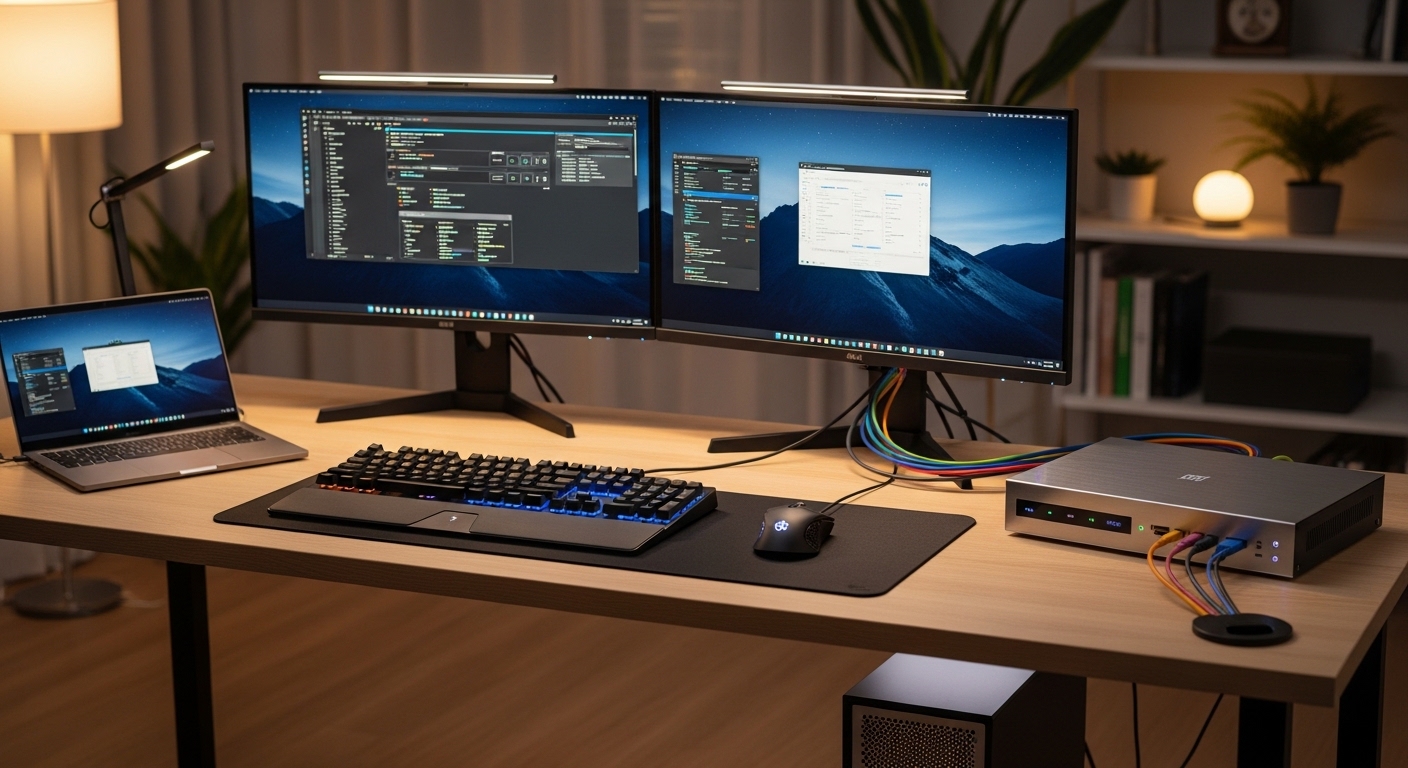
The Evolution of Multi Computer Productivity
Managing two separate computers while using a dual screen setup often leads to a cluttered desk and a chaotic workflow. Many professionals juggle a corporate laptop for meetings and a powerful desktop for heavy tasks like video editing or software development.
A dual monitor KVM switch serves as the central nervous system for your entire workstation. It allows you to toggle your displays, keyboard, and mouses between different machines with a single button press.
The science behind these devices involves complex signal routing and EDID management to ensure that your operating systems do not lose track of the display arrangement. Without this technology, every switch would trigger a frustrating rearrangement of your open windows and desktop icons.
By implementing one of the best dual monitor kvm switches for home office, you reclaim your physical space and mental focus. You no longer need to move cables or keep multiple sets of input peripherals on your desk.
Modern solutions support ultra high resolutions and high refresh rates which are essential for eye comfort during long working hours. They provide a seamless transition that makes two distinct computers feel like a single integrated system.
This efficiency is particularly crucial for those working in fields like financial analysis or engineering. Having the ability to compare data on one machine while executing code on another is a game changer for professional output.
Optimizing Your Digital Workspace
The home office has become a permanent fixture for many and the need for professional grade equipment has never been higher. A high quality switch eliminates the lag and reliability issues found in cheaper software based alternatives.
Investing in hardware switching ensures that your peripheral devices respond instantly without the latency associated with network based sharing. This is why hardware KVMs remain the gold standard for power users.
Quick Buying Guide
Before purchasing a KVM switch, you must verify the video output ports on both of your computers. Most modern systems use HDMI or DisplayPort, and mixing these often requires active adapters to function correctly.
Ensure the switch supports the native resolution and refresh rate of your monitors to avoid blurry text or stuttering visuals. A switch rated for 4K at 60Hz is generally the minimum requirement for a professional experience in 2026.
Check the number of USB ports available for your mouses, keyboards, and other accessories like webcams or printers. Some switches offer dedicated ports for keyboard emulation which enables hotkey switching but might conflict with specialized gaming mouses.
Consider the switching methods provided by the manufacturer such as physical buttons, hotkey sequences, or even desktop remote controls. Having multiple switching options ensures that you can tuck the device away to keep your desk looking clean.
Build quality matters because these devices handle significant heat and constant signal processing. A metal housing is usually preferred over plastic for better heat dissipation and long term durability in a busy home office.
Finally, look for EDID support which allows the computers to remember screen settings even when they are not actively selected. This feature prevents the rearrangement of windows every time you flip between your work laptop and personal desktop.
Understanding Connection Standards
DisplayPort often offers higher bandwidth for high refresh rate monitors compared to older HDMI standards. If you use monitors with a 144Hz refresh rate, a DisplayPort KVM is almost always the superior choice.
However, HDMI is more common for standard office monitors and laptops which makes it a versatile option for most users. Always double check your cable versions to ensure they match the capabilities of your new switch.
The 8 Best dual monitor kvm switches for home office
Explore our carefully selected list of the most reliable and high performing dual monitor KVM switches available today.
1. KVM Switch 2 Monitors 2
This dual monitor KVM switch supports two computers and provides crisp 4K resolution at 60Hz across both displays. It includes four USB 2.0 ports for connecting essential peripherals like keyboards and mice.
The wired remote and front panel buttons offer convenient ways to toggle between work and personal systems quickly. This device stands out as a reliable choice for the best dual monitor kvm switches for home office setups.

Performance and Reliability
Reliability is the hallmark of the TESmart brand in the KVM market. Users can trust that their display signals will remain crisp and clear without any flickering or signal loss during the day.
2. CKLau 2 Port Dual Monitor HDMI KVM Switch
CKLau has designed a compact and functional switch that focuses on ease of use for the average home office worker. The unit is constructed from high quality materials that provide a solid weight and prevent it from sliding around the desk.
The layout of the ports is logical and allows for relatively clean cable management even with eight cables attached. It is a practical solution for those with limited desk real estate who still need dual monitor support.
This model stands out because it supports a wide variety of switching methods including hotkeys and a wired remote button. The audio support allows you to share a single set of speakers or a headset between both of your computers.
It handles 4K resolutions with ease and maintains excellent color accuracy which is vital for designers and photographers. The integrated USB hub is reliable for connecting standard office mouses and keyboards without any lag.
This switch is perfect for users who want a balance between price and professional features. It provides all the essential connectivity options without the complexity of more expensive rack mount units.
While the build is sturdy, the cables included in the box are sometimes shorter than expected for large standing desks. It remains a fantastic choice for those who need a dependable daily driver for their multi computer workflow.

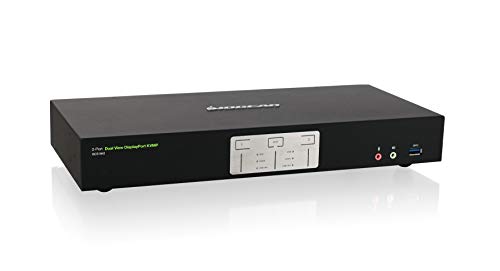
3. IOGEAR GCS1942 2-Port 4K DisplayPort Dual View KVM
IOGEAR is a legendary name in the peripheral space and the GCS1942 is their premium offering for power users. The design is industrial and functional, featuring a heavy duty casing that can withstand the rigors of a professional environment.
The buttons provide tactile feedback that is satisfying to use, and the status lights are bright enough to see in a well lit office. This device is clearly built for maximum longevity and performance.
Technically, this is one of the few switches on the list that focuses on DisplayPort connectivity for high bandwidth applications. It supports Cinema 4K resolutions and high end audio formats for a truly immersive workstation experience.
The USB 3.0 ports allow for much faster data transfer speeds when using external hard drives compared to the standard USB 2.0 found elsewhere. It effectively acts as a high speed docking station and a switch in one unit.
This product is best suited for video editors and gamers who require the highest possible refresh rates and color depths. It supports advanced mouse devices and mechanical keyboards without any compatibility issues.
The premium price point reflects its high end capabilities and the inclusion of all necessary cables in the package. If you refuse to compromise on visual fidelity, this IOGEAR unit is the ultimate workstation upgrade.
Why DisplayPort Matters
Using DisplayPort allows for daisy chaining and better support for ultra wide monitors. This makes the IOGEAR switch a future proof investment for evolving home office setups.
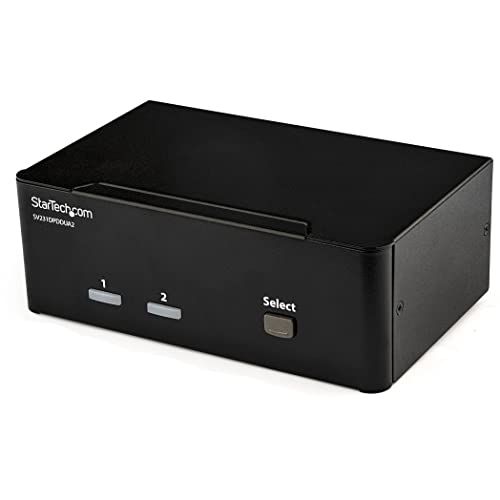
4. StarTech.com 2-Port Dual Monitor DisplayPort KVM
StarTech.com is known for producing reliable IT accessories, and this dual monitor KVM switch follows that tradition perfectly. The enclosure is minimalist and professional, designed to sit unobtrusively under a monitor stand or tucked away in a cable tray.
The build quality is exceptional, featuring a steel housing that offers excellent shielding against electromagnetic interference. It is a no nonsense tool for serious professionals who value stability over flashy design.
In terms of performance, it supports dual DisplayPort outputs at 4K 60Hz, ensuring that your desktop looks sharp on both screens. The switch is highly compatible with a wide range of operating systems including Windows, macOS, and Linux.
It features a built in USB 3.0 hub which is ideal for sharing high speed peripherals like webcams or thumb drives. The independent switching capability allows you to listen to audio from one computer while working on another.
This device is the best choice for IT professionals and system administrators who need a tool that just works every time. It offers rock solid performance in environments where downtime is not an option.
The only potential downside is the lack of a remote switching button, meaning the unit must be within arm’s reach. However, its reliability makes it a staple for high stakes home office environments.
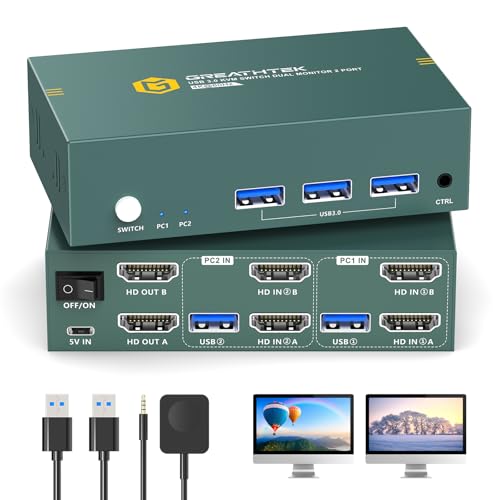
5. Greathtek 2 Port Dual Monitor HDMI KVM Switch
Greathtek offers a highly competitive solution for those who need dual monitor switching on a budget. The design is modern and slim, taking up very little space on a crowded desk surface.
The matte finish prevents fingerprints and keeps the device looking clean even with frequent use. It represents an excellent value proposition for home office users looking to optimize their setup without spending a fortune.
Performance is surprisingly good for this price range, as it handles 4K at 60Hz without any noticeable flickering. It includes all the necessary cables, which is a significant cost saving for the end user.
The switch supports various modes like extended display or mirror mode, giving you flexibility in how you use your two screens. It is a versatile peripheral that adapts to your specific workflow needs.
This model is ideal for students or remote workers who have a simple two computer setup. It easily connects a laptop and a home PC to standard HDMI monitors without any configuration headaches.
Some users might find the plastic buttons a bit less premium than the metal alternatives. For the price, the functionality is unbeatable and it solves the core problem of cable clutter effectively.
Value vs Performance
Choosing a budget friendly option like Greathtek does not mean sacrificing the essentials. You still get the core benefits of a dual screen workflow without the enterprise price tag.
6. Steetek Dual Monitor HDMI KVM Switch 2 Port
Steetek provides a streamlined and efficient KVM switch that focuses on a clutter free experience. The chassis is compact and features a very clear labeling system for all inputs and outputs on the rear panel.
The build feels dense and durable, suggesting that the internal components are well protected and properly cooled. It is a smartly designed device that prioritizes functional simplicity in a small form factor.
The performance is tailored for standard office tasks, providing crisp 4K visuals and lag free input for your mouses. It features an automatic detection system that can switch to a new active input if one computer is powered down.
The integrated USB ports are located on the front for easy access when you need to plug in a temporary device. This thoughtful layout makes it very convenient for daily interactions and peripheral swaps.
This switch is best for users who prioritize a clean desk and want a device that can be easily hidden. It is a space saving solution that does not compromise on the quality of the video signal.
One minor limitation is the absence of an external remote, so you will need to use the front button or hotkeys. For most home office setups, this is a minor trade off for such a compact and reliable unit.

7. Pway Dual Monitor KVM Switch 2 Port 4K 60Hz
Pway has built a reputation for reliable video distribution hardware, and this KVM switch is a testament to that expertise. The metal housing is finished in a professional gray color that matches high end laptop finishes.
The device feels sturdy and stays in place even when multiple thick HDMI cables are pulling on the back. It is a well engineered product that looks as good as it performs on a modern desk.
Technically, it excels at maintaining signal integrity over longer cable runs which is helpful for large desk setups. It supports 4K at 60Hz with full chroma subsampling for perfect text clarity in documents and spreadsheets.
The hotkey switching is responsive and customizable, allowing you to quickly move between systems without taking your hands off the keyboard. It supports a wide range of USB mouse devices and keyboards including those with RGB lighting.
This product is an excellent choice for general office productivity and standard administrative work. It provides a seamless transition between machines that keeps your momentum going throughout the workday.
While it lacks USB 3.0, the reliability of the video signal and the ease of setup make it a very strong contender. It is a dependable workhorse for any dual monitor home office environment.

Consistent Signal Quality
Pway focuses on the quality of the video handshake to ensure your screens never go black unexpectedly. This level of consistency is what makes it a top tier choice for home users.
8. AV Access iDock C10 Dual Monitor KVM Switch Dock
The AV Access iDock C10 is a unique hybrid that combines a traditional KVM switch with a modern USB-C docking station. The design is sleek and oriented toward users who frequently switch between a desktop and a modern laptop.
The build quality is premium, with a sophisticated look that fits perfectly in a high tech home office. It is a forward thinking device that simplifies the connectivity for the latest generation of hardware.
This device allows you to connect a laptop via a single USB-C cable while your desktop uses standard HDMI and USB connections. It even provides power delivery to charge your laptop while it is connected to the dual monitors.
It supports high refresh rates and ultra high resolutions, making it one of the most powerful options in this list. The integrated docking features eliminate the need for an extra laptop dock, saving even more desk space.
This is the ultimate choice for the modern professional who uses a powerful desktop for work and a thin laptop for travel. It offers the most integrated experience possible by merging power, data, and video into one switch.
The higher price is justified by the dual functionality of being both a switch and a high powered docking station. It is a premium investment for those who want the absolute best in home office technology.

Comparison of Top Dual Monitor KVM Switches
The following table provides a quick overview of how these leading models compare across key categories to help your decision.
| Product Name | Key Feature | Best For | Price Range |
|---|---|---|---|
| TESmart HKS0402A1U | EDID Emulation | Creative Professionals | Mid Range |
| CKLau 2 Port HDMI | Wired Remote Button | General Productivity | Budget Friendly |
| IOGEAR GCS1942 | DisplayPort 4K 60Hz | Video Editors | Premium |
| StarTech.com 2-Port DP | USB 3.0 Hub | IT Professionals | High End |
| Greathtek 2 Port HDMI | Compact Design | Students/Home Users | Budget Friendly |
| Steetek HDMI KVM | Auto Detection | Minimalist Desks | Entry Level |
| Pway 2 Port 4K | Metal Housing | Administrative Work | Budget Friendly |
| AV Access iDock C10 | Laptop Charging Dock | Hybrid Laptop Users | Premium |
Final Verdict
After analyzing all the options, the AV Access iDock C10 stands out as the most innovative and useful choice for the modern home office. Its ability to act as both a docking station and a KVM switch solves multiple problems with a single device.
For those who prefer a more traditional setup with purely DisplayPort connections, the IOGEAR GCS1942 remains the undisputed leader in performance. It provides the bandwidth and reliability required for the most demanding visual tasks and high end peripherals.