

Introduction to Seat Pan Ergonomics
Achieving the perfect seating position involves more than just setting the height of your desk. Most people focus on the backrest or the armrests while ignoring the foundation of comfort beneath them.
The seat pan depth determines how much support your thighs receive during a long workday. Understanding how to adjust ergonomic chair seat pan depth is a vital skill for anyone spending hours at a computer.
If the seat is too deep, it can cut off circulation behind your knees. Conversely, a seat that is too shallow fails to distribute your body weight effectively, leading to increased pressure on your sit bones.
In this comprehensive guide, we will explore the science of seat depth and the physical mechanics involved. You will learn the exact steps to optimize your chair for your unique body proportions.
Correcting this single setting can alleviate lower back pain and reduce leg fatigue significantly. Let us dive into the technical details of proper seat alignment for your home office.
Defining Seat Pan Depth and Its Importance
Seat pan depth refers to the distance between the backrest of your chair and the front edge of the seat cushion. This measurement must match the length of your upper leg bone or femur.
When you sit, your thighs should be fully supported by the cushion. However, the edge of the seat should never press against the back of your knees.
This sensitive area behind the knee contains vital nerves and blood vessels. Constant pressure here can lead to numbness or swelling in the lower legs and feet.
Proper depth ensures that your weight is spread across a large surface area. This distribution prevents pressure hot spots that cause discomfort after just a few hours of work.
By the year 2026, most ergonomic chairs will likely feature even more advanced sliding mechanisms. For now, mastering the manual adjustment of your current office chair is the best way to protect your health.
The Health Benefits of Proper Seat Depth
One of the primary benefits of a correct seat depth is improved blood circulation. When the seat pan is positioned correctly, blood flows freely to your extremities without obstruction.
Another benefit involves the health of your spine and the alignment of your pelvis. If the seat is too deep, you may find yourself sliding forward to avoid knee pressure.
Sliding forward creates a gap between your back and the lumbar support. This gap causes your spine to lose its natural curve, leading to slouching and strain.
When the seat depth is perfect, you can sit firmly against the backrest. This allows the chair to provide the lumbar support you need to maintain a healthy posture.
Consistent support reduces the risk of developing chronic conditions like sciatica. It also minimizes the muscle fatigue that often occurs at the end of a long shift.
Locating the Seat Slider Mechanism
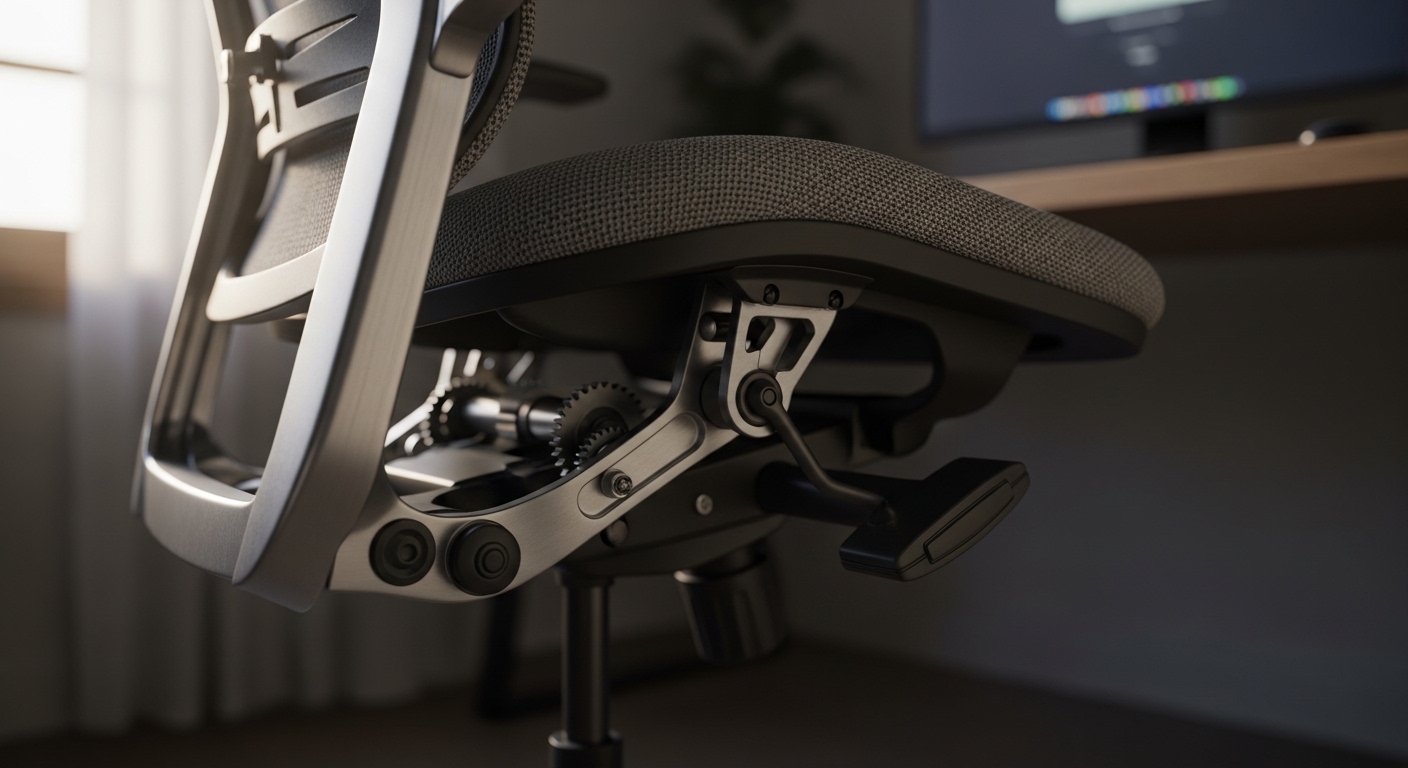
To begin the process, you must find the control that moves the seat pan forward or backward. This is usually a lever or button located on the side of the seat base.
On many high end ergonomic models, the lever is located on the left side. Some chairs use a paddle style handle that you pull upward or push downward.
If you do not see a lever, look for a sliding button near the front of the armrest supports. Manufacturers design these controls to be accessible while sitting in the chair.
You may need to refer to your specific chair manual to identify the exact location. However, most professional chairs follow a standard layout for these ergonomic adjustments.
Once you identify the control, practice engaging it to feel how the seat moves. Most mechanisms use a smooth sliding track that allows for incremental adjustments.
How to Adjust Ergonomic Chair Seat Pan Depth Step by Step
The first step in how to adjust ergonomic chair seat pan depth is to sit fully back in the chair. Ensure your tailbone is touching the backrest before you attempt any movement.
Reach down and engage the seat slider lever with your hand. While holding the lever, use your hips and thighs to shift the seat forward or backward.
If the seat is too far forward, push yourself backward to pull the seat toward the backrest. If it is too far back, slide your body forward to extend the seat length.
Release the lever once you reach a position that feels generally comfortable. You will likely hear a clicking sound as the seat locks into the nearest adjustment notch.
Stand up and sit back down several times to confirm the seat remains stable. A secure lock is essential for long term safety and consistent support during your workday.
The Essential Two Finger Rule
Ergonomics experts suggest a simple measurement technique to verify your seat depth. This is widely known among professionals as the two finger rule for seating.
While sitting with your back against the chair, place your fingers between the seat edge and your leg. There should be a gap approximately two fingers wide between the seat and your knee.
If the gap is wider than three fingers, the seat is likely too shallow. A shallow seat does not provide enough thigh support, which can cause leg tension.
If you cannot fit two fingers into the space, the seat is too deep. This configuration will likely cause nerve compression behind the knees over time.
Check this measurement frequently as you settle into your work routine. Your posture might shift, requiring a minor recalibration of the seat pan position.
Adjusting for Different Body Types
Taller individuals often require the seat pan to be extended to its maximum length. This ensures that their longer femurs are adequately supported throughout the day.
Without this extension, tall users may feel like they are falling off the front of the chair. This lack of stability leads to unnecessary muscle activation in the legs.
Petite users usually need the seat pan moved as far back as possible. For shorter users, the standard depth of many chairs is often too large for comfort.
If you are petite and the seat still touches your knees at the shortest setting, you may need a footrest. A footrest helps by shifting your weight and changing the angle of your legs.
Properly managing these variations is a key part of customizing your workspace. Every body is different, so do not rely on factory default settings.
Common Mistakes When Adjusting Seat Depth
One common mistake is adjusting the seat while standing up next to the chair. You cannot accurately gauge the pressure on your thighs unless you are actually seated.
Another error is failing to keep the backrest in its upright or locked position. If the chair is reclining during adjustment, you will get an inaccurate measurement of the depth.
Some users prioritize the aesthetic look of the chair over their physical comfort. A seat that is extended too far might look strange, but ergonomic function is more important than visual symmetry.
Ignoring the tension of the slider can also lead to problems over time. Ensure the seat is firmly locked so it does not slide unexpectedly while you are working.
Finally, do not assume that a single adjustment will last forever. Your clothing thickness or physical health changes may require you to tweak the depth occasionally.
Interactions Between Seat Depth and Height
Seat depth and seat height are closely linked in the world of ergonomics. If your seat is too high, you might feel additional pressure at the front edge of the pan.
Always adjust your seat height first so that your feet are flat on the floor. Only after the height is set should you refine the depth of the seat.
When the height and depth are synchronized, your hips should be slightly higher than your knees. This creates an open hip angle which is beneficial for your lower back health.
If you feel the need to cross your legs, your seat depth might be incorrect. Crossing your legs is often a subconscious attempt to relieve pressure caused by a deep seat.
Maintain a neutral posture where your weight is centered over your sit bones. This synergy between height and depth creates the most sustainable seating experience.
Troubleshooting a Stuck Seat Slider
Sometimes, the mechanism for how to adjust ergonomic chair seat pan depth can become difficult to move. This is usually due to dust buildup or mechanical friction in the tracks.
If the lever feels stuck, try applying gentle pressure to the seat while pulling the handle. Sometimes the locking pin needs a slight weight shift to disengage from the slot.
Do not force the lever if it resists your initial efforts. Instead, check for any small debris that might be trapped within the sliding rails under the seat.
You can use a can of compressed air to clear out dust from the mechanism. A clean track ensures that the sliding movement remains smooth and effortless for years.
If the chair still refuses to move, consult the manufacturer regarding potential warranty repairs. Maintaining the mechanical integrity of your chair is vital for its long term utility.
The Impact on Lower Back Pain
Lower back pain is often a direct result of poor seat pan positioning. If the seat is too deep, you lose contact with the lumbar support system of the chair.
This lack of contact forces your lower back muscles to work harder to keep you upright. Over several hours, this leads to muscle strain and significant spinal discomfort.
By shortening the seat pan, you can sit closer to the backrest. This allows the lumbar curve to nestle into your spine, providing passive support.
Passive support means your muscles can finally relax while you focus on your work tasks. This is the ultimate goal of any ergonomic home office setup.
Reducing strain in the lumbar region also helps prevent neck and shoulder tension. Proper alignment starts at the base and radiates upward through the entire body.
Weight Distribution and Thigh Support
A well adjusted seat pan ensures that your body weight is evenly distributed. Ideally, the pressure should be felt across the entire length of your thighs.
If you only feel pressure on your buttocks, the seat is too shallow. This concentration of weight can cause skin irritation and deep tissue discomfort over time.
When the seat supports the thighs, it reduces the load on the pelvic structure. This makes sitting feel much lighter and less taxing on your skeletal system.
Pay attention to the firmness of your seat cushion during this process. A cushion that is too soft might bottom out regardless of the depth setting you choose.
Ensure your chair has high density foam that holds its shape under your weight. The combination of quality foam and correct depth is the key to lasting comfort.
Practical Tips for Daily Comfort
- Check your seat depth every Monday morning to ensure it has not shifted.
- Wear comfortable clothing that does not bunch up behind your knees.
- Take a short walk every sixty minutes to restore blood flow to your legs.
- Use a mirror to check the gap between the chair and your legs if you cannot see it.
- Avoid sitting on the edge of your seat, which negates the depth adjustment.
Optimizing Your Work Environment
Beyond the chair, consider the height of your desk and the placement of your monitor. These factors influence how you lean or sit within the chair itself.
If your monitor is too far away, you might lean forward and leave the backrest. This movement makes even the best seat depth adjustment completely ineffective for your posture.
Ensure everything is within reach so you can remain seated against the backrest. This creates a holistic ergonomic environment that supports your health and productivity.
Frequency of Adjustments
Many users wonder how often they should change their seat pan settings. Generally, once you find the optimal depth, you can leave it in place.
However, if you share your home office chair with a partner, you must readjust it. Sharing a chair requires a quick check of all settings before starting your work.
Changes in footwear can also affect how you sit and interact with the seat. Thicker soles might change your leg angle, requiring a slight adjustment to the depth.
Listen to your body throughout the day for any signs of discomfort. If you feel a dull ache in your thighs, try sliding the seat forward or backward slightly.
Small changes can make a massive difference in how you feel by the evening. Being proactive about minor adjustments prevents major pain from developing over time.
Maintaining Your Ergonomic Chair
To keep the seat pan slider functional, you should perform basic maintenance. Wipe down the underside of the chair with a damp cloth to remove hair and dust.
Avoid using harsh chemicals on the plastic or metal rails of the mechanism. A simple dry microfiber cloth is usually enough to keep the tracks clear of obstructions.
If the seat starts to wobble, check the bolts that connect the pan to the base. Tightening these hex screws can restore the solid feel of a professional chair.
Inspect the fabric or mesh for signs of wear at the adjustment points. Persistent friction can eventually damage the material if the seat is not aligned correctly on the rails.
Taking care of your investment ensures that the chair remains supportive for years. A well maintained chair is a reliable tool for your professional success and physical wellbeing.
FAQ: Common Seating Questions
How do I know if my seat pan is too deep?
You will feel the front edge of the seat pressing into the back of your knees or calves. You may also find it impossible to sit with your back touching the lumbar support.
Can I add a cushion if my seat is too shallow?
Adding a cushion can help with comfort, but it might change the overall height. It is better to use the built in slider whenever possible to maintain proper geometry.
Does every office chair have a seat slider?
No, many entry level chairs have fixed seat pans that do not move. If you are tall or petite, investing in a chair with a slider is highly recommended for health.
What if the seat slider lever is broken?
If the mechanism fails, the seat may become unsafe or unstable. You should contact the manufacturer for replacement parts or a professional repair service immediately.
Conclusion
Learning how to adjust ergonomic chair seat pan depth is a fundamental aspect of workplace health. It is the bridge between a chair that fits and a chair that causes pain.
By following the two finger rule, you ensure that your circulation remains healthy and your spine is supported. This attention to detail separates a standard office setup from a professional lab environment.
Remember that ergonomics is an ongoing process of observation and refinement. As you spend more time at your desk, continue to evaluate your comfort and make changes as needed.
A properly adjusted chair allows you to focus on your work rather than your discomfort. We hope this guide helps you optimize your station for maximum productivity and long term health.
Thank you for visiting The Home Office Lab for your ergonomic needs. Stay tuned for more technical guides on creating the ultimate home workspace for your professional life.