

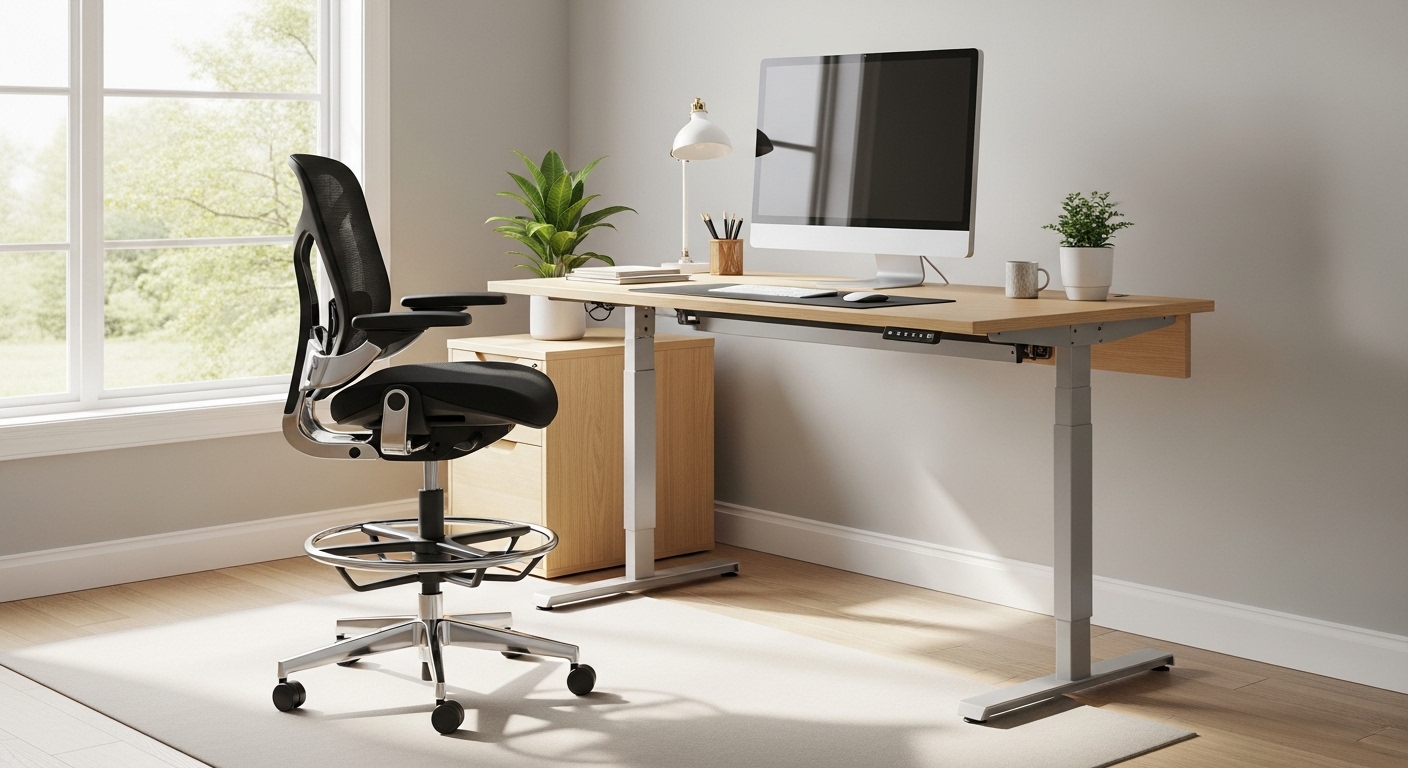
Introduction to Elevated Ergonomics
Standing desks have revolutionized modern workspaces by encouraging movement and reducing sedentary habits. However, remaining on your feet for long hours can lead to physical fatigue and lower limb discomfort.
To maximize the benefits of a dynamic workstation, you need a high quality seating option that matches your elevated desk. Learning how to choose drafting chair for standing desk setups is the best way to maintain optimal ergonomic posture throughout your workday.
The Challenge of Standing Desks
While standing improves energy levels, static standing for hours is not ideal for your skeletal health. It can strain your lower back, knees, and ankles over time.
A tall chair provides a quick resting option without requiring you to constantly lower your adjustable desk. This seamless transition keeps your daily workflow smooth and uninterrupted.
Defining the Drafting Chair
Drafting chairs are specifically designed to be used at high work surfaces like design tables and standing desks. They are taller than standard office task chairs and feature unique supportive components.
These chairs allow you to work comfortably at counter height or bar height while keeping your spine properly aligned. They are highly popular among architects, artists, and modern office workers alike.
Key Differences from Office Chairs
The primary difference lies in the hydraulic lift cylinder which offers a much greater range of vertical movement. Standard office chairs rarely rise above twenty one inches, whereas drafting chairs easily reach thirty inches or more.
They also include a specialized circular footrest to support your feet when they cannot reach the floor. This prevents leg dangling which can restrict healthy blood flow to your lower extremities.
Height Range and Cylinder Specifications
When selecting a drafting chair, the pneumatic cylinder is the most critical component to inspect. You must ensure the height adjustment range matches both your physical height and your desk height.
Most quality drafting chairs offer a vertical travel range of eight to twelve inches. This allows the seat to move easily from a standard height up to an elevated workspace level.
How to Measure Your Desk Height
Begin by measuring the height of your standing desk in its sitting and standing configurations. You want to ensure the chair can accommodate your body comfortably at both positions.
Ideally, your seat should adjust to a point where your elbows rest flat on the desk. Your forearm angle should be roughly ninety degrees when typing on your keyboard.
The Importance of a Sturdy Footring
A footring is a non negotiable feature for any tall chair used at a standing desk. When sitting at an elevated height, your feet must remain supported to avoid strain on your lower back.
A high quality footring acts as a stable floor substitute for your feet. This element is essential for pelvic alignment and reduces pressure on the back of your thighs.
Adjustable vs Fixed Footrings
Some cheap drafting chairs come with fixed footrings that cannot be moved up or down. This is highly problematic because users have different leg lengths and body proportions.
Always look for an adjustable footring that can be locked securely at your preferred height. A robust knob or friction clamp will prevent unwanted slipping during daily use.
Backrest and Lumbar Support Anatomy
Extended sitting at a high desk requires excellent back support to prevent slouching and muscle strain. A well designed backrest should mimic the natural curves of your spine.
Adjustable lumbar support is crucial because it allows you to target the exact area of your lower back. This prevents the slouching that often occurs when muscles become fatigued.
Tilt Tension and Recline Locks
A static backrest can feel rigid and uncomfortable during a long working day. Look for a chair that offers a reclining mechanism with tilt tension control.
This allows you to lean back comfortably to stretch your core muscles. A robust tilt lock mechanism is also useful to keep the chair secure when you need to focus intensely.
Seat Cushion Ergonomics and Depth
The seat cushion is where your body makes the most contact with the chair. A poorly designed seat will quickly cause discomfort and restrict blood flow.
High density molded foam is the gold standard for comfortable office seating. It distributes your body weight evenly and retains its supportive shape over years of use.
Selecting the Right Cushion Material
Cheap cut foam will flatten out within a few months of daily use. Molded foam is more durable and provides a much firmer base of support for your sit bones.
Make sure the seat has a waterfall front edge. This curved edge reduces pressure behind your knees and keeps circulation flowing smoothly.
Armrest Functionality and Placement
Armrests play a vital role in reducing muscle fatigue in your neck, shoulders, and upper back. They support the weight of your arms so your upper body does not have to work constantly.
For elevated seating, adjustable armrests are highly recommended. You should be able to adjust their height and width to match your body frame.
When to Choose Flip Up Arms
If you perform tasks that require wide arm movements, standard armrests might get in your way. Chairs with flip up armrests allow you to swing them back and out of sight.
This feature is also beneficial when you want to slide your tall chair completely under your desk. It saves valuable floor space in compact home office setups.
Base Stability and Casters
Because you are sitting much higher, the center of gravity is higher than on a standard chair. This makes stability a crucial safety factor when selecting your drafting chair.
A wide, five star base is essential to prevent tipping when you lean forward or reach for items. Aluminum or steel bases offer maximum durability and strength.
Standard Casters vs Glides
Standard casters allow you to roll around your workspace easily. However, on a high chair, sudden movement can feel unstable or dangerous.
Some users prefer stationary glides instead of wheels to keep the chair locked in place. Alternatively, you can look for specialized braking casters that lock when weight is applied.
Material Comparison: Mesh vs Fabric
The material of your drafting chair affects both comfort and temperature regulation. The two most popular choices are mesh and upholstered fabric.
Each material has its own set of advantages and disadvantages depending on your specific working environment.
Why Mesh is Popular
Mesh is highly breathable and allows air to circulate around your back and thighs. This keeps you cool and comfortable even during hot summer days.
Mesh also offers a modern, high tech look that fits well in minimalist offices. It contours nicely to curves of your spine without requiring thick padding.
The Benefits of Fabric Upholstery
Fabric chairs provide a more traditional, cushioned feel that many users find cozy. The thick foam underneath the fabric offers substantial support for long sitting sessions.
Fabric is also available in a wider range of colors to match your home office aesthetic. However, it can trap body heat and is much harder to clean if you accidently spill liquids.
Active Seating: The Saddle Stool Alternative
If you prefer to move frequently, a traditional drafting chair might feel too restrictive. A saddle stool with a drafting cylinder is an excellent alternative for active workers.
Saddle stools force your hips into a wider angle which naturally aligns your spine and pelvis. This style of seating is highly popular among creative professionals and medical workers.
Pros and Cons of Active Stools
Active stools encourage micro movements that keep your core muscles engaged throughout the day. This helps prevent stiffness and burns a small number of calories as you work.
However, stools lack backrests and armrests which can lead to muscle fatigue during long shifts. They are best used as a secondary seating option rather than an all day solution.
Budget Tiers Explained
Drafting chairs are available at various price points to suit different budgets. Understanding what you get at each price tier helps you make an intelligent investment.
Remember that a cheap chair may cost you more in the long run if it requires frequent replacement.
What to Expect in Each Bracket
Under one hundred dollars, you will find basic stools with minimal padding and limited adjustability. These are fine for occasional use but lack proper ergonomic support.
Between one hundred and three hundred dollars, you will find excellent mid range chairs. These models offer adjustable footrings, decent lumbar support, and comfortable mesh backrests.
Over three hundred dollars, you enter the premium category. These chairs feature high grade materials, advanced tilt mechanisms, and exceptional manufacturer warranties.
Ergonomic Setup Guide for Standing Desks
Buying the perfect chair is only half the battle. You must set it up correctly to protect your joints and maintain a healthy posture.
Improper adjustment can negate all the benefits of a premium ergonomic design.
Finding Your Optimal Seating Height
Start by adjusting the seat height so your hands rest naturally on your keyboard. Your shoulders should remain relaxed, not shrugged upward.
Next, adjust your footring so your knees form a ninety degree angle. Your feet should rest firmly on the footring surface without any unwanted dangling.
Common Mistakes to Avoid
One common mistake is choosing a chair with a base that is too narrow. A narrow base increases the risk of tipping, especially on thick office carpets.
Another error is ignoring the total weight capacity of the cylinder. Always check the specifications to ensure the chair can safely support your weight over several years.
Ignoring the Desk Weight Limits
Many users also forget to check if their standing desk can handle the weight of an elevated chair when tucked in. Heavy chairs can strain the motors of lower end standing desks.
Make sure your desk has a high lift capacity if you plan to store a heavy chair on top of its platform.
Understanding Weight Capacity and Cylinder Ratings
Every drafting chair has a specified weight limit determined by its base, frame, and gas lift. Exceeding this limit will cause the cylinder to fail prematurely and slowly sink over time.
Most standard drafting chairs are rated to support up to two hundred and fifty pounds. If you require a more robust solution, look for heavy duty options rated for higher capacities.
Why Class Four Cylinders Matter
Pneumatic cylinders are rated in classes from one to four, with class four being the most durable. Class four cylinders use thicker steel walls and better seals to withstand daily pressure.
When selecting your chair, verify that it utilizes a class four cylinder for maximum safety and longevity.
Tilting Mechanisms and Backrest Angles
The type of tilt mechanism determines how the seat and backrest move together when you lean back. This movement is essential for keeping your joints active during long work shifts.
Basic chairs only allow the backrest to tilt, while the seat remains completely flat. This can create an uncomfortable angle for your hips and lower back.
Synchro Tilt vs Center Tilt
Synchro tilt mechanisms recline the backrest and seat at a healthy ratio of two to one. This means for every two degrees the backrest reclines, the seat tilts up by only one degree.
This synchronization keeps your feet flat and your body properly supported as you move. Center tilt is less ergonomic because it tilts the entire chair bucket back as a single unit.
Maintenance and Longevity of Tall Chairs
A drafting chair is a long term investment in your comfort and workspace health. Proper maintenance will extend the life of your chair and keep it performing like new.
Regularly inspect the hardware of your chair to ensure no screws have worked loose over time. The constant movement of rolling and adjusting can loosen fasteners slowly.
Cleaning Your Drafting Chair
Keep your chair clean by vacuuming the fabric or wiping down the mesh with a damp cloth. For leather or vinyl surfaces, use mild soap and warm water to remove surface oils.
Clean casters regularly to remove hair and dust that can clog the wheels. Free rolling casters prevent accidental floor scratching and keep your movement effortless.
Final Verdict on Selecting Your Chair
Finding the perfect seating partner for your standing desk requires careful consideration of height, stability, and comfort. A quality drafting chair offers the ideal compromise between sitting and standing.
Focus on finding a model with a robust cylinder, adjustable footring, and high quality lumbar support. By investing in the right chair, you will create a highly productive workspace.