

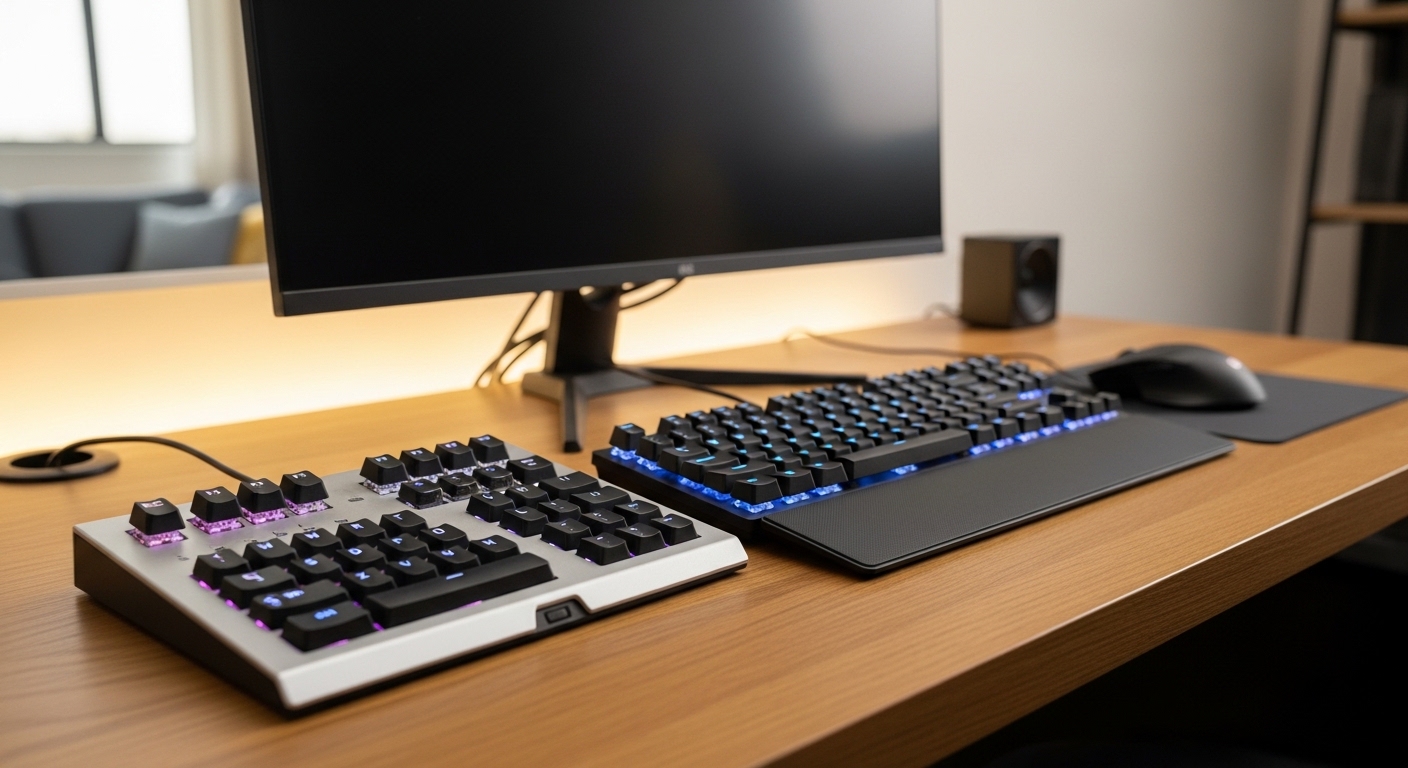
The Science of Streamlining Your Digital Workspace
Modern professional environments require navigating an overwhelming number of software applications and complex digital commands. Professionals often spend hours every week repeating the same sequences of clicks or searching for buried menu options within their creative or administrative software suites.
This constant context switching and repetitive physical motion leads to significant cognitive load and physical strain on the hands. By implementing dedicated hardware for shortcuts, you move these digital actions from your abstract memory into your physical muscle memory.
In the year 2026, the integration of specialized input devices has become the gold standard for high performance remote work. These devices allow you to execute dozens of operations with a single touch, effectively acting as an extension of your creative intent.
The core benefit of these tools lies in their ability to reduce the distance between a thought and its execution. When you no longer have to remember a four key combination, your brain remains focused on the primary task at hand.
Furthermore, these devices offer a tactile feedback loop that standard keyboards and touchscreens often lack. This physical engagement with your digital tools creates a more satisfying and efficient ergonomic experience overall.
Quick Buying Guide
When selecting a macro pad, you must first evaluate the software ecosystem that supports the hardware. Some devices use proprietary software that offers deep integration with apps like Photoshop or Excel, while others rely on open source firmware like QMK.
If you enjoy deep customization and want to control every aspect of the device behavior, look for hardware that supports VIA or QMK protocols. If you prefer a plug and play experience with pre made profiles, a brand with a dedicated software store is better.
The physical build quality and switch type also play a massive role in long term satisfaction. Mechanical switches offer the most durability and a variety of tactile sensations ranging from clicky to silent and linear.
Consider the footprint of the device on your desk because a massive pad might interfere with your mouse devices or other peripherals. Portability is also a factor if you frequently move between a home office and a corporate space.
Finally, look at the visual feedback options such as LCD keys or customizable RGB lighting. Visual cues help you identify which profile is active and what each specific button does without needing to memorize the entire layout.
The 8 Best programmable macro pads for home office productivity
These selections represent the pinnacle of efficiency for the modern professional seeking to master their digital domain.
1. Elgato Stream Deck MK.2
The Elgato Stream Deck MK.2 stands as the most recognizable name in the world of specialized input devices. Its build features a sturdy plastic chassis with a removable faceplate that allows for personalized aesthetics.
The fifteen transparent LCD keys provide vibrant visual feedback that can be customized with any image or animated icon. This physical design ensures that you always know exactly what function you are about to trigger.
Technical performance is where this device truly shines thanks to its massive ecosystem of plugins and integrations. It can control everything from your smart lights to complex video editing macros with unrivaled ease.
The software allows for folder nesting which means you can theoretically have hundreds of commands available within a few clicks. It handles multi action sequences where a single press launches multiple apps and sets your status to busy.
This product is the best choice for users who want the most polished and widely supported experience available. It is ideal for creators and office workers who prefer a visual interface over mechanical keys.

Optimizing Your Workspace Layout
Proper placement of your macro pad can prevent repetitive strain injuries. Keep it within easy reach of your non dominant hand to maintain a balance of movement across your body.
2. Razer Tartarus V2
The Razer Tartarus V2 offers a unique ergonomic shape designed to cradle the human hand during long work sessions. It features thirty two fully programmable keys arranged in a way that minimizes finger travel.
The build quality is robust with a soft touch palm rest that provides comfort during intensive data entry or design work. It uses mecha membrane technology which combines the click of a mechanical switch with a soft cushion feel.
A standout technical feature is the eight way directional thumb pad that can be used for scrolling or navigation. This allows you to keep your hand in one place while navigating through large spreadsheets or creative timelines.
The Razer Synapse software provides a highly visual way to remap every key and create complex macros. You can save multiple profiles and toggle between them instantly as you switch between different professional applications.
This device is perfect for users who want maximum ergonomic support and a high number of physical inputs. It excels in scenarios where you need to replace many standard keyboard functions entirely.

Choosing the Right Switch Type
Mechanical switches come in various weights and sound profiles. Choose linear switches for a quiet office or tactile switches for better physical confirmation of your actions.
3. Loupedeck Live S
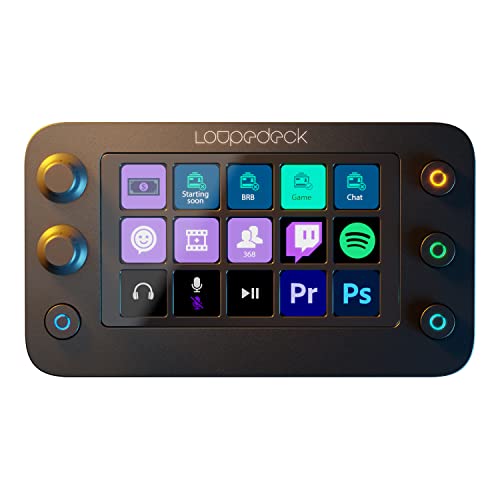
The Loupedeck Live S is a compact powerhouse that balances touch sensitive controls with physical tactile dials. It features a sleek glass front and a very slim profile that fits perfectly on any desk.
The combination of two analog dials and fifteen touch buttons provides a unique way to interact with software. You can feel the precise increments when adjusting volume or brush sizes in creative software.
The technical integration of the Loupedeck software is specifically tailored for professional suites like Adobe and Premiere. It offers native support for many streaming and productivity tools right out of the box.
The touch buttons have haptic feedback to simulate the feeling of a real press which improves the user experience. You can create custom pages for every app you use and the device switches them automatically.
This macro pad is best for creative professionals who need fine analog control over their digital workspace. It is the ultimate choice for those who value premium aesthetics and touch interfaces.
The Importance of Software Ecosystems
Hardware is only as good as the software that powers it. Look for devices that receive regular updates and have an active community of users creating new plugins.
4. Cooler Master ControlPad
The Cooler Master ControlPad looks like a standard mechanical numpad but hides revolutionary pressure sensitive technology. It utilizes Aimpad technology to detect how far down you have pressed each of its twenty four keys.
The build is exceptionally high end with a brushed aluminum top plate and high quality mechanical switches. It feels like a premium piece of hardware that is built to last for many years of heavy use.
Technically this device allows for precision control that standard digital keys cannot match. You can map a slow scroll to a light press and a fast scroll to a deep press on the same key.
This creates a new dimension of productivity where a single button can perform different actions based on pressure. The software supports macro recording and full RGB customization for every individual key.
This is the ideal pad for power users who want the benefits of mechanical switches with added analog functionality. It is particularly useful for video editors and CAD professionals who need granular control.

Managing Cable Clutter
Most macro pads use USB connections to ensure zero latency during operation. Use a cable management sleeve or a desk mat with integrated channels to keep your workspace tidy.
5. X keys XK 24 USB Programmable Keypad
The X keys XK 24 is an industrial grade solution designed for reliability in demanding work environments. It features a simple grid of twenty four keys with clear plastic caps.
The design allows you to print and insert your own paper labels under the keycaps for permanent identification. This makes it a favorite for specialized industries like medical imaging or broadcast television.
The technical performance is centered around its internal memory which stores all your programmed macros. This means you can program the pad on one computer and use it on any other without installing software again.
It supports hardware mode which emulates a standard keyboard or HID device for maximum compatibility. The keys have a satisfying travel and are rated for millions of individual activations.
This product is best for professionals who need a dependable and customizable tool that works across different machines. It is the workhorse of the macro pad world for serious office environments.

Customizing Your Macros
- Start with your most used shortcuts like copy and paste.
- Add complex multi key combinations for specific software features.
- Create macros that automate repetitive email responses or text blocks.
- Map system functions like screen brightness or microphone muting.
6. Koolertron Programmable Mechanical Pad
The Koolertron Programmable Mechanical Pad offers a minimalist approach with a focus on mechanical switch customization. It features a compact design with high quality PBT keycaps that resist wear over time.
The build is sturdy and compact which makes it easy to position anywhere on your desk. It uses standard Cherry MX style switches which can be swapped if you want a different tactile feel.
Technically the device is highly versatile because it supports four different layers of programming. This allows you to have up to ninety six different commands accessible from a tiny footprint of twenty four keys.
Everything is stored on the hardware so your settings remain intact regardless of the computer you connect to. The software is straightforward and allows for complex delay settings between key presses in a macro.
This pad is the best option for enthusiasts who love the feel of mechanical keyboards and want a portable solution. It provides immense value for its price point while remaining a professional tool.
Enhancing Productivity with Layers
Layers allow you to multiply the functionality of your device without increasing its physical size. Use one layer for daily office tasks and another for specific creative projects.
7. Keychron Q0 Plus
The Keychron Q0 Plus is a custom mechanical number pad that serves as a premium extension for any keyboard. It is constructed from a solid block of CNC machined aluminum for incredible weight and stability.
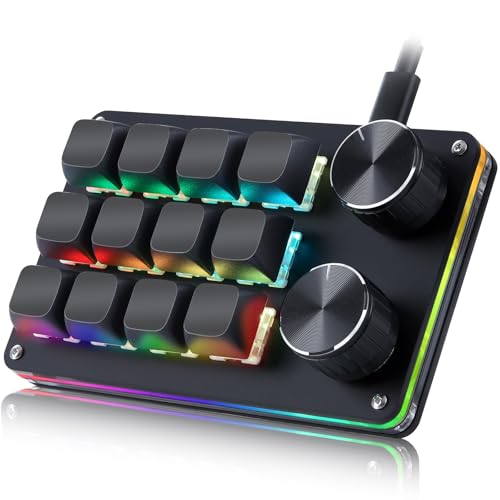
The design includes a dedicated programmable knob that is perfect for scrolling or adjusting system parameters. It also features a few extra macro keys on the left side for quick access.
On the technical side it fully supports QMK and VIA which are the industry standards for custom keyboard programming. This gives you total control over the layout and behavior of the device without proprietary bloatware.
The switches are hot swappable so you can change them without any soldering required. The south facing RGB lighting ensures that the light is visible even with premium non shine through keycaps.
This is the ultimate choice for the mechanical keyboard purist who wants a heavy and stable macro pad. It is best for those who want a customizable hobbyist experience with professional build quality.

The Benefits of Aluminum Construction
Heavy aluminum frames prevent the device from sliding around your desk during rapid use. The extra mass also improves the acoustic profile of the mechanical switches for a better sound.
8. PCsensor 3 Key Mini Keypad
The PCsensor 3 Key Mini Keypad features three mechanical switches and a simple USB connection. It allows users to store custom functions directly on the internal memory for use across multiple computers.
This device provides a compact solution for those seeking the best programmable macro pads to assist with daily tasks. The included software supports various key combinations and mouse actions to improve efficiency during the workday.

Visual Feedback vs Tactile Memory
Display keys are great for complex tasks where you need a visual reminder of the function. Mechanical keys are often better for simple tasks that you perform by touch alone.
Comparison
Below is a summary of how these top tier productivity tools compare against each other in terms of features and ideal use cases.
| Product Name | Key Feature | Best For | Price Range |
|---|---|---|---|
| Elgato Stream Deck MK.2 | 15 LCD Keys | App Integration | Mid Range |
| Razer Tartarus V2 | Ergonomic Shape | Heavy Macro Users | Mid Range |
| Loupedeck Live S | Analog Dials | Creative Editing | Premium |
| Cooler Master ControlPad | Analog Pressure | Precision Work | Premium |
| X keys XK 24 USB Programmable Keypad | Paper Inserts | Industrial Use | Mid Range |
| Koolertron Programmable Mechanical Pad | Onboard Memory | Portability | Entry Level |
| Keychron Q0 Plus | QMK/VIA Support | Keyboard Purists | Mid Range |
| Mountain DisplayPad | High Res Icons | Modern Aesthetics | Mid Range |
Final Verdict
After analyzing the features and real world performance of these devices, the Elgato Stream Deck MK.2 remains the overall champion for most home office professionals. Its incredible software ecosystem and visual feedback make it the most versatile tool for streamlining any digital workflow without a steep learning curve.
However, for those who require a more tactile and traditional feel, the Keychron Q0 Plus is a phenomenal alternative that offers superior build quality. Choosing between visual icons and mechanical switches is the most important decision you will make when upgrading your productivity setup.