

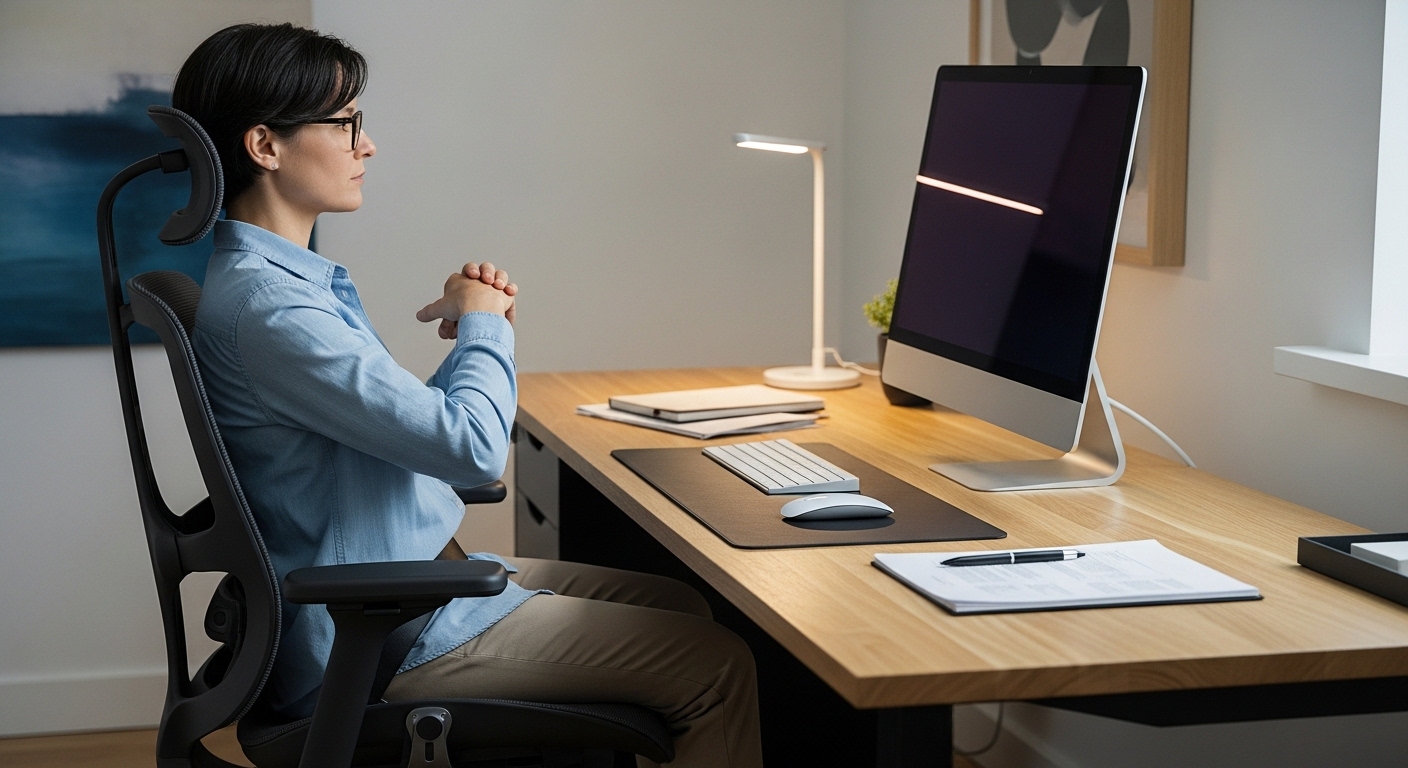
The Importance of Ergonomic Posture
Maintaining a healthy posture is one of the most overlooked aspects of professional life. Many office workers spend over eight hours every day seated in front of a screen.
Understanding how to sit correctly at a computer desk is vital for your long term physical health. Poor habits can lead to chronic pain in the neck, back, and shoulders.
A properly adjusted workspace does more than just prevent injury. It actually improves your concentration and overall energy levels throughout the workday.
When your body is aligned, your muscles do not have to work as hard to keep you upright. This reduces fatigue and allows you to focus on complex tasks without distraction.
In this guide, we will explore every detail of ergonomic positioning. We will cover everything from the height of your chair to the angle of your monitor.
Starting with the Foundation
The way your feet interact with the floor dictates the position of your entire upper body. If your feet are not stable, your pelvis will likely tilt out of alignment.
Your feet should always be flat on the floor while you are working. This provides a solid base for your spine and reduces pressure on your lower back.
If your chair is too high for your feet to reach the ground, you should use a footrest. This prevents the backs of your thighs from feeling excessive pressure from the seat edge.
Avoid crossing your legs while you work for extended periods. This habit can restrict blood flow and cause your pelvis to rotate awkwardly.
Mastering Your Chair Adjustments
Your chair is the most critical piece of equipment in your home office lab. It must support the natural curves of your human frame.
The height of the seat should be set so your knees are at a ninety degree angle. This keeps your hips at the same level as your knees or slightly higher.
A seat that is too low can cause your lower back to round. A seat that is too high forces you to slouch forward to reach your tools.
Check the depth of the seat pan to ensure it supports your thighs properly. There should be a small gap between the back of your knees and the front of the seat.
This gap, roughly the size of a clenched fist, prevents pressure on the popliteal veins. Proper circulation in the legs is essential for preventing deep vein issues.
Supporting the Lumbar Curve
The human spine has a natural inward curve at the bottom. This is known as the lumbar region of the back.
Your chair must provide firm support in this specific area. Without it, you will likely begin to slouch as the day progresses.
Slouching flattens the lumbar curve and puts immense pressure on the spinal discs. Over time, this can lead to significant discomfort and reduced mobility.
Adjust the backrest so it pushes gently against your lower back. You should feel supported without being pushed forward out of the chair.
If your current chair lacks this feature, a small rolled up towel can serve as a temporary fix. However, a dedicated ergonomic design is always the superior choice for long term use.
Optimizing Keyboard and Mouse Placement
Your arms and wrists are frequently the first areas to feel the strain of poor ergonomics. Positioning your input devices correctly is crucial for wrist health.
The keyboard should be placed directly in front of you. Your elbows should remain close to your body while you type.
Your forearms should be parallel to the floor or angled slightly downward. This prevents the muscles in your forearms from becoming overextended during long typing sessions.
Keep your wrists in a neutral, straight position rather than bending them up or down. A wrist rest can help, but you should not lean on it heavily while actually typing.
The mouse should be placed on the same level as the keyboard. It should be close enough that you do not have to reach outward to move it.
Reducing Shoulder Tension
High tension in the shoulders often stems from armrests that are poorly adjusted. If they are too high, they force your shoulders to shrug upward.
If they are too low, you might lean to one side to find support. This asymmetrical sitting can lead to imbalances in the muscles of the torso.
Adjust your armrests so your shoulders can stay relaxed and dropped. Your elbows should just lightly touch the surface of the armrests.
In some cases, removing the armrests entirely allows you to get closer to the desk. This can be beneficial if it helps you maintain a better overall posture.
Always prioritize the ability to keep your shoulders back and down. This opens up the chest and allows for better breathing and oxygen intake.
The Science of Monitor Elevation
Neck pain is a very common complaint among computer users. This is often caused by looking down at a screen for hours.
The top of your monitor should be at eye level or slightly below. This ensures your neck remains in a neutral position throughout the day.
If you use a laptop, you should use a stand to raise the screen. A separate keyboard and mouse are necessary when the laptop is elevated in this way.
The distance between your eyes and the screen should be about an arm length away. This prevents eye strain and stops you from leaning forward to see details.
Leaning forward creates a position known as turtle neck. This puts excessive weight on the cervical spine and leads to chronic headaches.
Dual Monitor Alignment
Using two screens can increase productivity but it also introduces ergonomic risks. You must decide which monitor is your primary work area.
If you use both equally, they should be angled in a slight V shape directly in front of you. The point where they meet should be centered with your nose.
If one screen is primary, place it directly in front of you. The secondary screen should be placed to the side at the same height.
Switching your focus between screens should involve moving your eyes, not just twisting your neck. Excessive neck rotation can lead to muscle strain on one side of the body.
Proper alignment ensures that you do not develop a permanent tilt in your posture. Consistency in screen placement is key to maintaining a healthy spine.
Managing Vision and Lighting
The way you see your work impacts how you sit correctly at a computer desk. If you struggle to see the text, you will naturally lean forward.
Adjust the font size on your screen so it is comfortable to read from a distance. You should not have to squint or move your head closer to the glass.
Glare from windows or overhead lights can also cause you to adopt awkward positions. Position your desk so that light sources are to the side of the monitor.
Consider using a monitor light bar to illuminate your desk surface without causing screen reflections. This helps maintain a clear view of your workspace at all times.
Regular eye exams are also a part of a good ergonomic strategy. If your prescription is outdated, your posture will suffer as you compensate for poor vision.
The Rule of Twenty
Digital eye strain can cause you to tense your neck and facial muscles. To prevent this, follow the twenty twenty twenty rule throughout your day.
Every twenty minutes, look at something twenty feet away for twenty seconds. This allows the muscles in your eyes to relax and reset their focus.
While you do this, take the opportunity to check your sitting posture. Use these brief moments to sit back and realign your spine against the chair.
These microbreaks are essential for maintaining mental clarity as well. They break the cycle of static muscle loading that occurs when sitting still.
Movement and Dynamic Sitting
The human body was not designed to be perfectly still for hours. Even the best posture can become harmful if held for too long without movement.
Dynamic sitting involves making small adjustments to your position throughout the day. You should shift your weight and stretch your limbs frequently.
Try to stand up and walk around at least once every hour. This encourages blood flow to the legs and reoxygenates the muscle tissues.
Stretching your hip flexors is particularly important for those who sit. Sitting for long periods causes these muscles to tighten and shorten over time.
Tight hip flexors can pull on the pelvis and cause lower back pain. A simple standing stretch can counteract this effect and keep your body limber.
The Role of Standing Desks
In 2026, many professionals are incorporating standing intervals into their work routine. Alternating between sitting and standing can reduce the risks of a sedentary lifestyle.
When standing, the same ergonomic principles apply to your upper body. Your elbows should be at ninety degrees and the screen at eye level.
Do not stand all day, as this can lead to foot and joint fatigue. The goal is to find a healthy balance between different working positions.
Wear supportive shoes if you plan to stand for significant portions of the day. A high quality mat can also reduce the impact on your knees and ankles.
Listen to your body and sit down if you feel your posture beginning to fail. Standing with poor form is just as detrimental as sitting with poor form.
Organizing Your Workspace for Comfort
The layout of your desk determines how often you have to reach or twist. Frequent reaching can lead to repetitive strain injuries in the shoulders.
Place the items you use most often in the primary reach zone. This is the area you can reach without moving your elbows away from your torso.
Items like your phone or a notepad should be in the secondary zone. This is the area reachable by extending your arms without leaning your trunk.
Avoid placing essential items in a location that requires you to twist your spine. Repetitive twisting under load is a major cause of back injuries in office environments.
Keeping a clean and organized desk also reduces mental stress. A clear space allows you to focus on maintaining your physical alignment.
Hydration and Joint Health
Staying hydrated is a subtle but effective way to support your posture. Water is essential for the lubrication of joints and spinal discs.
Dehydrated discs are less effective at absorbing the pressure of sitting. This can make back pain feel more intense during a long work session.
Drinking water also encourages you to take natural breaks throughout the day. These short walks to the kitchen or bathroom are beneficial for your circulation.
Keep a reusable bottle on your desk within easy reach. This ensures you stay hydrated without having to break your deep work flow too often.
Practical Tips for Daily Success
- Set a recurring timer to remind yourself to check your shoulder position.
- Use a mirror to periodically view your profile and identify any slouching.
- Adjust your chair every morning to ensure it has not shifted overnight.
- Perform gentle neck rolls to release tension during your scheduled breaks.
- Ensure your monitor is centered to avoid leaning to one side.
Consistency is the most difficult part of ergonomic health. It takes time to build new habits that replace years of poor sitting form.
Do not be discouraged if you find yourself slouching occasionally. Simply acknowledge the position and return to the correct alignment immediately.
Over time, sitting correctly will become your natural default state. You will notice that you finish your days with less pain and more vitality.
The Psychological Impact of Posture
Good posture is closely linked to confidence and mood. Sitting upright can actually reduce feelings of stress and anxiety while you work.
An open posture signals to the brain that you are in a safe and productive state. This can improve your performance during high pressure meetings or tasks.
Conversely, a collapsed posture is often associated with feelings of defeat or fatigue. By changing your physical state, you can often influence your mental state.
Pay attention to how your mood changes when you sit tall. You may find that you feel more capable and assertive throughout the day.
Frequently Asked Questions
Should I use a lumbar pillow? If your chair does not have built in support, a lumbar pillow is a great addition to maintain the curve of your spine.
Is it okay to sit on the edge of the chair? Sitting on the edge usually leads to a lack of back support and increases the load on your core muscles.
How high should my desk be? Your desk should be at a height that allows your arms to be level with the keyboard while your shoulders are relaxed.
Can poor sitting cause headaches? Yes, tension in the neck and upper back often radiates to the head, resulting in tension headaches.
How long does it take to fix posture? It can take several weeks of conscious effort to retrain your muscles to hold a new, healthier position.
Conclusion
Learning how to sit correctly at a computer desk is an investment in your future. It protects your body from the wear and tear of a modern professional lifestyle.
By following the principles of alignment and movement, you can transform your workspace into a place of health. Start by making one small adjustment to your chair today.
Remember that ergonomics is a continuous process of refinement. Stay mindful of your body, move often, and enjoy the benefits of a pain free work life.