

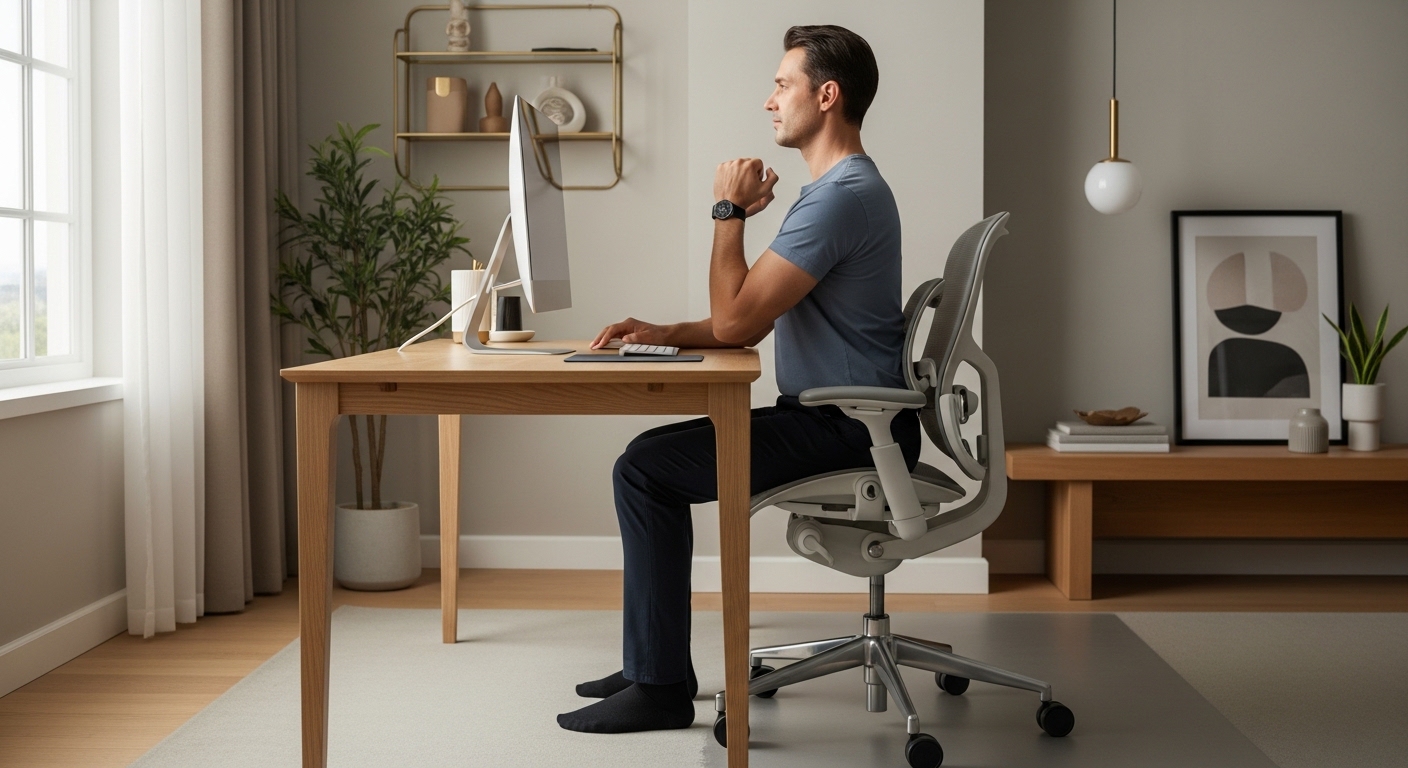
Creating a workspace that supports your body is a fundamental requirement for modern professionals. Many individuals spend over eight hours a day sitting or standing at a workstation.
If your furniture does not align with your physical dimensions, you risk developing chronic health issues. Learning how to determine correct desk height for ergonomics is the first step toward a healthier lifestyle.
This guide provides a comprehensive breakdown of the measurements and adjustments needed for a perfect setup. We will explore the biomechanics of sitting and standing to ensure your comfort.
The Fundamental Principles of Ergonomic Alignment
Ergonomics is the study of how people interact with their environment. In a workspace, this focuses on maximizing comfort and efficiency.
The human body is not designed for static positions over long periods. When you work at a desk that is too high, you force your shoulders to shrug.
This creates tension in the trapezius muscles and can lead to tension headaches. Conversely, a desk that is too low causes you to slouch.
A neutral posture is the ultimate goal of any ergonomic adjustment. This position places the least amount of stress on your joints and connective tissues.
Defining the Neutral Posture
A neutral posture involves keeping your joints naturally aligned. Your spine should maintain its natural curves without excessive pressure.
Your head should be balanced directly over your neck and shoulders. Your elbows should remain close to your body while you work.
Achieving this state requires a desk that meets your unique physical height. Standard office furniture often fails to accommodate the diverse range of human sizes.
How to Determine Correct Desk Height for Ergonomics While Sitting
The process of setting up a sitting desk begins with your chair. You cannot determine the desk height until your seating is stabilized.
Start by adjusting your chair height so that your feet are flat on the floor. Your thighs should be parallel to the ground with your knees at a 90 degree angle.
Once your lower body is positioned correctly, you can look at the desk surface. Bend your elbows to a 90 degree angle and hold your arms at your sides.
The desk height should meet your forearms exactly at this level. Your wrists should remain neutral and flat while you rest your hands on the keyboard.
If the desk is too high, you will feel your shoulders lifting. If it is too low, you will lean forward and strain your lower back.
- Sit with your back against the chair lumbar support.
- Relax your shoulders completely before taking measurements.
- Ensure there is a small gap between the seat and your knees.
- Keep your feet firmly planted on the floor or a footrest.
The Impact of Thigh Clearance
While focusing on the top of the desk, do not forget the space underneath. There must be enough room for your thighs to move freely.
Thick desk frames or drawers can sometimes interfere with proper positioning. If the desk top is too thick, you might be forced to lower your chair.
Lowering the chair can cause your knees to be higher than your hips. This creates pressure on the sit bones and can lead to numbness.
Measuring Your Ideal Standing Desk Height
Standing desks have become popular for their ability to reduce sedentary behavior. However, a standing desk at the wrong height is just as harmful.
To measure for a standing desk, stand up straight with your shoulders relaxed. Bend your elbows at a 90 degree angle as if you were typing.
Measure the distance from the floor to the bottom of your elbows. This measurement represents the height where your keyboard should sit.
Keep in mind that standing for long periods requires proper support. You should consider the thickness of your footwear.
If you wear shoes with thick soles, add that height to your final calculation. Standing on a hard surface without support can cause leg fatigue.
The Importance of Elbow Alignment
Your elbows act as the primary pivot point for your arm movements. If they are positioned too high, you risk developing bursitis.
If they are too low, you may rest your wrists on the sharp edge of the desk. This can compress the median nerve and lead to pain.
Always aim for a surface that allows the forearm to be horizontal. The angle at the elbow should ideally stay between 90 and 100 degrees.
Factors That Change Your Ideal Measurements
Physical measurements are a great starting point but other variables exist. The equipment you use can change how you interact with the desk.
For example, a high profile mechanical keyboard adds significant height to the surface. You may need to lower your desk by an inch to compensate.
Conversely, a very slim laptop might allow for a slightly higher desk setting. Always measure from the top of the input device.
By the year 2026, many experts expect desks to include more integrated sensors for height. Until then, manual precision is required.
The Influence of Footwear and Floor Mats
The surface you stand on can change your height by several centimeters. An anti fatigue mat is often one inch thick.
If you calibrate your desk while standing on the floor, it will be wrong once you add the mat. Always perform your measurements while wearing your work shoes.
If you frequently switch between being barefoot and wearing shoes, an adjustable desk is vital. It allows for those minor adjustments.
Physical Indicators of Incorrect Desk Height
Your body will often provide signals when your ergonomics are failing. Identifying these signs early can prevent chronic injury.
One common symptom is a tingling sensation in the fingers or hands. This often points to wrist compression or poor circulation.
Neck pain is another major indicator of a desk height issue. If you find yourself tilting your head down, the desk or monitor is too low.
Upper back pain usually results from reaching too far forward or upward. Your desk should allow your arms to stay in a natural position.
Recognizing Shoulder and Neck Tension
Check your shoulder position throughout the day to see if they are relaxed. If you find them creeping toward your ears, your desk is too high.
This elevation causes the muscles in your neck to stay contracted. Over time, this leads to a condition known as text neck.
A desk that is at the correct height allows the shoulders to drop naturally. This creates a feeling of lightness in the upper body.
The Role of the Chair in Desk Ergonomics
A desk and a chair must function as a single cohesive system. You cannot fix one without addressing the other.
If your chair does not have adjustable armrests, the desk must provide all the support. This makes the desk height measurement even more critical.
If your chair armrests are adjustable, they should be level with the desk. This creates a continuous surface for your forearms.
Ensure your chair allows you to sit close enough to the desk edge. Large gaps cause you to lean forward and break alignment.
- Adjust chair height before touching the desk settings.
- Use lumbar support to maintain the spinal curve.
- Avoid chairs that force your knees into an upward angle.
- Clear any obstacles from under the desk area.
Practical Tips for Accurate Measurements
Taking measurements alone can be difficult and leads to inaccuracies. If possible, ask someone to help you measure the elbow height.
Use a metal tape measure for the best results over long distances. Ensure you are standing or sitting with your typical posture.
Do not try to stand extra straight just for the measurement. You want the desk to fit how you actually work.
Record your measurements in both inches and centimeters for reference. Many adjustable desks use metric scales for their digital displays.
Using Measurement Tools Effectively
A carpenter level can be a helpful tool to check your forearm position. Place the level on your forearm while your hand is on the keyboard.
If the bubble is centered, your arm is perfectly horizontal to the floor. This confirms that your desk height is optimal.
You can also use a mirror to check your side profile. Look for the 90 degree angles at your elbows and hips.
Advanced Concepts for Home Office Lab Users
For those who use multiple monitors, desk height affects the visual field. A desk that is too high might push your monitors too high.
This forces you to look up, which strains the delicate muscles in your eyes. The top of your screen should be at eye level.
If your desk is at the right height for typing, use a monitor arm to fix the screens. This separates the input height from the viewing height.
Professional gamers and developers often prefer a slightly lower desk for faster movements. However, for general productivity, the neutral rule applies.
Creating a Dynamic Work Environment
Movement is the best way to combat the negative effects of sedentary work. Even a perfect desk height becomes tiring if you never move.
Try to change your desk height by a few millimeters every few hours. This small change shifts the load to different muscles.
A dynamic environment keeps your body engaged and your mind sharp. Use the measurements you found as a base for these variations.
How Height Impacts Long Term Health
Ignoring ergonomic principles can lead to repetitive strain injuries like carpal tunnel. These conditions are often difficult to reverse.
By determining the correct desk height, you protect your nerves and tendons. Proper height ensures that blood flow to your hands remains unrestricted.
Spinal health also depends heavily on the relationship between your seat and desk. A desk that is too low can lead to disc compression.
Invest the time now to measure your body and adjust your equipment. Your body will thank you with increased energy levels.
Frequently Asked Questions
Is there a standard desk height for everyone? Most standard desks are 29 inches tall, but this is often too high for many people.
What if my desk is not adjustable? You can use a footrest to raise your body or use desk risers to lift the surface.
Should my keyboard tray be lower than the desk? Yes, a keyboard tray often helps achieve the 90 degree elbow angle on a high desk.
How often should I recheck my ergonomic settings? You should check your alignment every few months or whenever you change your footwear.
Can a desk be too low for a tall person? Yes, tall users often need a desk that exceeds 30 inches to avoid hunching over.
Conclusion
Determining the correct desk height is a personal process that requires careful attention. There is no universal measurement that fits every individual perfectly.
By following the 90 degree rule and measuring from the floor to your elbow, you find your base. Remember to account for your chair, shoes, and specific equipment.
A well adjusted desk is the foundation of a productive and pain free home office. Take the time to refine your setup at The Home Office Lab.
Your health and productivity are worth the effort of precise ergonomic measurement. Start adjusting your workstation today for a better tomorrow.