

Introduction to Spinal Health at the Desk
Achieving the perfect seating arrangement is more than just a matter of luxury. It is a fundamental necessity for anyone spending long hours at a workstation.
The core of this comfort lies in your ability to maintain the natural curvature of your spine. Understanding how to adjust lumbar support on ergonomic chair systems can drastically improve your daily productivity.
Many professionals ignore these settings simply because they do not know where to start. However, a properly configured chair acts as a preventative measure against chronic fatigue.
In this comprehensive guide, we will explore the science behind spinal support. You will learn the exact steps to calibrate your chair for your unique body type.
The Home Office Lab is dedicated to helping you master your environment. Let us dive into the mechanics of proper lumbar alignment for better health.
The Importance of the Lordotic Curve
The human spine is not a straight line. It features a natural inward curve at the base known as the lordotic curve.
When you sit for extended periods, your muscles begin to tire. This fatigue causes your back to flatten against the chair or slouch forward in a rounded shape.
Slouching puts immense pressure on the spinal discs and ligaments. Over time, this pressure leads to chronic lower back pain and reduced mobility.
Lumbar support is designed to fill the gap between the chair back and your lower spine. It provides a physical reminder and structural base to maintain that vital inward curve.
By filling this space, the chair takes the weight off your muscles. This allows your skeletal structure to support your upper body weight more efficiently.
Identifying Your Lumbar Adjustment Mechanism
Not every ergonomic chair uses the same method for adjustment. Before you start, you must identify which system your specific chair model utilizes.
Some chairs feature a dedicated lumbar pad that moves independently of the backrest. These are often visible through a mesh back or attached to the frame with brackets.
Other chairs incorporate the support directly into the shape of the backrest itself. In these cases, you might adjust the entire backrest height to move the curve.
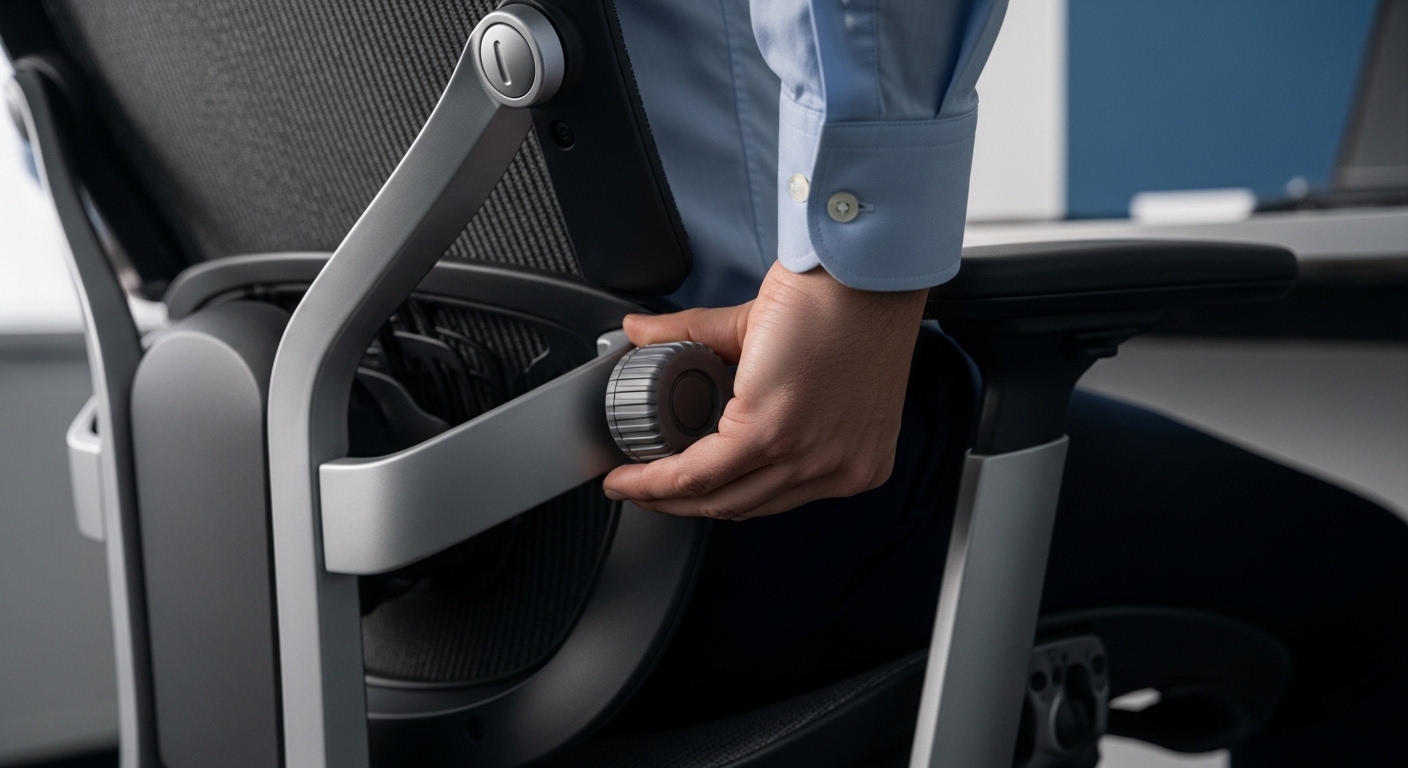
Higher end models may include a dial or a knob on the side of the chair. Turning this knob changes the depth of the support without moving it vertically.
There are also chairs with reactive systems that use tension and weight. These self adjusting mechanisms require no manual input but respond to your body pressure.
Manual Height Sliders
Manual sliders are the most common form of adjustment found in modern offices. They usually consist of a plastic or foam bar behind the mesh.
You can grasp this bar with both hands and slide it up or down. It should click into place or stay held by friction against the frame.
Tension and Depth Knobs
Depth adjustment allows you to control how far the support protrudes into your back. A knob on the side or rear controls the internal tension of the lumbar area.
Increasing the tension makes the support firmer and more pronounced. Decreasing it allows the backrest to feel flatter and more forgiving for smaller frames.
How to Adjust Lumbar Support on Ergonomic Chair: Vertical Setup
The first step in the calibration process is finding the correct height. The support must sit in the natural hollow of your lower back.
Sit all the way back in your chair so your tailbone touches the backrest. Your shoulders should be aligned with your hips for an upright posture.
Reach behind you and move the lumbar support until it fits into the small of your back. This area is located just above the beltline for most people.
If the support is too low, it will push against your sacrum and tailbone. This creates a sensation of being pushed out of the chair seat.
If the support is too high, it will press against your rib cage. This can restrict your breathing and cause discomfort in the middle back region.
Spend a few minutes moving the support up and down in small increments. You are looking for the spot where the pressure feels most distributed across the curve.
Mastering Lumbar Depth and Firmness
Once the height is set, you need to address how much pressure is applied. Not everyone requires the same level of firmness in their chair.
If your chair has a depth adjustment, start by setting it to the neutral or flat position. Slowly increase the depth until you feel a firm but comfortable support.
You should feel the chair gently guiding your spine into its natural shape. It should never feel like a hard object poking you in the spine.
The goal is to provide enough resistance so that you cannot easily slouch. If you find yourself leaning away from the backrest, the depth is likely too high.
Adjusting this setting throughout the day can also be beneficial for some. Your muscles may prefer a softer setting in the afternoon as they fatigue.
The Role of Materials
Mesh chairs provide a more breathable and flexible form of lumbar support. The tension of the mesh creates a cradle for your back during the day.
Foam based chairs offer a more solid and consistent feel for the user. These often use high density memory foam to contour to your specific spinal shape.
Integrating Lumbar Support with Seat Depth
Your lumbar support will not work effectively if your seat pan is set incorrectly. Seat depth refers to the distance from the front to the back of the seat.
If the seat is too deep, you will be unable to sit back far enough. This creates a gap between your back and the lumbar support system.
You should be able to sit with your back fully supported while leaving space behind your knees. Aim for a two or three finger gap between the seat and your calves.
Adjust the seat pan forward or backward before finalizing your lumbar settings. A properly positioned seat pan ensures you utilize the full potential of the chair.
When these two elements work in harmony, the pressure on your lower body is minimized. This synergy is essential for long term comfort and health at work.
The Importance of the Pelvic Tilt
The position of your pelvis determines the shape of your entire spine. Lumbar support helps facilitate a slight forward pelvic tilt while you are sitting.
A forward tilt keeps the lumbar vertebrae in an extension position. This is the most stable configuration for the discs in your lower back.
If your pelvis tilts backward, your spine enters a flexed or rounded state. This stretches the posterior ligaments and can lead to herniated disc issues over time.
Use your lumbar support as a physical cue to keep your pelvis upright. You should feel your weight balanced on the sit bones of your pelvis.
This alignment allows the rest of your body to relax. Even your neck and shoulders will feel lighter when the base of your spine is supported.
Common Mistakes When Adjusting Your Chair
The most common mistake is setting the lumbar support far too high. Many people confuse middle back support with lower back support during their initial setup.
Another error is using a support that is too aggressive for your body. Overextending the spine can cause muscle strain just as easily as slouching can.
Do not rely on the chair to do all the work for you. You must still engage your core muscles slightly to maintain an active sitting posture.
Failing to readjust the chair after changing your footwear can also cause issues. Different heel heights change your pelvic angle and how you sit in the seat.
Remember to check your settings at least once a month. Knobs can loosen and sliders can move accidentally during normal daily use of the furniture.
Signs That Your Lumbar Support Needs Adjustment
If you feel a dull ache in your lower back after one hour, something is wrong. This is often a sign of insufficient vertical height in the lumbar pad.
Leg numbness or tingling can indicate that you are sitting too far forward. This happens when the lumbar support is too deep, pushing you off the seat.
Tightness in the shoulders can actually stem from the lower back. When the base is not stable, your upper body compensates by tensing the trapezius muscles.
Feeling the need to lean forward toward the monitor is another red flag. This suggests that the chair backrest angle and lumbar support are not providing enough forward tilt.
Listen to your body signals throughout the working day. Small adjustments can prevent significant pain issues from developing as the weeks pass by.
Advanced Ergonomic Considerations
In the year 2026, many ergonomic designs have moved toward dynamic support systems. These systems move as you recline to keep the lumbar pad in place.
When you recline, your spine naturally lengthens and the curve changes. A static lumbar support may become less effective during a deep recline.
If your chair does not have dynamic support, you may need to adjust the height when you tilt. For active tasks like typing, a more upright and firm setting is usually best.
For passive tasks like reading or video calls, a slight recline with softer support is acceptable. Changing your posture frequently is the best way to stay healthy while working.
The human body is designed for movement, not for remaining static for eight hours. Use your adjustable chair features to facilitate these regular micro movements.
Lumbar Support for Different Body Types
Petite users often struggle with lumbar supports that are too large or too high. Looking for a chair with a wide range of vertical travel is critical for them.
Taller individuals may find that standard lumbar pads do not reach high enough. Ensure the support can reach the peak of your specific lordotic curve for comfort.
How to Test Your New Settings
Once you have followed the steps on how to adjust lumbar support on ergonomic chair, you must test it. Sit in the chair for at least thirty minutes without moving.
Pay attention to any hot spots or points of pressure on your spine. A perfect setup should feel invisible after a few minutes of focused work.
Try moving through different tasks like typing, mouse usage, and phone calls. Your back should remain in contact with the support through all these movements.
If you feel the urge to slouch, increase the depth or firmness slightly. If you feel pushed away from the desk, decrease the depth or check the height.
It may take a few days for your muscles to adapt to a new position. Do not be discouraged by minor soreness during the first few hours of a major change.
Actionable Tips for Daily Ergonomics
- Always sit with your feet flat on the floor to stabilize your pelvis.
- Check that your monitor is at eye level to prevent leaning forward.
- Take a standing break every sixty minutes to reset your spinal discs.
- Avoid tucking your feet under the chair as this flattens the lumbar curve.
- Use the tilt tension feature to support your weight without collapsing backward.
Frequently Asked Questions
Should lumbar support be hard or soft?
It should be firm enough to hold your shape but soft enough to avoid bruising. The ideal firmness is subjective and depends on your muscle mass and sensitivity.
How high should lumbar support be?
It should be centered in the curve of your lower back, usually around the beltline. It should never touch your shoulder blades or the very bottom of your tailbone.
Can I add lumbar support to a chair that lacks it?
Yes, you can use external pillows or specialized lumbar rolls for this purpose. However, an integrated adjustable system is always superior for long term ergonomic health.
Why does my back hurt after adjusting the support?
Your muscles may be used to a slouched position and are now stretching. If the pain persists for days, the support may be too aggressive or positioned incorrectly.
Conclusion
Mastering your office environment starts with understanding the tools at your disposal. Knowing how to adjust lumbar support on ergonomic chair equipment is a vital skill.
By prioritizing your spinal health, you enhance your focus and reduce physical stress. A well configured workstation is the foundation of professional success and longevity.
Take the time today to examine your chair and make the necessary tweaks. Your back will thank you for years to come as you work in comfort.
The Home Office Lab is here to guide you through every technical aspect of your setup. Stay tuned for more expert ergonomic advice to optimize your daily life.