

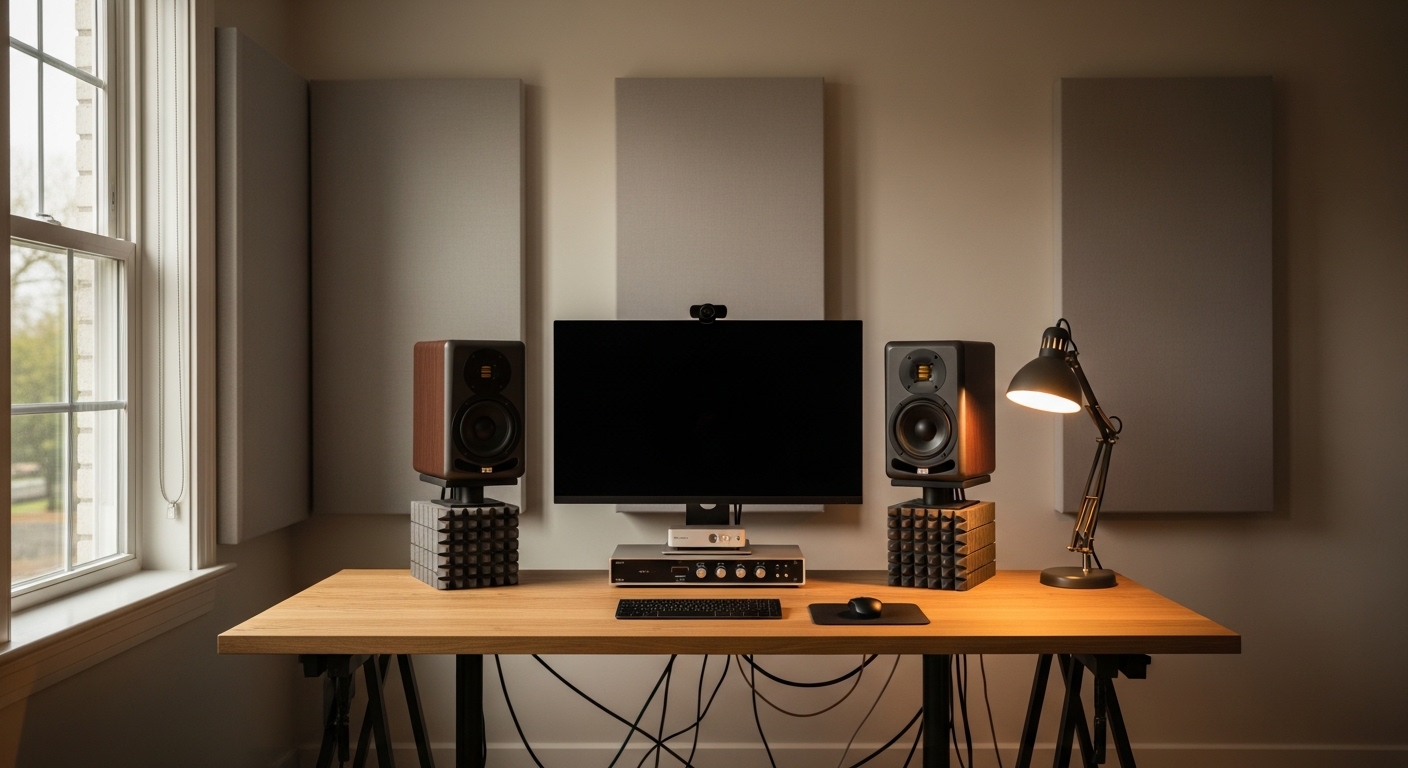
Elevating Your Audio Experience at Home
Creating a professional workspace requires more than just a fast computer and a comfortable chair. High quality sound is a critical component of any modern work environment, especially for those involved in creative industries.
Learning how to choose studio monitors for home office environments is the first step toward achieving sonic clarity. Standard consumer speakers often emphasize certain frequencies to make music sound more exciting, which masks the true nature of the audio.
Studio monitors aim for a flat frequency response, providing an honest representation of the sound. This accuracy is essential for video editing, podcasting, or simply enjoying high fidelity music while you work.
Your home office presents unique acoustic challenges that differ from a professional recording studio. Understanding how sound interacts with your furniture and walls will guide your purchasing decision.
Investing in the right equipment ensures that your audio projects translate well to other devices. This guide will walk you through every technical detail necessary to make an informed choice for your professional audio setup.
Defining the Purpose of Studio Monitors
The primary goal of a studio monitor is to offer a transparent listening experience. They are designed to reveal flaws in a recording rather than hiding them behind enhanced bass response.
In a home office setting, these speakers serve multiple roles including video conferencing and media consumption. Their precision makes it easier to distinguish voices during crowded virtual meetings.
Unlike traditional hifi speakers, monitors are typically built for nearfield listening. This means they are optimized for short distances, usually between three and five feet from the listener.
This design minimizes the influence of room reflections on the sound you hear. By focusing the energy directly toward your ears, the speakers provide a clear stereo image even in untreated rooms.
Selecting the right monitors involves balancing technical specifications with the physical constraints of your desk. A pair that is too large might overwhelm a small room with uncontrolled low frequencies.
Active Versus Passive Monitor Systems
Most professionals today prefer active monitors for their home workstations. These units have internal power amplifiers specifically tuned to the drivers within the cabinet.
This integrated design eliminates the need for bulky external amplifiers on your desk. It also ensures that the tweeter and woofer receive the exact amount of power they require for optimal performance.
Passive monitors require an external power source and speaker wire connections. While they offer some customization, they are generally less convenient for a streamlined office layout.
Active systems often include bi amping technology, where separate amplifiers power the high and low frequency drivers. This results in cleaner sound reproduction and better transient response across the spectrum.
For a home office, simplicity is usually a priority to maintain a clean aesthetic. Active monitors provide a plug and play solution that connects directly to your computer or audio interface.
The Importance of Driver Size and Room Volume
The size of the woofer determines how much air the speaker can move. This directly impacts the low frequency extension and the overall volume the monitor can produce without distortion.
Common driver sizes for home environments range from four inches to eight inches. Smaller drivers are excellent for tight spaces where desk real estate is at a premium.
If your home office is small, an eight inch monitor might be counterproductive. Large speakers in small rooms often create standing waves that make the bass sound muddy and imprecise.
A five inch or six inch driver is frequently the sweet spot for many residential offices. These sizes provide enough low end for most tasks while maintaining a compact physical footprint.
If your work requires deep sub bass monitoring, you might consider a smaller pair of monitors paired with a dedicated subwoofer. This allows for more flexible placement options within your room.
Frequency Response and Accuracy
Frequency response refers to the range of human hearing that the speaker can effectively reproduce. A standard range might span from 50 hertz to 20 kilohertz, covering most musical content.
Accuracy is just as important as the range itself. You want a monitor that maintains a consistent volume level across all frequencies without significant peaks or dips.
Manufacturers provide charts showing the frequency response of their products. Look for a relatively flat line to ensure the speaker does not color your audio with artificial warmth.
High frequency drivers, known as tweeters, are often made from materials like silk or aluminum. Each material offers a different sonic character, with silk being smoother and metal being more analytical.
Cabinet Design and Porting Options
The physical enclosure of the speaker plays a massive role in sound quality. Most monitors use medium density fiberboard because it is dense and resists unwanted vibrations.
Porting is another critical design feature to consider for your desk. Many speakers have a hole, or port, to help extend the bass response of the cabinet.
Rear ported monitors exhaust air out of the back of the speaker. These can be tricky in a home office if you need to place them against a wall.
Placing a rear ported speaker too close to a boundary can cause an unnatural buildup of low frequencies. Front ported designs are more forgiving when space is limited near walls.
Some premium monitors use a sealed box design, also known as acoustic suspension. These typically offer the tightest bass response but may require more power to reach higher volume levels.
Connectivity and Interface Requirements
To get the best sound, you should avoid using the headphone jack on your laptop. A dedicated digital to analog converter or audio interface is highly recommended.
Professional monitors usually feature balanced inputs like XLR or quarter inch TRS connectors. Balanced connections are vital because they reject electrical noise from power cables and monitors.
Standard RCA cables are unbalanced and are more prone to picking up hum or interference. This is especially problematic in a home office filled with multiple electronic devices.
Check the back of the monitors for input sensitivity switches. These allow you to match the speaker volume to the output level of your specific audio interface.
Some modern monitors now include digital inputs or USB connections. While convenient, these can sometimes limit your future upgrade paths compared to traditional analog connections.
Room Correction and Digital Signal Processing
Modern technology has introduced advanced ways to handle poor room acoustics. Many monitors now feature onboard DSP to help calibrate the sound to your specific environment.
This software can compensate for speakers being placed too close to corners or walls. These room correction filters are incredibly helpful in non traditional office spaces.
Some systems even include a measurement microphone to analyze your room automatically. The monitor then adjusts its internal equalization to produce a flatter response at your listening position.
Even without automatic calibration, most professional monitors have manual switches for high and low shelf adjustments. These allow you to fine tune the output based on your personal preference and room layout.
In 2026, we expect these digital features to become even more integrated into entry level models. Utilizing these tools can significantly bridge the gap between a bedroom office and a professional studio.
The Role of Speaker Placement
Where you put your monitors is just as important as which ones you buy. They should be positioned so your head and the two speakers form an equilateral triangle.
The tweeters should be at the same height as your ears. If the speakers sit directly on your desk, the sound will reflect off the surface and cause phase cancellation.
Using dedicated speaker stands can elevate them to the correct height. This also helps to decouple the speakers from your desk, preventing the furniture from vibrating.
If you lack space for stands, isolation pads are a great alternative. These foam or rubber platforms sit under the speakers to absorb mechanical energy.
Pros and Cons of Different Monitor Types
- Nearfield Monitors provide excellent detail at close range but have a small listening sweet spot.
- Active Monitors offer easy setup and matched components but require a power outlet for each speaker.
- Front Ported Cabinets allow for placement near walls but can sometimes produce audible air turbulence.
- Ribbon Tweeters offer incredibly smooth high frequencies but are often more fragile and expensive.
- DSP Enabled Speakers can fix room issues but add complexity and potential latency to the signal chain.
Acoustic Treatment Basics for Home Offices
Even the most expensive monitors will sound poor in a room with a lot of echo. Hard surfaces like windows and bare walls cause sound waves to bounce uncontrollably.
Adding soft materials to your office can help absorb these reflections. Rugs, heavy curtains, and bookshelves filled with books act as natural diffusers.
For better results, consider professional acoustic panels made from dense fiberglass or rockwool. Placing these at first reflection points will dramatically sharpen the stereo image.
Bass traps in the corners of the room are also beneficial. They help manage low frequency buildup, which is the most common acoustic problem in residential settings.
A well treated room makes the process of how to choose studio monitors for home office use much easier. When the room is controlled, the true character of the speakers can shine through.
Budget Considerations for Audio Equipment
Price points for studio monitors vary wildly based on components and brand reputation. It is important to set a realistic budget that includes necessary accessories like cables and stands.
Entry level monitors are quite capable these days and offer a massive upgrade over standard computer speakers. They are perfect for general office tasks and light content creation.
Mid range monitors offer better internal components and more robust cabinet construction. This usually results in lower distortion and a more detailed soundstage for critical listening.
High end monitors are an investment in professional accuracy and longevity. These units often use premium driver materials and sophisticated amplification circuits for the ultimate performance.
Remember that the most expensive speaker is not always the best fit for your specific desk. Choose the highest quality option that matches the physical size of your working environment.
Additional Features to Look For
Look for monitors with robust protection circuitry to prevent damage from power surges. Some models also include an auto standby mode to save energy when not in use.
Front mounted volume controls can be very convenient if you do not have a dedicated monitor controller. However, rear mounted controls are more common on professional units to prevent accidental changes.
Check the warranty period offered by the manufacturer. High quality monitors are built to last for many years of daily use in a professional capacity.
Common Mistakes to Avoid
One common error is buying monitors that are too large for the desk. This leads to a cluttered workspace and poor ergonomic positioning of your computer screens.
Another mistake is neglecting the quality of the audio cables. Using cheap, unshielded wires can introduce unwanted hiss and hum into your pristine audio signal.
Do not assume that more bass always means better sound. Precision and tonal balance are far more important than sheer low end power for professional work.
Avoid placing your monitors in the corners of the room if possible. This creates a bass boost that is difficult to correct even with advanced digital processing tools.
Conclusion and Final Recommendations
Selecting the right audio gear is a personal journey that depends on your specific needs and environment. By focusing on accuracy and placement, you can transform your home office into a high performance studio.
Take the time to measure your desk and consider your room acoustics before making a purchase. Understanding how to choose studio monitors for home office settings will ensure your investment pays off in clarity.
A professional audio setup reduces ear fatigue during long work sessions. It allows you to hear every nuance in your communication and your favorite media with absolute precision.
Focus on balanced connections and appropriate driver sizes to achieve the best results. With the right monitors, your home office lab will become a center of productivity and high fidelity sound.