

The Importance of Your Digital First Impression
In the modern era of remote work, your video call environment serves as your digital handshake. It communicates your level of professionalism and attention to detail before you even speak a word.
A cluttered or distracting background can undermine your authority during important meetings. Conversely, a well curated space fosters trust and displays a sense of organized competence to your colleagues.
Understanding how to choose professional background for video calls is an essential skill for any career professional. This guide will walk you through the technical and aesthetic principles required to master your visual presence.
Your background is not just a wall behind you, it is a strategic tool. It helps define your personal brand identity in every virtual interaction you have.
The Psychology of Visual Credibility
Human brains process visual information much faster than text or audio. When a camera turns on, your audience immediately judges the reliability and status of your environment.
A clean and intentional space suggests that you are in control of your surroundings. This perception often translates to the quality of your work and your professional reliability.
Psychologists suggest that organized environments reduce cognitive load for the viewer. When your background is simple, the focus remains entirely on your message and facial expressions.
Visual noise like laundry piles or open closets creates a sense of chaos. Avoiding these common pitfalls is the first step toward achieving visual authority.
Defining Your Professional Background Strategy
Before moving furniture, you must decide what image you want to project. A creative professional might want more vibrant and artistic elements in their frame.
A legal or financial expert usually benefits from a more conservative and structured office aesthetic. Tailoring your space to your specific industry is a smart move.
Consider the difference between a real physical background and a virtual one. While software solutions are convenient, a genuine physical setup often looks more authentic and premium.
Physical backgrounds provide a sense of place and depth that AI filters cannot perfectly replicate. They show that you have invested in your permanent workspace setup.
Creating Depth and Perspective
One of the biggest mistakes in home offices is sitting directly against a flat wall. This creates a 2D effect that feels cramped and uninspiring to the viewer.
You should aim to create a sense of three dimensional space. Placing your desk a few feet away from the back wall adds depth and visual interest.
Depth allows the camera to create a natural blur effect. This separation between you and the background makes you pop from the screen.
If you use a camera with a wide aperture, this depth becomes even more pronounced. It mimics the look of professional cinematic productions used in high budget media.
The Role of Color Theory in Backgrounds
Color has a profound impact on how people feel during a conversation. Neutral tones like soft grey, beige, or off white are safe and professional choices.
Cooler colors like navy blue or forest green can evoke a sense of calm and stability. These colors are excellent for high stakes negotiations or long meetings.
Avoid overly bright or neon colors that can cause eye strain. Such colors might also interfere with the auto white balance of your webcam.
Ensure that your clothing color provides enough contrast against the wall. You do not want to appear like a floating head because you match the paint color.
Mastering Lighting for Professional Clarity
Lighting is the most critical technical element of any video setup. Even a beautiful background looks poor if it is shrouded in shadows or improperly lit.
Natural light is the most flattering source available. Positioning your desk so you face a window provides a soft and even glow on your face.
Never have a bright window directly behind you during a call. This creates a silhouette effect that makes your features completely invisible to others.
If natural light is unavailable, use dedicated desk lamps or LED panels. Aim for a balanced light distribution to eliminate harsh shadows under your eyes.
Incorporating Shelving and Books
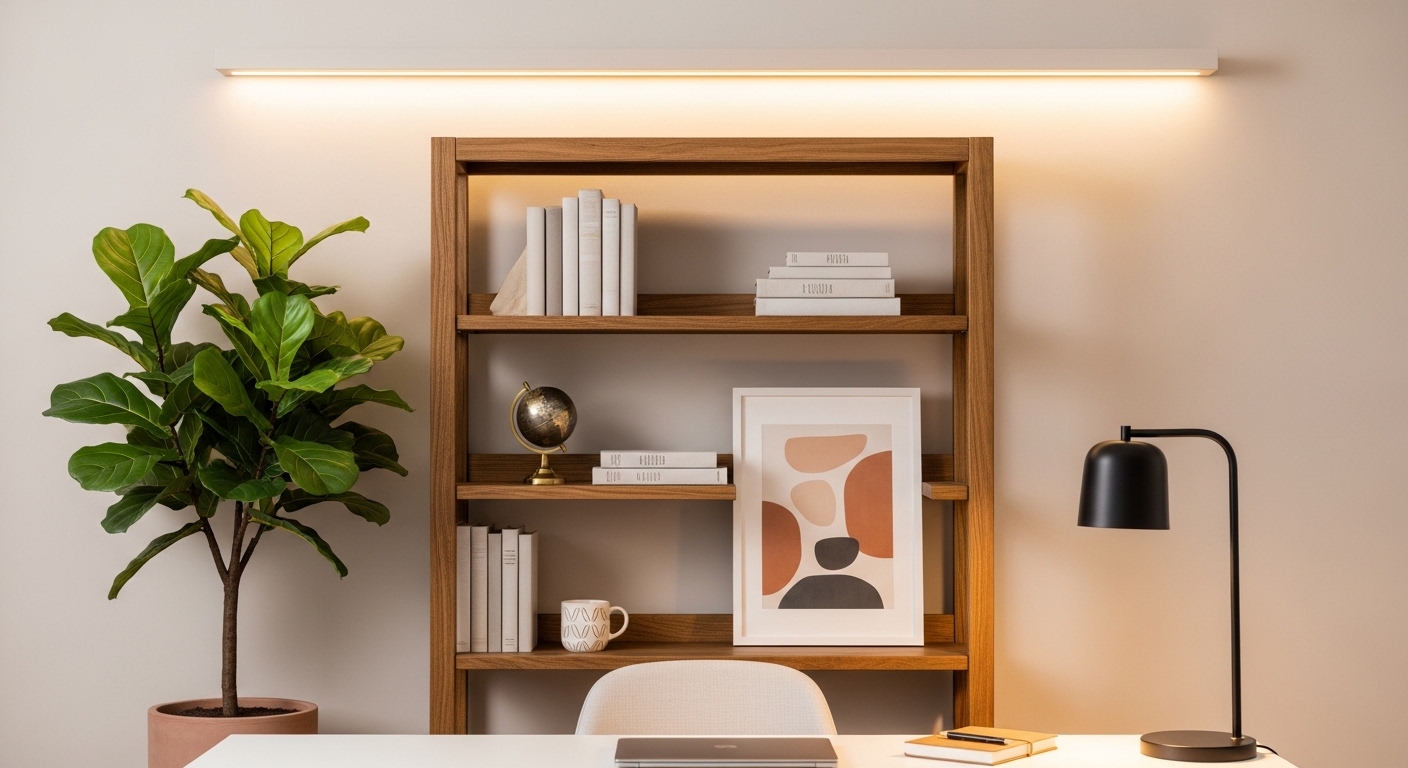
Bookshelves are a classic choice for professional backgrounds. They suggest knowledge and intellectual curiosity while providing a structured visual pattern.
Avoid overstuffing your shelves with too many small items. A cluttered shelf looks messy and distracts the viewer from your face.
Use the rule of thirds to place items of interest. Group books by color or size to create a visually harmonious arrangement on the shelves.
Leave some empty space on each shelf to let the design breathe. This minimalist shelf styling is much more effective than a packed library look.
Using Plants to Add Life and Texture
Biophilic design involves bringing nature into your workspace. Adding a green plant can make your background feel warm and inviting.
Plants also help soften the hard lines of furniture and technology. A large leaf plant like a Monstera provides excellent visual texture in the corner.
Ensure the plant is healthy and well maintained. A dying or wilted plant can unintentionally signal neglect or lack of attention to detail.
Artificial plants are a great alternative if your office lacks sunlight. High quality silk plants look realistic on camera and require zero maintenance.
Art and Personal Branding Elements
Art can be a great conversation starter and a way to show personality. Choose pieces that are understated and sophisticated rather than loud or controversial.
Abstract art or landscape photography works well in most professional settings. Ensure the frame is level and securely mounted on the wall.
Avoid glass frames that reflect your monitor or studio lights. Reflections can be distracting for viewers and hide the artwork itself.
Consider placing one or two personal items that reflect your career. An award or a unique design object can reinforce your expertise subtly.
Technical Optimization for Your Background
The hardware you use affects how your background is rendered. A high quality camera will capture textures and colors more accurately than a cheap laptop lens.
Focal length is a key consideration for your background. Wide angle lenses show more of the room, requiring a larger clean area behind you.
Narrower lenses crop out the periphery of the room. This is helpful if you are working in a multi purpose space like a bedroom.
Adjust your camera settings to manually control the exposure. This prevents the camera from constantly shifting brightness as you move in your chair.
Managing Small Spaces and Bedroom Offices
Not everyone has a dedicated office room for their video calls. If you work from a bedroom, you must hide personal furniture like your bed.
Room dividers or folding screens are perfect for creating a temporary wall. They allow you to segment your workspace from your living area easily.
A simple curtain system can also block out undesirable views. Choose a heavy fabric that does not wrinkle easily for a polished look.
If space is very tight, consider a corner setup. Using two walls can create a wrapped background effect that feels more immersive.
Virtual Backgrounds: When to Use Them
Sometimes a physical background is simply not an option. In these cases, virtual backgrounds provide a consistent and professional alternative for users.
Avoid the default preset backgrounds provided by video software. They often look cheap and generic to seasoned professional viewers.
Choose a high resolution image of a clean office or a modern loft. Using an image with realistic lighting and perspective is the key to success.
A green screen is essential for the best virtual background performance. It allows the software to cleanly separate you from the artificial image.
Actionable Tips for Background Maintenance
- Clean your camera lens daily to remove dust and fingerprints.
- Check your background in a test call before every major meeting.
- Keep a lint roller and microfiber cloth nearby for quick touch ups.
- Rotate your decor seasonally to keep the environment feeling fresh.
How to Choose Professional Background for Video Calls: Practical Steps
Start by identifying the main frame that the camera sees. Use a masking tape to mark the visible boundaries on your wall or shelves.
Focus your decoration efforts only within that specific frame. This saves time and ensures every visible inch is perfect for the viewer.
In the year 2026, the standard for remote professional appearances will be even higher. Investing time now ensures you stay ahead of the curve in your industry.
Experiment with different chair heights to see how it changes the background view. A lower seat might show more of the ceiling, which is usually undesirable.
Common Background Distractions to Avoid
Ceiling fans can be very distracting when they are spinning in the frame. If possible, keep the fan turned off during your important video presentations.
Open doors in the background invite interruptions from family or pets. Always ensure your office door is closed and the frame is sealed.
Clocks on the wall can be a subtle distraction if they are ticking or showing a different time. It is best to keep timepieces out of the camera view.
Avoid having mirrors behind you as they can show things you want to keep private. Mirrors also create complex light reflections that confuse the camera sensor.
The Role of Texture in Professional Vibe
Flat, white walls can look sterile and clinical on camera. Adding texture through wallpaper or wood panels creates a high end feel for your office.
Fabric elements like acoustic panels serve a dual purpose. they improve the sound quality of your room while adding visual depth.
Acoustic panels come in many colors and geometric shapes. They can be arranged to create a modern art installation behind your desk.
Texture helps the camera lens find focus more easily. A varied background prevents the autofocus from hunting during your video call sessions.
Finalizing Your Professional Setup
Once you have arranged your furniture and lighting, do a final review. Record a short video of yourself speaking and moving in the space.
Watch for any weird shadows or items that look like they are growing out of your head. Adjust your positioning and framing to fix these issues.
Consistency is key for your professional reputation. Try to maintain the same background for all your recurring weekly meetings.
This creates a familiar and stable environment for your team. It reinforces your digital presence as a reliable and prepared professional.
Frequently Asked Questions
Should I use a blurry background?
A slight blur or bokeh effect is very professional. It helps the viewer focus on you rather than every small detail of your room.
Are white backgrounds okay?
Pure white can look washed out or overly bright. A soft off white or light grey is usually a better choice for video calls.
Can I use a bookshelf with too many books?
It is better to have fewer, neatly organized books. Too many books can look cluttered and messy on a small laptop screen.
How do I handle a messy room?
If you cannot clean the room, use a high quality virtual background. Always prioritize a clean visual appearance over a messy reality.
Conclusion
Mastering how to choose professional background for video calls is a long term investment in your career. It combines elements of interior design and technical video production.
By focusing on depth, lighting, and curated decor, you can transform any space into a command center. Your environment should inspire confidence in your skills and your brand.
Take the time to experiment with different layouts and items. A truly professional background is a reflection of your personality and your work ethic.
Thank you for visiting The Home Office Lab to refine your setup. We hope these tips help you stand out in every virtual meeting you attend.