

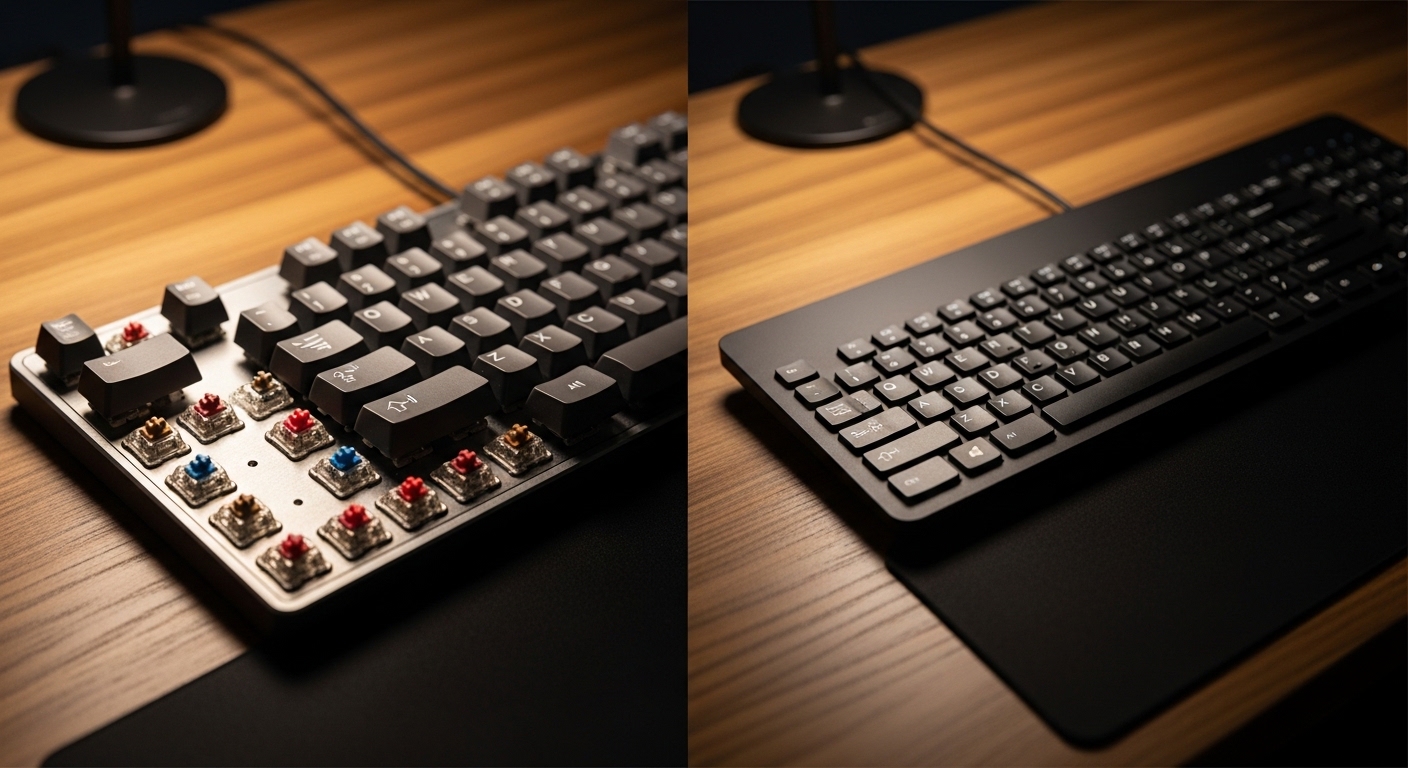
The Evolution of the Modern Typing Experience
Choosing a keyboard is no longer a simple task for the average professional. As we spend more time at our desks, the quality of our input devices directly impacts our productivity.
Finding the right balance between comfort and performance requires understanding the internal technology. Many users wonder how to choose between mechanical and membrane keyboards for their specific needs.
The Home Office Lab is here to dissect every technical detail. We will explore the mechanics behind each keypress to help you make an informed decision.
Whether you are a writer or a programmer, your choice will dictate your daily comfort levels. Let us dive into the fundamental differences that define these two popular technologies.
Understanding the Core Architecture of Membrane Keyboards
Membrane keyboards are the most common type found in modern offices today. They rely on a layered pressure sensitive system to register your keystrokes.
Underneath the plastic keys lies a three layer rubber or silicone membrane. When you press a key, the top layer pushes through a hole to touch the bottom layer.
This contact completes an electrical circuit that sends a signal to your computer. This design is highly efficient for mass production and results in a very thin profile.
Most laptops utilize a variation of this technology known as scissor switches. These provide a shorter travel distance compared to traditional desktop versions.
The Benefits of the Rubber Dome Design
One primary advantage of membrane technology is the silent operation it provides. The rubber domes act as natural shock absorbers which muffle the sound of every strike.
This makes them ideal for shared workspaces where loud clicking might disturb others. Additionally, the sealed nature of the membrane provides some protection against crumbs or light spills.
Because the components are lightweight, these keyboards are often very portable. They are the budget friendly choice for those setting up a basic home office.
However, the soft nature of the rubber can lead to a mushy feeling over time. This lack of tactile clarity is why many power users eventually look for alternatives.
The Mechanical Revolution in Desktop Productivity
Mechanical keyboards operate on a completely different set of principles. Each individual key sits on top of its own dedicated physical switch housing.
Inside that housing, a metal spring and a stem determine the feel of the press. There is no shared membrane sheet across the board.
When you press a mechanical key, the stem slides down to allow two metal contacts to meet. This physical interaction provides a consistent and reliable signal every single time.
The variety of available switches allows for immense personalization. You can choose switches based on how much force your fingers naturally apply.
Why Switch Consistency Matters for Accuracy
Consistency is the hallmark of a high quality mechanical typing experience. Because each switch is a separate machine, the resistance remains uniform across the entire layout.
On a membrane board, the rubber can age unevenly. This causes some keys to feel stiffer than others which can lead to typing errors.
Mechanical switches are rated for tens of millions of presses. This exceptional long term durability ensures your investment lasts for many years to come.
Many professionals find that the clear actuation point helps them type faster. You do not always need to bottom out the key to register the character.
Comparing Tactile Feedback and Sensory Response
The sensory experience is where the two technologies diverge most significantly. Membrane keyboards offer a soft cushioned landing that feels gentle on the fingertips.
Some users prefer this dampened sensation for casual browsing or light data entry. It reduces the impact force on your joints during short sessions.
In contrast, mechanical boards offer distinct tactile events. You might feel a slight physical bump the exact moment the key registers.
This feedback tells your brain that the action is complete. It allows for a more rhythmic and confident typing flow during long writing marathons.
The Three Main Categories of Mechanical Switches
If you choose the mechanical path, you must understand switch categories. Linear switches offer a smooth vertical press without any tactile bump or noise.
Tactile switches provide that physical bump without a loud clicking sound. They are often considered the best middle ground for office environments.
Clicky switches add an audible click to the tactile bump. These are satisfying for solo workers but can be distracting in meetings or shared rooms.
Understanding these variations is a vital part of knowing how to choose between mechanical and membrane keyboards. Your personal preference for sound and feel will be the deciding factor.
The Impact of Noise Levels on Your Workspace
Acoustics play a massive role in the overall atmosphere of your home office. Membrane keyboards are inherently much quieter due to their construction materials.
The soft rubber dome prevents the sharp clack of plastic hitting plastic. This is a significant benefit if you frequently participate in voice calls.
Mechanical keyboards are often criticized for being too loud for professional settings. However, modern designs have introduced silent switch variants with internal dampeners.
You can also install small silicone O rings under the keycaps to reduce noise. These modifications allow for a mechanical feel with a membrane volume level.
Managing Sound in a Shared Environment
If you work in a living room, your keyboard noise affects everyone. A loud clicky keyboard might cause unnecessary friction with family members or roommates.
Membrane boards are the safest bet for maintaining a peaceful household. They allow you to work late at night without waking anyone up in the next room.
If you crave mechanical performance, look for switches labeled as Silent Red or Silent Black. These use integrated rubber pads to soften both the downstroke and the upstroke.
Sound testing is a great way to verify your choice before committing. Many enthusiasts watch video demonstrations to hear the subtle differences in switch acoustics.
Durability and the Total Cost of Ownership
When looking at the price, membrane keyboards are much more affordable upfront. You can find functional entry level models for a very small investment.
The trade off is that these keyboards have a shorter lifespan. The rubber membrane will eventually lose its elasticity and become stiff or unresponsive.
Mechanical keyboards require a higher initial expenditure. However, they are built to last for a decade or more of heavy daily use.
The switches are often the first thing to fail on any keyboard. With a mechanical board, you can often replace a single switch instead of the whole unit.
The Rise of Hotswappable Keyboards
A major innovation in the mechanical market is hotswappable technology. This allows you to change your switches without using a soldering iron.
If a key stops working, you simply pull it out and snap in a new one. This modularity extends the life of the keyboard indefinitely.
Membrane keyboards are generally considered disposable items. If one key fails, the entire circuit board is usually compromised beyond repair.
Over a five year period, a single mechanical keyboard might actually be cheaper. You avoid the cycle of buying and throwing away cheap plastic replacements.
Customization and Personal Expression
For many, the keyboard is a centerpiece of their desk aesthetic. Mechanical keyboards offer a vast world of customization that membrane boards cannot match.
You can swap the keycaps for different colors, textures, and materials. High quality PBT plastic keycaps resist the shiny wear that affects cheaper ABS caps.
Membrane keyboards usually come with fixed keycaps that cannot be changed. The entire look is permanent from the day you purchase it.
Mechanical enthusiasts often build their own boards from scratch. This includes choosing the case material, the mounting plate, and the internal foam for sound dampening.
Standardized Layouts and Keycap Compatibility
Most mechanical boards follow standard layouts like ANSI or ISO. This makes it easy to find aftermarket parts that fit perfectly.
Membrane boards often use proprietary shapes for their keys. This means you are stuck with the factory font and color scheme forever.
If you value a unique setup, mechanical is the clear winner. You can match your keyboard to your office decor or your favorite color palette.
This level of personalization makes the tool feel more like an extension of yourself. It can even provide a small boost to your daily mood and motivation.
Performance for Gaming and Technical Tasks
Gamers and developers often have specific technical requirements for their hardware. One major factor is N key rollover which mechanical boards handle expertly.
This feature allows the keyboard to register every single key pressed simultaneously. Many membrane boards struggle with ghosting where certain combinations fail to register.
Mechanical switches also offer faster polling rates and lower latency. This ensures that your inputs are translated to the screen with zero perceived delay.
While membrane boards are fine for standard office work, they may lag in high stakes scenarios. Precision is the priority for those working in fast paced digital environments.
The Importance of Actuation Points
An actuation point is the exact depth where a command is sent. Mechanical switches allow you to trigger a keypress halfway through the stroke.
This allows for rapid firing and quicker reactions. On a membrane board, you must press the key all the way down to hit the circuit.
This extra travel time might seem small but it adds up over thousands of keystrokes. Professional gamers almost exclusively use mechanical hardware for this very reason.
In the year 2026, we expect these performance gaps to narrow as membrane tech improves. However, the physical reality of the switch remains a distinct advantage for mechanical users.
How to Choose Between Mechanical and Membrane Keyboards: A Practical Guide
To make the final decision, you should evaluate your primary daily tasks. If your work involves heavy data entry or coding, the mechanical feel is likely better.
If your budget is tight and you need something functional right now, membrane is acceptable. Consider the following checklist to help narrow down your priorities.
- Determine your total budget for peripherals, membrane is cheaper while mechanical is an investment.
- Assess your noise tolerance, think about your colleagues and your family members.
- Evaluate your typing volume, heavy users benefit from the durability of individual switches.
- Decide if you want to customize the look, only mechanical boards offer wide keycap compatibility.
- Check if you need specialized features like macro keys or high speed polling.
Testing a keyboard in person is the most effective strategy. Many electronics stores have demo units available for you to touch and feel.
Pay attention to the reset point of the keys. A faster reset allows for more fluid typing without feeling like the keys are sluggish.
Choosing for Ergonomics and Wrist Health
Ergonomics should never be overlooked when selecting a keyboard. Some mechanical boards are quite tall and require a wrist rest for comfort.
Membrane boards are often lower to the desk. This can promote a more neutral wrist angle for some users without extra accessories.
However, the force required to bottom out a membrane key can cause fatigue. Mechanical switches allow for a lighter touch which may reduce strain over time.
Look for a board that allows you to maintain a straight line from your elbow to your knuckles. The angle of the keyboard is just as important as the switch technology inside.
Maintenance and Cleaning for Long Term Success
A clean keyboard is a functional keyboard. Mechanical keyboards are significantly easier to clean because the keycaps are removable.
You can pull off every cap to wipe away dust and hair from the plate. This prevents the switches from becoming gritty or sticking over time.
Membrane keyboards are more difficult to deep clean. Debris can get trapped under the rubber sheet where it is hard to reach.
If a membrane board becomes very dirty, the keys may start to feel uneven. Regular maintenance will extend the life of any device you choose.
Safely Caring for Your Investment
Use compressed air to blow out loose particles once a week. For mechanical boards, a dedicated keycap puller is a helpful tool to have.
Never spray liquid cleaners directly onto the surface. Instead, use a slightly damp cloth to wipe the caps and the frame.
If you have a hotswappable board, avoid getting moisture inside the switch sockets. Proper care ensures that you rarely have to deal with hardware failures.
Remember that oils from your skin can wear down the legends on the keys. Choosing high quality double shot keycaps ensures the letters never fade away.
Frequently Asked Questions
Which keyboard type is better for beginners? Membrane keyboards are often better for beginners due to their low cost and familiarity. Most people grow up using membrane boards in schools or on laptops.
Are mechanical keyboards always loud? No, they are not always loud. You can choose silent linear switches or add dampeners to make them as quiet as a membrane board.
Can I use a mechanical keyboard with a Mac? Yes, most mechanical keyboards are fully compatible with macOS. Many even come with specific Mac keycaps for the Command and Option keys.
Why are mechanical keyboards so heavy? They often use a metal internal plate for stability and switch mounting. This weight prevents the keyboard from sliding around on your desk during intense typing.
Conclusion: Making the Best Choice for Your Lab
Ultimately, the decision rests on your personal typing style and work environment. Membrane keyboards offer quiet and affordable performance for the casual user.
Mechanical keyboards provide a premium and customizable experience for those who view typing as a craft. Both technologies have a valid place in the modern home office.
We hope this guide on how to choose between mechanical and membrane keyboards has clarified the technical landscape. Your hands will thank you for the extra consideration you put into this choice.
Take your time to explore the options and find the perfect tactile fit. A great keyboard is the most important bridge between your ideas and the digital world.