

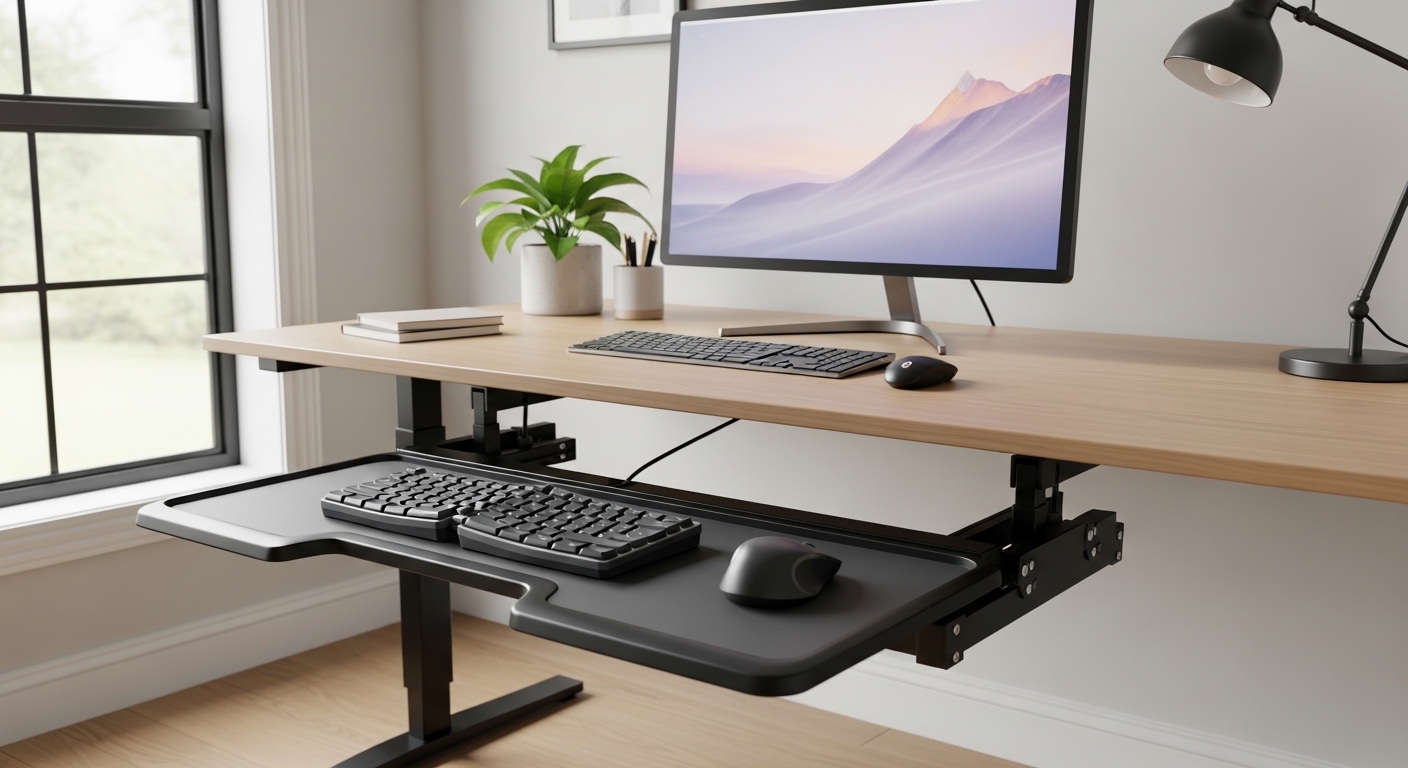
Creating a workspace that supports your physical health is a primary goal for any modern professional. One often overlooked component of a healthy setup is the keyboard tray.
Learning how to choose an ergonomic keyboard tray can transform your daily comfort and long term productivity. This guide will walk you through every critical detail to ensure you make an informed decision.
The Importance of Proper Keyboard Positioning
Many office workers suffer from repetitive strain injuries because their desks are at the wrong height. A standard desk is often too high for comfortable typing for the average person.
An ergonomic tray allows you to drop the typing surface to a level that relaxes your shoulders. This neutral reach zone ensures that your elbows remain at a comfortable ninety degree angle.
By bringing the keys closer to your lap, you eliminate the need to hunch over your workspace. This adjustment significantly reduces the tension in your upper back and neck throughout the day.
Furthermore, a tray creates more space on your actual desktop for other tasks. This increased surface area is vital for maintaining an organized and efficient home office environment.
Understanding the Physiology of Typing
When you type on a surface that is too high, your wrists often bend upward. This position puts pressure on the median nerve and can lead to carpal tunnel syndrome over time.
A properly installed tray facilitates a downward slope for your forearms. This alignment keeps the wrists in a straight and neutral position which is the safest way to work.
In the evolving landscape of 2026 office design, experts agree that flexibility is the key to longevity. Investing in your physical health starts with the tools that bridge the gap between your body and your computer.
Measuring Your Desk for Compatibility
Before you purchase any accessory, you must understand the physical constraints of your current desk. Not every tray will fit every style of furniture on the market.
Start by measuring the available depth under the surface of your desk. Most trays require a mounting track that is between twelve and twenty two inches long.
If your desk has a support beam or a cross bar, this could block the installation of a standard track. You must ensure there is a flat and unobstructed area for the mounting hardware to sit flush.
Width is another crucial factor because you need enough room to slide the tray in and out. Measure the distance between the desk legs to ensure the tray has sufficient lateral clearance for full movement.
Dealing with Desk Obstructions
Many standing desks have a central motor or a structural frame that limits under desk space. You may need to look for a short track version if your desk depth is limited by design.
Some manufacturers offer spacers that allow the track to sit below the level of a cross bar. These spacer kits are essential for those with specific modern desk frames that utilize heavy bracing.
Check the thickness of your desk material as well. A desk made of thin glass or hollow particle board might not support the weight of a heavy duty tray without additional reinforcement.
Solid wood or high density fiberboard provides the best foundation for the mounting screws. If you have a glass desk, you will likely need a clamp on model rather than a screw in version.
Critical Adjustment Features to Consider
The primary benefit of an ergonomic tray is its ability to move in multiple directions. A fixed tray offers very little benefit compared to a fully adjustable mechanism.
Look for a tray that offers a wide range of height adjustments. This allows you to fine tune the position whether you are sitting or standing during your work session.
The ability to swivel the tray is also a valuable feature for collaborative environments. You can easily turn the tray to show your screen to a colleague or to change your seating angle.
Most high quality units utilize a single lever or a knob to lock the tray into place. Some advanced models use a lift and lock system that requires no knobs at all for height changes.
The Power of Negative Tilt
One of the most important ergonomic features is the ability to tilt the keyboard away from you. This is known as negative tilt and it is the opposite of how most keyboards are built.
A negative tilt ensures that your wrists stay in a straight line with your forearms. Most expert guides suggest a slight downward angle for the best ergonomic results during long typing sessions.
Positive tilt, which is common on many built in keyboard feet, can actually cause harm. It forces the wrist to extend upward which restricts blood flow and increases muscle fatigue.
Ensure the tray you choose can achieve at least fifteen degrees of negative tilt. This mechanical flexibility is what separates a premium ergonomic solution from a basic sliding shelf.
Platform Size and Surface Materials
The physical platform of the tray must be large enough to accommodate your specific hardware. Think about whether you use a standard full size keyboard or a compact version.
If you use a mouse on the same level, you need a tray that is at least twenty six to twenty eight inches wide. A wide platform allows for a seamless transition between typing and navigating with your cursor.
Some trays feature a separate mouse platform that can be positioned independently. This separate mousing surface can sometimes be placed at a different height or angle for better comfort.
Consider the material of the platform itself. Phenolic resin is a popular choice because it is extremely thin yet incredibly strong and durable over time.
Surface Texture and Maintenance
A non slip surface is helpful to keep your keyboard from sliding when the tray is tilted. Many trays come with integrated wrist rests to provide additional support for your palms.
However, ensure the wrist rest is removable if you prefer to use your own custom solution. The cleaning requirements for the tray surface should also be taken into account for hygiene.
Metal platforms are sturdy but can feel cold to the touch in winter months. Wood or composite materials often provide a more comfortable temperature for your hands and wrists.
Check for a cable management system built into the tray. A well designed channel will prevent your mouse and keyboard wires from getting tangled in the sliding mechanism.
Pros and Cons of Different Tray Types
There are several categories of trays available, each with its own set of advantages. Understanding these will help you narrow down how to choose an ergonomic keyboard tray for your specific needs.
Under desk tracks are the most common and offer the best range of motion. They provide superior stability because they are screwed directly into the desktop framework.
- Track mounted trays offer the most height and tilt adjustability.
- Clamp on trays are easy to install without drilling holes.
- Wall mounted trays are ideal for space constrained standing stations.
- Fixed height trays are the most affordable but offer limited ergonomics.
Clamp on trays are perfect for renters or people with glass desks. They are highly portable and can be moved between different desks with very little effort.
However, clamp on models often have a more limited range of height adjustment. They might also vibrate more than a permanently mounted track during heavy typing sessions.
Sit to Stand Converters vs Integrated Trays
If you already have a standing desk converter, it may have a built in tray. These are convenient but often lack the independent tilt features found on dedicated trays.
A dedicated ergonomic tray is usually more robust than the ones found on budget converters. They provide a more stable platform which is critical for preventing screen shake while you work.
Weight capacity is a significant factor if you tend to lean on your tray while thinking. Most professional grade trays can support up to twenty pounds without sagging or bouncing.
Stability is the hallmark of a high quality mechanism. A bouncy tray can be distracting and may lead to errors in your typing over a long day.
Stability and Build Quality Standards
When evaluating a keyboard tray, look at the thickness of the metal arm. A thin arm will likely flex and bounce, which creates a poor user experience.
High quality arms are usually made of heavy gauge steel. This structural integrity ensures that the tray stays exactly where you put it, even during intense workloads.
The sliding mechanism should use ball bearings rather than simple plastic glides. Ball bearing slides offer a much smoother motion and will last for many years of daily use.
Check for any wobble in the tray when it is fully extended. A sturdy mounting track should minimize any side to side movement when you are mousing.
Spring Tension and Adjustment Knobs
Some trays use a gas spring or a counterbalanced spring to help with height changes. This internal tension system makes it feel like the tray is floating as you move it.
If the tray uses a knob, ensure the knob is easy to grip and turn. A large ergonomic knob is much better for people with limited hand strength or arthritis.
Look for a mechanism that provides a visual indicator for the tilt angle. This allows you to quickly reset the tray to your preferred position if it gets moved by someone else.
Longevity is often determined by the quality of the pivot points. Reinforced joints prevent the tray from becoming loose or slanted after months of adjustment.
Installation Procedures and Tools Required
Installing a keyboard tray is generally a straightforward project for most home office owners. You will typically need a power drill and a screwdriver to complete the task.
Most manufacturers include a paper template to help you mark the holes. Using a template ensures that the track is perfectly centered and straight under your desk.
It is often easier to install the tray if you can flip the desk upside down. If the desk is too heavy, you will need to work from underneath, which requires careful tool handling.
Always pre drill your holes to prevent the wood from splitting. This simple preparation step protects the structural integrity of your desk and ensures a tight fit for the screws.
Checking for Clearance and Fit
Once the track is installed, slide the arm in to check for any friction. The smoothness of the slide should be immediate and effortless if the track is level.
Test the full range of motion to ensure the tray does not hit the desk legs. You may need to reposition the track slightly if it interferes with your seating position.
Ensure that the cables for your peripherals have enough slack to move with the tray. Cable slack is vital to prevent unplugging your devices when you push the tray back under the desk.
Finalize the installation by tightening all bolts and checking the level. A level typing surface prevents the mouse from drifting away when you let go of it.
Budget Considerations for Keyboard Trays
The price of keyboard trays can vary widely based on features and build quality. You can find entry level models for under fifty dollars, but they often lack essential adjustments.
A mid range tray usually costs between one hundred and two hundred dollars. This price bracket typically offers a good balance of stability and ergonomic tilt features.
Professional grade trays from high end furniture brands can exceed three hundred dollars. These premium options often come with lifetime warranties and superior mechanical engineering.
Consider the cost as an investment in your health and comfort. Reducing the risk of chronic pain is often worth the extra expenditure on a high quality product.
Evaluating Value for Money
A cheaper tray might seem like a bargain, but it may need replacement sooner. Look for long warranty periods as a sign of manufacturer confidence in their product.
If you spend more than eight hours a day at your desk, the professional models are usually better. They offer the refined adjustments that make a massive difference during long work weeks.
Check if the tray includes a mouse pad or a wrist rest in the price. These included accessories can add value and save you money on separate purchases.
Sometimes, buying a used high end tray from an office liquidator is a smart move. This allows you to get commercial grade quality at a fraction of the retail price.
Conclusion
Choosing the right tray is a vital step in creating an ergonomic home office. It requires a careful balance of measuring, feature checking, and budgeting.
By focusing on height range, negative tilt, and mounting compatibility, you can find the perfect fit. Your wrists and shoulders will thank you for the extra attention to detail.
Remember that the goal is to achieve a neutral posture that minimizes stress. A properly selected tray is the most effective tool to reach this ergonomic ideal.
Take your time to measure twice and research the different mechanisms available. With the right information, you can confidently upgrade your workspace for years of comfortable productivity.