

Understanding Background Noise in the Office
Clear communication remains the cornerstone of every successful professional interaction in the modern era. When your colleagues or clients hear distracting sounds, your message loses its impact and authority.
Learning how to reduce background noise on office microphone is a vital skill for anyone working remotely. It ensures that your voice remains the primary focus of every virtual meeting.
Background noise typically falls into two main categories which include ambient sounds and mechanical interference. Ambient noise includes things like distant traffic, chirping birds, or the hum of a refrigerator.
Mechanical noise often comes from your computer fans or the vibration of your desk. Identifying the source of the unwanted sound is the first step toward achieving professional audio.
In this guide, we will explore various methods to isolate your voice. These range from simple physical adjustments to advanced digital processing techniques.
The Physics of Sound Capture
Microphones are sensitive instruments designed to convert air pressure changes into electrical signals. They do not naturally distinguish between your voice and a barking dog nearby.
Everything in your environment that creates vibration can potentially be picked up. This is why controlling the acoustic environment is just as important as the device itself.
Choosing the Right Environment for Audio
The room you choose for your office significantly impacts how much noise your microphone captures. Hard surfaces like glass windows and bare walls reflect sound waves creating echoes.
These reflections are often perceived as a hollow or distant sound by your listeners. To minimize this, seek out rooms with soft furnishings like carpets, curtains, and bookshelves.
Soft materials absorb sound energy rather than bouncing it back into the room. If you must work in a room with many windows, heavy drapes can serve as a massive acoustic improvement.
Avoid placing your desk in the center of a large, empty space. Corner placements can sometimes amplify bass frequencies, but they generally offer more control over reflections.
Positioning Your Desk Away from Noise
Take a moment to listen to the constant sounds in your home or office. Do you hear a buzzing air conditioner or a loud computer tower?
Position your microphone as far away from these stationary noise sources as possible. Even a few feet of distance can significantly lower the volume of background hums.
The Importance of Microphone Placement
Distance is the most critical factor when determining your signal to noise ratio. This ratio represents the strength of your voice compared to the surrounding noise level.
The closer you are to the microphone, the louder your voice will be relative to the background. Professional broadcasters usually stay within two to six inches of the capsule.
If you are too far away, you must increase the gain to be heard. This unfortunately makes the microphone more sensitive to distant noises like doors closing or keyboards clicking.
Experiment with different angles to find the sweet spot for your specific voice. Speaking slightly off axis can also prevent harsh air blasts from hitting the sensor directly.
Using Boom Arms for Isolation
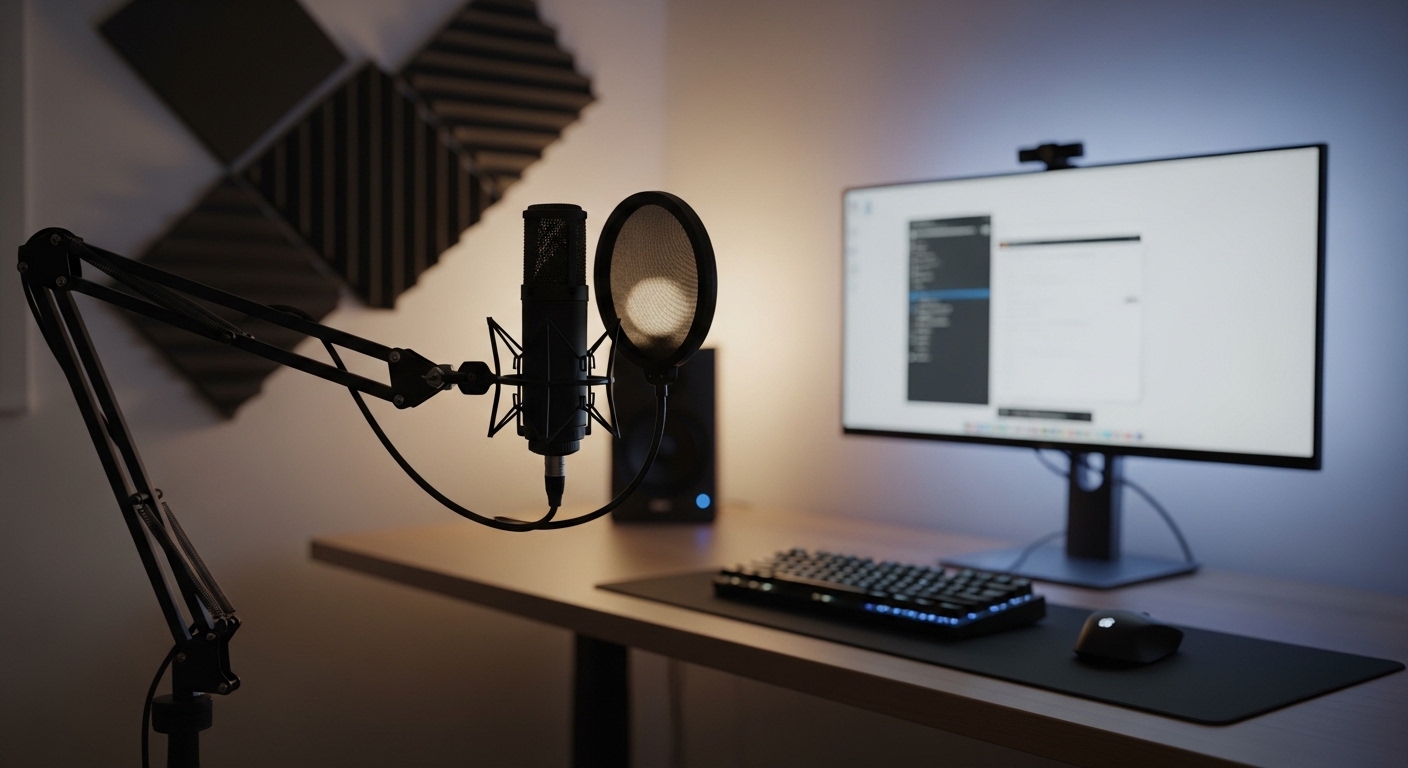
A boom arm allows you to position the microphone closer to your mouth without blocking your view. It also helps decouple the device from your desk surface.
When a microphone sits directly on a desk, it picks up every vibration from typing or mouse movements. Suspending the microphone in the air reduces structural noise effectively.
Understanding Polar Patterns
Microphones have different pickup patterns that determine where they listen for sound. For office work, the cardioid pattern is usually the most effective choice.
This pattern captures sound primarily from the front while rejecting noise from the sides and back. It creates a heart shaped area of sensitivity that focuses on your speech.
Omnidirectional microphones pick up sound from all directions equally. These are generally poor choices for noisy environments because they capture everything nearby.
Some microphones allow you to switch between these patterns using a physical dial. Ensure your device is set to cardioid to block unwanted sounds from behind the microphone.
Bidirectional and Supercardioid Options
Supercardioid patterns are even tighter than standard cardioid patterns. They offer superior side rejection but have a small area of sensitivity in the back.
If you use a supercardioid mic, ensure there are no noise sources directly behind it. Matching your microphone pattern to your room layout is a pro move.
Managing Digital Gain Staging
Gain is the sensitivity level of your microphone preamplifier. Setting your gain too high will introduce electrical hiss and pick up distant sounds.
Ideally, you want your voice to peak between minus twelve and minus six decibels on your meter. This provides enough volume without distorting the signal or capturing room noise.
Always adjust your hardware gain before touching the software volume sliders. Clean gain from a quality interface is always better than digital amplification.
Check your operating system settings to ensure the input level is not set to one hundred percent. Lowering this slightly can often clear up static or background humming noise.
The Role of the Preamp
A preamplifier boosts the weak signal from the microphone to a usable level. High quality preamps provide transparent gain without adding their own noise floor.
If you hear a constant white noise, your preamp might be struggling. Reducing the gain and speaking closer to the mic usually solves this issue.
Software Based Noise Suppression
Modern software can perform incredible tasks to clean up your audio in real time. Many video conferencing apps now include AI noise reduction features built in.
These algorithms are trained to recognize human speech and filter out everything else. They are particularly good at removing constant hums like fans or air conditioning.
However, aggressive software filtering can sometimes make your voice sound robotic or muffled. It is best to use a balanced setting rather than the highest possible level.
There are also third party applications that create a virtual microphone on your system. These apps process the audio before it reaches your meeting software.
How Noise Gates Work
A noise gate is a tool that mutes the microphone when you are not speaking. It only opens the audio channel when the volume exceeds a certain threshold.
This is perfect for eliminating the sound of a quiet room or distant traffic during pauses. You must set the threshold carefully so it does not cut off the start of your sentences.
Acoustic Treatment for the Home Office
You do not need a professional studio to improve your room acoustics. Simple items like acoustic foam panels can be placed on the walls to stop reflections.
Focus on the wall directly behind the microphone and the wall behind your head. These are the primary reflection points that cause the most audible echo.
If you do not want to stick foam to your walls, try using thick blankets or rugs. Hanging a decorative tapestry can provide both aesthetic value and sound absorption.
Even filling your room with more objects can help break up sound waves. Bookshelves filled with books are excellent natural diffusers for office spaces.
The Power of Bass Traps
Low frequency sounds tend to gather in the corners of a room. This can lead to a muddy audio quality that sounds muffled.
Placing thick foam blocks in the corners can help manage these low frequencies. This results in a clearer vocal tone for your listeners.
Reducing Mechanical and Desk Noise
The vibrations from your hands hitting the keyboard can travel through the desk and into the mic. A shock mount is the primary defense against this type of noise.
Shock mounts use elastic bands to suspend the microphone within a frame. This prevents physical vibrations from reaching the sensitive internal components.
You can also place a thick desk mat under your keyboard and mouse. The extra padding dampens the sound of every click and keystroke.
If your computer fans are loud, try moving the tower under the desk. Physical barriers like wooden desk panels can block a surprising amount of high frequency fan noise.
Dealing with Cable Interference
Audio cables can sometimes pick up electromagnetic interference from power cords. This results in a consistent buzzing or humming sound in your audio.
Keep your microphone cables away from power strips and monitor power bricks. Using shielded cables can also prevent this interference from ruining your recordings.
Using Pop Filters and Windscreens
Plosive sounds like P and B create sudden bursts of air that can overload a microphone. These sounds are often perceived as loud thuds or pops by the listener.
A pop filter acts as a physical shield to break up these air blasts. It is an inexpensive solution for professional sounding speech.
Windscreens are foam covers that slide directly over the microphone head. They are excellent for reducing subtle air movements from fans or open windows.
While they don’t block loud background noise, they improve the overall clarity of your voice. Using both can ensure consistent audio quality in a 2026 professional office environment.
The Benefit of a Dedicated Interface
Integrated sound cards inside computers are often prone to electronic noise. A dedicated USB audio interface provides a cleaner signal path for your microphone.
These devices move the sensitive audio processing away from the noisy interior of your PC. This is often the most significant hardware upgrade you can make.
Optimizing Operating System Settings
Both Windows and macOS have internal settings that can affect your microphone performance. Ensure that automatic gain control is disabled if you want consistent levels.
Automatic gain often tries to boost the volume during silence, which brings up the background noise. Manual control gives you total authority over your sound profile.
Check for driver updates for your microphone or audio interface regularly. Manufacturers often release updates that improve noise handling and stability.
In Windows, you can also look for the Listen to this device option. This allows you to hear exactly what the microphone captures so you can adjust accordingly.
Advanced Settings in Video Apps
Platforms like Zoom and Microsoft Teams have their own audio processing layers. Go into the advanced audio menu to find specialized noise suppression toggles.
Setting these to Auto usually works well for most users. However, if you have a high quality setup, setting them to Low might preserve more of your natural voice.
Managing Environmental Factors
Sometimes the best way to reduce noise is to stop it at the source. Close your office door and windows before starting an important call.
Ask family members or roommates to avoid loud activities during your meeting times. A simple sign on the door can prevent many accidental interruptions.
Turn off any non essential electronics that might be humming in the background. Even a small desk fan can create significant noise that software struggles to remove.
If you use a laptop, ensure it is on a hard surface so the fans can breathe. Overheating laptops often spin fans faster, creating more background noise.
Communication is Key
Tell your audience if you are in a noisy environment at the start. Most people are understanding of occasional disruptions if they are acknowledged.
However, following these steps will minimize the need for apologies. Consistency builds trust and professionalism in every digital interaction.
Frequently Asked Questions
Can I use a headset microphone to reduce noise?
Yes, headset microphones are naturally close to your mouth. This proximity helps isolate your voice from the surrounding environment effectively.
Does a more expensive microphone always mean less noise?
Not necessarily, as high end microphones are often more sensitive. A properly set up budget microphone can outperform an expensive one in a noisy room.
Is AI noise cancellation better than physical treatment?
Physical treatment is always better because it prevents the noise from being recorded. AI is a powerful backup but it can sometimes distort the natural tone of your voice.
Should I use a condenser or dynamic microphone for a noisy office?
Dynamic microphones are generally better for noisy rooms. They are less sensitive to distant sounds compared to condenser microphones.
Conclusion
Mastering how to reduce background noise on office microphone involves a combination of hardware, software, and environmental awareness. Start by optimizing your physical space and your distance from the microphone.
Layer in software solutions and hardware tools like boom arms and shock mounts to refine the signal further. By taking these steps, you will project a much more professional image during every call.
Clear audio is not just a luxury but a necessity for effective remote collaboration. Spend time testing your setup today to ensure your voice is heard without any distractions.
The goal is always to make the technology invisible so the conversation can thrive. With these tips, you are well on your way to achieving studio quality audio in your home office.