

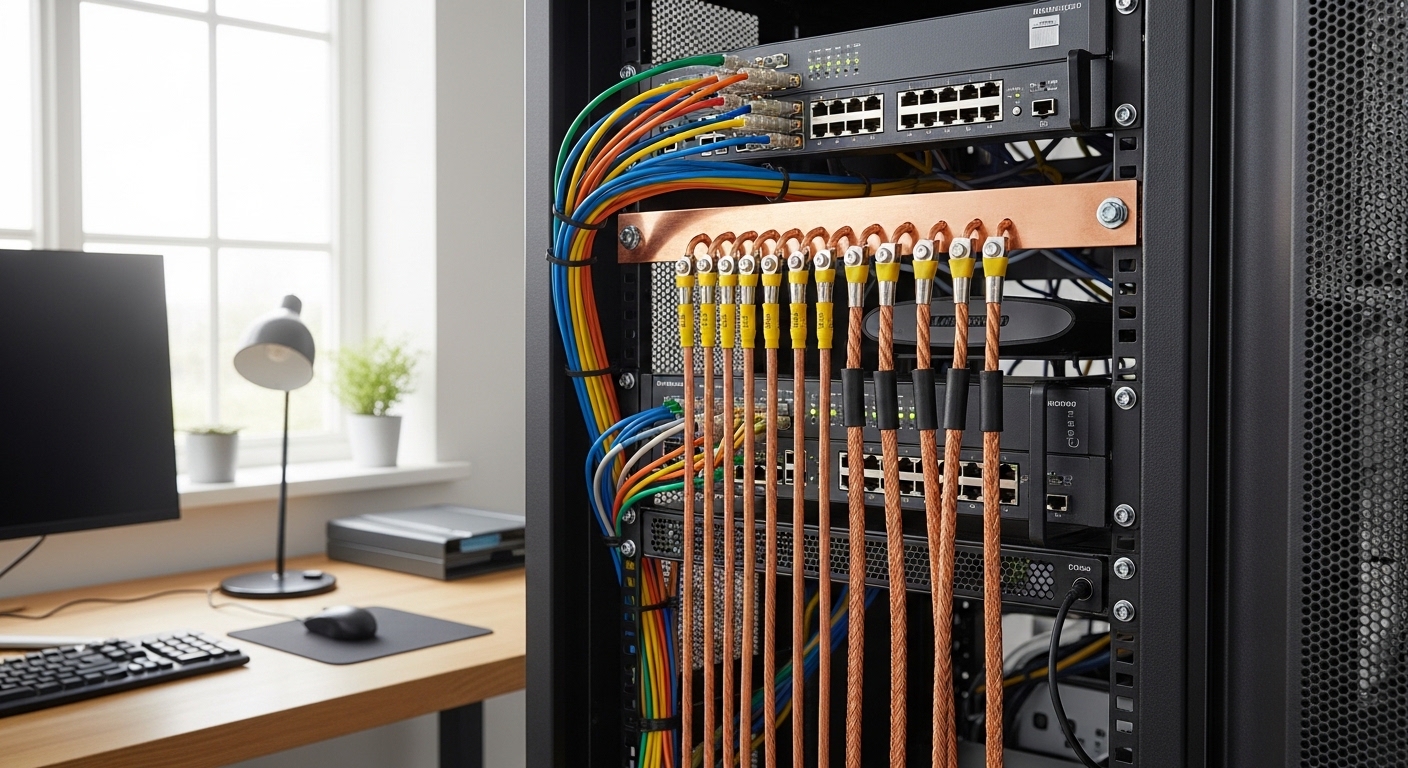
The Importance of Electrical Safety in the Home Lab
Building a sophisticated server environment at home is a rewarding challenge for any technology enthusiast. You spend significant time selecting the perfect components and configuring complex software architectures for your home lab projects.
However, one critical aspect often gets overlooked during the initial setup phase. Knowing how to properly ground a home lab rack is essential for protecting your hardware and your safety.
Electrical surges or static buildup can cause permanent damage to sensitive server components. Without a dedicated path to the earth, these discharges might travel through your expensive processors or storage drives.
Proper grounding provides a safe route for excess electricity to follow. This prevents the metal frame of your rack from becoming energized during faults.
Understanding the Basics of Grounding and Bonding
Before diving into the physical installation, it is vital to understand the terminology involved. Many people confuse grounding with bonding, yet they serve distinct safety purposes.
Bonding refers to the process of connecting all metal components of your rack together. This ensures that every piece of metal in the structure stays at the same electrical potential.
If a wire touches the frame, bonding allows the electricity to flow to the ground wire. This surge of current will then trip the breaker.
Grounding is the final step where you connect that bonded system to the earth. This is usually done through the electrical system of your local residence.
Why Static Electricity is a Threat
Electrostatic discharge is a silent killer for modern computing equipment. Even a small spark that you cannot feel can destroy integrated circuits.
A properly grounded rack helps to bleed off this static charge continuously. This creates a safer environment for handling internal server components.
Essential Tools for Rack Grounding Projects
To begin this process, you will need several specific materials designed for electrical work. Using the correct gauge wire is the first step toward a safe installation.
Most experts recommend using a copper wire with a size of six AWG for the main connection. This thick wire provides low electrical resistance.
You will also need a copper grounding busbar that attaches directly to your rack. This serves as the central connection point.
Do not forget to acquire star washers and specialized grounding lugs. These components ensure a solid metal connection.
The Role of the Grounding Busbar
The busbar acts as a distribution hub for all your grounding wires. It allows you to organize multiple connections without creating clutter.
Each server or switch can have its own dedicated wire leading to this bar. This creates a clean and professional looking setup.
Preparing the Rack Surface for Connection
Most server racks come with a durable powder coating or paint finish. While this looks great, paint is an effective electrical insulator.
To create a proper electrical bond, you must remove the paint at connection points. You can use a small piece of sandpaper to expose the bare metal.
Applying an antioxidant joint compound to the exposed metal is a wise choice. This prevents rust and maintains conductivity over time.
Once the metal is clear, you can attach your grounding lugs or busbars. Always use star washers between the bolt and the rack frame.
Using Star Washers Effectively
Star washers have small teeth that bite into the metal surfaces. This creates a superior electrical bond compared to flat washers.
They are essential for penetrating any remaining residue or thin layers of oxidation. Using them ensures maximum safety and performance.
Installing the Main Grounding Busbar
Position the grounding busbar in a location that is easy to access. Many technicians prefer mounting it at the bottom or the top of the rack.
Ensure the busbar is bolted tightly to the rack frame using the methods mentioned earlier. This bar now represents the single point of ground for your entire system.
Once the bar is secure, you can begin running wires from your equipment. Each chassis usually has a designated grounding stud.
Use smaller green insulated wires to connect each server chassis to the busbar. This ensures every device shares the same reference point.
Managing Cable Runs for Grounding
Keep your grounding wires as short as possible to minimize resistance. Long loops of wire can act as antennas for electromagnetic interference.
Route these wires along the side rails of the rack using velcro ties. This keeps the installation tidy and prevents accidental snags.
Connecting Individual Servers and Switches
Most high quality rack mount equipment includes a specific screw for grounding purposes. You should find a small symbol that looks like an inverted arrow or tree.
Attach a copper lug to your wire and secure it to this point. The other end of the wire goes directly to your main grounding bar.
Even if your devices are powered by three prong cables, this additional bond is helpful. It provides a redundant safety path for the chassis.
Switches and patch panels also benefit from this level of attention. Proper grounding can actually reduce packet errors in high speed networks.
The Impact on Signal Integrity
In a home lab, you might be running ten gigabit networking or faster. High frequency signals are very sensitive to electrical noise and interference.
A solid grounding system helps to drain away this interference before it hits the wires. This results in more stable data transfers.
Connecting the Rack to the House Ground
The most important step is connecting your rack busbar to the building ground. This usually involves running a thick six gauge copper wire to your electrical panel.
You should never attempt to connect wires inside your main breaker box yourself. This task requires the expertise of a licensed electrical professional.
The electrician will ensure that the connection meets all local building codes. This is critical for insurance and safety reasons.
They will typically bond your rack wire to the existing grounding electrode system. This might be a buried copper rod or a cold water pipe.
Verifying the Connection with a Multimeter
Once the installation is complete, you can use a multimeter to verify your work. Set the device to measure continuity or low resistance.
Check the resistance between the rack frame and a known ground point. The reading should be extremely close to zero.
Avoiding Common Grounding Mistakes
One frequent error is creating what technicians call a ground loop. This happens when there are multiple paths to the ground with different resistance levels.
Ground loops can cause a hum in audio equipment or strange errors in servers. Always use a single point grounding strategy to avoid this.
Another mistake is daisy chaining grounding connections from one server to another. Each device should have a direct line to the main busbar.
Finally, never use the mounting rails as your only electrical path. The screws and paint can create high resistance points.
The Danger of Using Extension Cords
Some users try to ground their rack through a standard power strip or extension cord. These wires are usually too thin to handle large fault currents.
A dedicated grounding wire is the only way to ensure total protection for equipment. Always prioritize physical wire connections over power cord grounds.
Maintaining Your Grounding System
Electrical connections can loosen over time due to vibrations from server fans. It is a good idea to inspect your grounding points annually.
Check for any signs of oxidation or corrosion on the copper surfaces. Tighten any bolts that feel loose or unstable.
In the year 2026, many modern racks will come with integrated grounding features. However, checking the physical connections will always remain necessary.
Keeping a log of your maintenance helps you track the health of your lab. A safe lab is a productive and reliable lab.
Planning for Future Expansion
As your home lab grows, you might add more racks or larger enclosures. Ensure your grounding busbar has enough open ports for new arrivals.
If you add a second rack, bond it to the first rack with a heavy wire. This maintains a consistent electrical potential across your entire infrastructure.
Grounding and Uninterruptible Power Supplies
Many home labs rely on a UPS to keep servers running during power outages. These devices also play a role in how to properly ground a home lab rack.
A UPS often provides surge protection that relies on a solid ground connection. If the ground is weak, the protection will not work.
Most rack mounted UPS units have a grounding screw on the back panel. You must connect this screw to your central grounding busbar.
This ensures that the internal surge circuitry has a place to send excess energy. It protects your sensitive battery backup system from damage.
Electrical Standards and Compliance
Always refer to the National Electrical Code or your local equivalent for guidance. These rules exist to prevent fires and electrical shocks.
Following professional standards ensures that your home lab remains a safe hobby. It also increases the resale value of hardware.
Frequently Asked Questions about Rack Grounding
Can I use a water pipe as a ground for my server rack? You should only use a water pipe if it is properly bonded and approved by a professional electrician.
Is grounding necessary if I only have one small server? Yes, even a single device can benefit from protection against static discharge and electrical faults.
What color wire should I use for grounding? In many regions, green or bare copper is the standard for grounding wires.
Do I need to ground a wooden or plastic rack? You only need to ground conductive metal surfaces that could carry an electrical charge.
How often should I test my ground connection? Testing once per year with a multimeter is sufficient for most users.
Final Thoughts on Proper Rack Grounding
Taking the time to understand how to properly ground a home lab rack is a hallmark of a professional setup. It shows that you value the longevity of your equipment and the safety of your home.
While it requires extra materials and effort, the peace of mind is worth the cost. You can rest easy knowing your data is safe from electrical surges.
Always remember to consult with a professional when dealing with your home electrical panel. Safety should always be your highest priority in technology.
Thank you for visiting The Home Office Lab to learn about these vital technical procedures. Your journey toward a perfectly optimized home lab continues here.