

Understanding the Importance of Keyboard Hygiene
Maintaining a pristine workspace is essential for any dedicated professional or enthusiast. Your peripheral devices act as the primary interface between your hands and your digital world.
Over time, these tools accumulate dust, skin oils, and various debris that can hinder performance. Knowing how to clean your mechanical keyboard safely ensures that your hardware remains functional for many years.
Mechanical switches are precision engineered components that rely on clean contact points. When dirt enters the housing, it can lead to key chatter or missed strokes.
A consistent cleaning schedule also prevents the growth of bacteria and microbes. Many users spend hours every day touching their keys without considering the accumulated germs present on the surface.
Regular maintenance preserves the resale value of your premium hardware. Collectors and enthusiasts highly value boards that have been kept in excellent condition through proper care.
Beyond functionality, a clean keyboard simply feels better to use. The tactile feedback remains crisp and the legends on your keycaps stay visible and vibrant over time.
Gathering the Essential Cleaning Tools
You cannot perform a thorough job without the correct equipment on your desk. Using the wrong tools can result in scratched plastic or damaged electronic components.
The most important tool in your kit is a wire keycap puller. Unlike plastic ring pullers, wire versions do not scratch the sides of your expensive keycaps.
You will also need a high quality can of compressed air to blow out loose particles. This is the fastest way to remove hair and crumbs from the plate beneath the switches.
Microfiber cloths are indispensable for wiping down the case and the key surfaces. These cloths trap dust effectively without leaving behind fine lint particles that could clog switches.
For deeper cleaning, you should acquire a bottle of high purity isopropyl alcohol. Look for a concentration of ninety percent or higher to ensure it evaporates quickly and safely.
A soft bristle brush or a dedicated keyboard cleaning brush is useful for agitation. This helps dislodge stubborn grime from the corners of the keyboard frame or plate.
Finally, gather some cotton swabs for detailed work in tight spaces. These are perfect for applying alcohol to specific areas without soaking the entire board in liquid.
Preparing Your Workspace for Maintenance
Before you begin the process, you must clear a large area on your desk. Having enough room to organize your keycaps will make the reassembly process much easier.
Always ensure that your keyboard is completely unplugged from your computer. Working on a powered device increases the risk of electrical shorts or unexpected input errors.
- Clear a flat surface and lay down a soft towel to prevent scratches.
- Ensure your room is well ventilated when using cleaning chemicals or alcohol.
- Gather small bowls to hold your keycaps during the soaking phase.
- Keep a digital camera or smartphone nearby to document the layout.
Taking a photograph of your keyboard layout is a vital preliminary step. Even if you are a touch typist, remembering the exact placement of secondary keys can be difficult.
This photograph will serve as your primary reference when you return the caps to the switches. It eliminates the frustration of guessing the positions of functional or media keys.
Step by Step Keycap Removal
Removing keycaps is a delicate process that requires patience and a steady hand. You should never force a keycap off if it feels unusually stuck to the stem.
Gently slide the wires of your puller under the corners of the keycap. Pull straight upward with a consistent and even pressure to avoid tilting the switch stem.
Larger keys like the spacebar or shift keys often use stabilizers for balance. These require extra care as they are connected to small plastic inserts or metal wires.
If your keyboard uses Costar style stabilizers, you may need to wiggle the key slightly. Be careful not to snap the small plastic clips that hold the stabilizer wire in place.
Place each removed keycap into a container to keep them organized. This prevents them from rolling off the desk and getting lost or damaged during the process.
Once all the caps are removed, you will likely see a significant amount of debris. This is the perfect time to evaluate the condition of the plate and the switches.
Deep Cleaning Your Keycaps
Keycaps are the parts of the keyboard that face the most direct contact with your skin. They collect oils and sweat which can lead to a greasy texture over time.
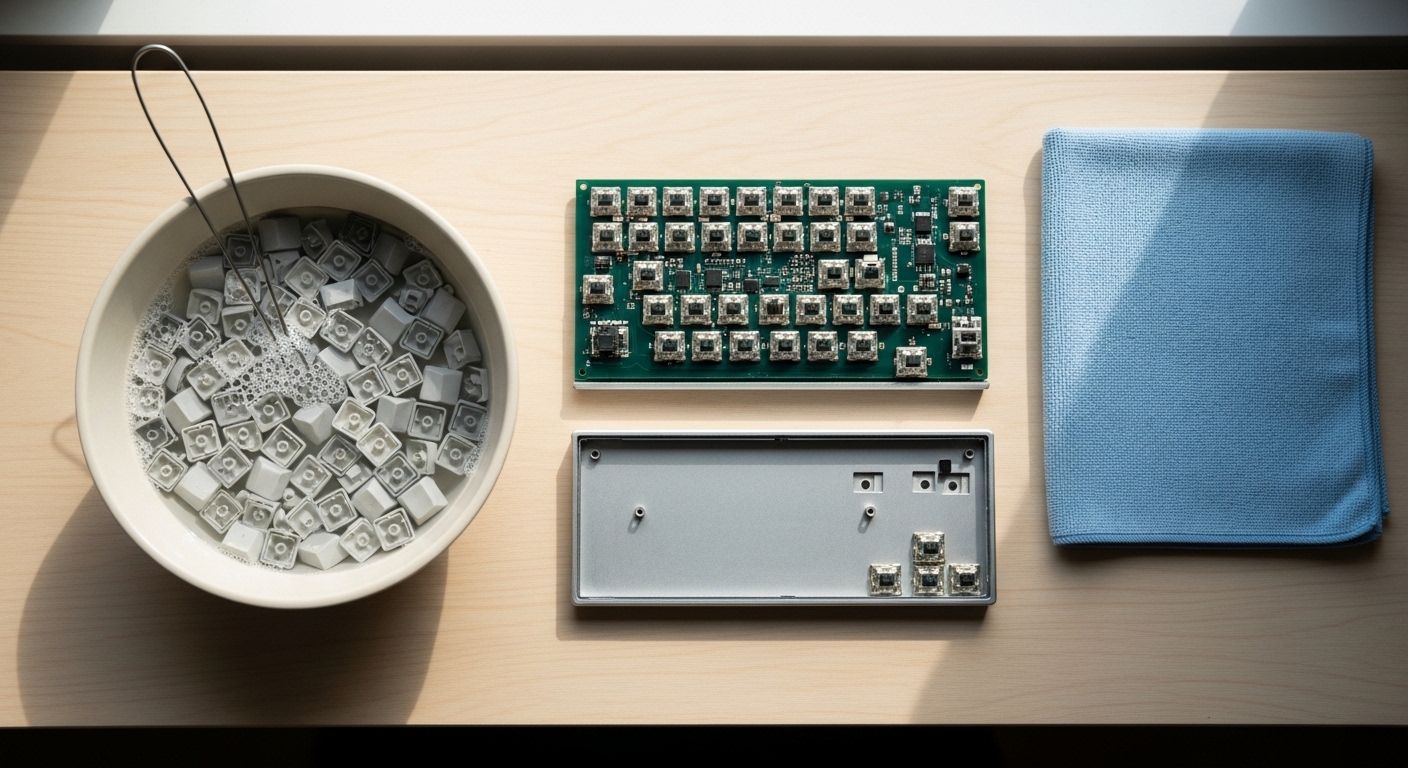
Fill a bowl with warm water and add a few drops of mild dish soap. Avoid using harsh chemicals that could damage the plastic integrity or the legends on the caps.
Submerge the keycaps in the soapy water and let them soak for at least thirty minutes. This duration allows the soap to break down the stubborn oils and grime effectively.
For particularly dirty caps, you can use a soft toothbrush to scrub the surfaces. Pay close attention to the sides and undersides where dust often clings to the plastic.
Rinse the keycaps thoroughly under cool running water to remove all soap residue. Any leftover soap can create a sticky film that attracts more dust later on.
Drying is the most critical part of the keycap cleaning process. You must ensure that no moisture remains inside the stem housing before reattaching them.
Lay the keycaps out on a dry towel with the stems facing upward. Allow them to air dry for at least twenty four hours to ensure complete evaporation.
Maintaining the Plate and the Case
While the keycaps are drying, you can focus your attention on the keyboard base. This area acts as a collection point for all types of debris that fall between keys.
Hold the keyboard upside down and give it a few gentle taps. This will release the loose crumbs and larger particles that are not stuck to the plate.
- Use a can of compressed air to blow out the remaining dust from the plate.
- Work in short bursts to prevent moisture from forming on the components.
- Use a soft brush to sweep away any lingering particles around the switches.
- Dampen a microfiber cloth with a small amount of water for the case exterior.
If the plate has stubborn stains, use a cotton swab dipped in isopropyl alcohol. Rub the area gently until the stain is removed and the surface looks clean.
Be extremely careful not to let any liquid drip into the switch housings. Moisture inside a switch can cause corrosion or permanent failure of the internal leaf springs.
Maintaining your setup in 2026 requires a bit of diligence and the right approach. Clean components ensure that your desk remains an inspiring environment for productive work.
Detailed Switch Maintenance
Cleaning switches is more complex than cleaning keycaps because they are intricate mechanical parts. For most users, a surface level cleaning is sufficient to maintain performance.
If a switch feels scratchy, you can use a small brush to clean the top housing. Removing dust from the area surrounding the stem often restores the smooth movement.
Avoid spraying any lubricants or cleaners directly into the switch without proper knowledge. Incorrect lubrication can ruin the tactile feel and lead to a messy buildup over time.
If you have a hot swappable keyboard, you can remove individual switches for better access. This allows you to clean the socket contacts on the printed circuit board easily.
For soldered keyboards, you should never attempt to open a switch while it is attached. This could damage the internal components and require a difficult repair process.
Sticky switches are often the result of dried liquids from accidental spills. Dealing with these requires a specific approach to avoid damaging the electronics permanently.
Managing Accidental Spills Safely
A spill is a major emergency for any mechanical keyboard owner. Your immediate reaction can determine whether the hardware survives the incident or fails entirely.
The very first step is to unplug the keyboard as fast as possible. Cutting the power prevents short circuits that can fry the internal controller chip immediately.
Turn the keyboard upside down to let the liquid drain out away from the switches. Do not shake the board, as this can spread the liquid further into the internal layers.
Remove all the keycaps in the affected area to see the extent of the spill. Use a paper towel to blot up as much moisture as you can reach.
If the liquid was sugary or sticky, you will need to use isopropyl alcohol for cleaning. The alcohol will help dissolve the sugar residue and accelerate the drying process.
You may need to use a straw or a small dropper to apply alcohol into the switch. Press the switch repeatedly to work the alcohol through the internal mechanism and dissolve the stickiness.
Allow the keyboard to dry for several days before attempting to plug it back in. Patience is the key to recovery when dealing with liquid ingress on electronic devices.
Reassembling Your Clean Keyboard
Once everything is completely dry, you can begin the rewarding process of reassembly. Refer to the photo you took earlier to ensure perfect placement of every key.
Start with the larger keys that require stabilizers to ensure they are seated correctly. Apply a tiny amount of non conductive grease to the stabilizer wires if they feel dry.
- Align the keycap stem with the switch cross and press down firmly.
- Listen for a satisfying click or feel the cap seat against the housing.
- Work in rows from the bottom to the top to keep things organized.
- Double check the orientation of functional keys like Escape or Delete.
Check the feel of each key after you have pressed it back into place. Every button should have its original tactile response without any sticking or sluggishness.
Once the assembly is complete, wipe the entire surface with a dry microfiber cloth. This removes any fingerprints or smudges created during the reattachment phase of the project.
Common Cleaning Mistakes to Avoid
Many people damage their keyboards by using cleaning methods that are too aggressive. One of the biggest mistakes is using a hair dryer on a high heat setting.
Excessive heat can warp the plastic of the keycaps or the keyboard case. Always use cool air or simply wait for the parts to air dry naturally over time.
Another error is using too much water when cleaning the keyboard frame. Liquid can easily seep into the screw holes and reach the sensitive electronics inside.
Avoid using paper towels to scrub the plate because they can leave behind small fibers. These fibers often get caught in the switch sliders and cause friction or jamming.
Do not use bleach or acetone based cleaners on any part of your keyboard. These chemicals can melt the ABS plastic used in many standard keycap sets.
Finally, never plug the keyboard back in while there is even a hint of moisture. Waiting an extra day is a small price to pay for protecting your investment from failure.
Frequently Asked Questions
How often should I perform a deep clean on my keyboard? For most users, a deep clean every six months is sufficient to keep it in peak condition.
Can I put my keycaps in the dishwasher for convenience? No, the high heat and harsh detergents used in dishwashers can deform or discolor the plastic caps.
What should I do if a key remains sticky after cleaning? You may need to replace that specific switch if it is hot swappable or use more isopropyl alcohol.
Is it safe to use a vacuum cleaner on my keyboard? It is generally better to use compressed air because vacuums can create static discharge that damages circuits.
Does cleaning my keyboard void the manufacturer warranty? Most companies allow for basic cleaning, but disassembling the case might void your specific warranty terms.
Can I use baby wipes to clean the surface of the keys? Baby wipes often contain oils or fragrances that can leave a slippery residue on the plastic.
Final Thoughts on Keyboard Maintenance
Learning how to clean your mechanical keyboard safely is a skill that pays dividends in comfort. A well maintained keyboard provides a superior typing experience every single day.
By following these professional steps, you protect both the functionality and the beauty of your gear. Consistency is the secret to keeping your home office lab looking professional and clean.
Take pride in the tools you use for your creative and professional endeavors. A clean keyboard is a reflection of a disciplined and organized approach to technology and work.