

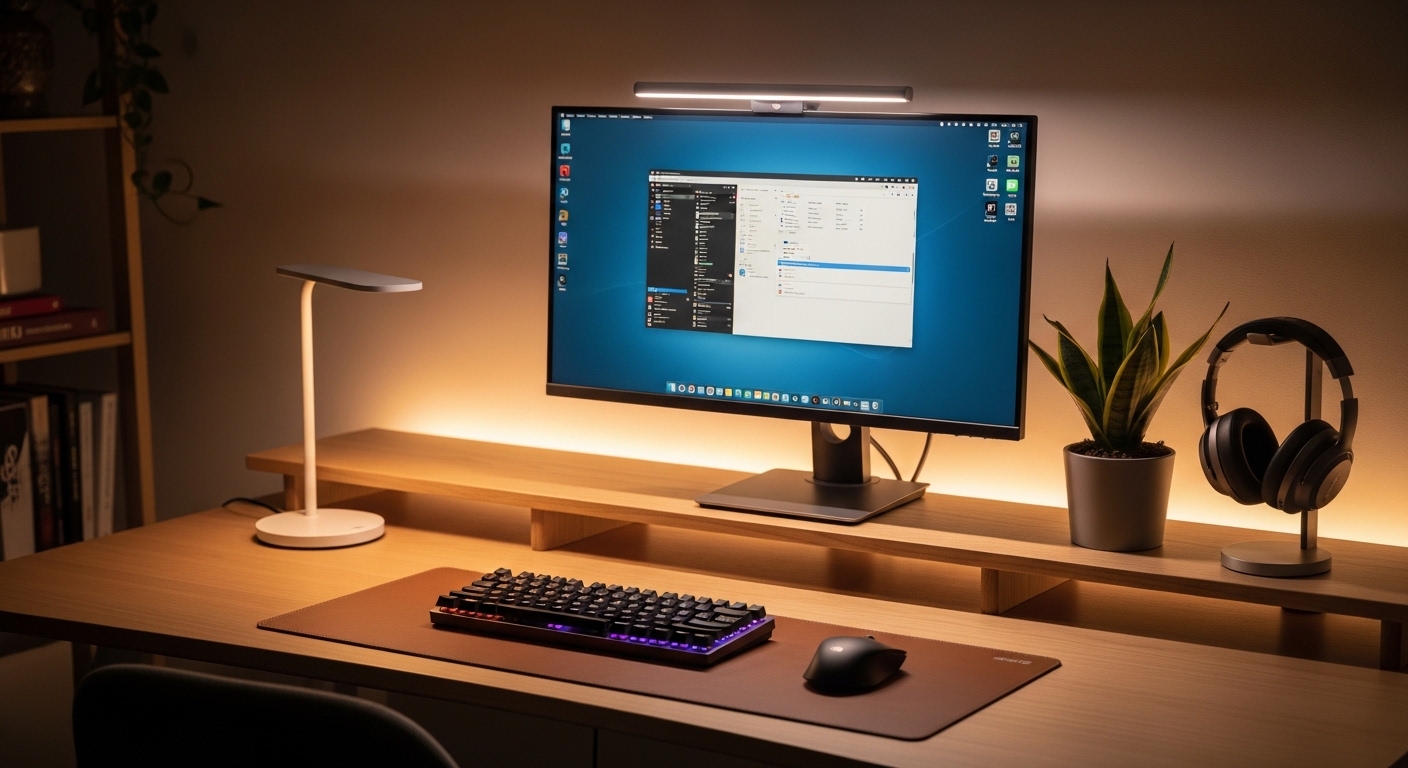
The Science of Visual Comfort in the Modern Workspace
Prolonged exposure to digital screens often leads to a condition known as computer vision syndrome, which manifests as dry eyes and recurring headaches. This physical fatigue occurs because the contrast between a bright monitor and a dark room forces your pupils to adjust constantly, leading to significant ocular strain over several hours.
Traditional desk lamps are frequently ineffective because they create harsh reflections on the glass surface of your screen. These reflections produce veiling glare, which obscures content and makes your eyes work much harder to process the information presented on the display.
A monitor light bar solves this fundamental problem by utilizing an asymmetric optical design that directs light downward onto the desk surface. This clever engineering ensures that no light shines directly onto the screen, effectively eliminating glare while providing optimal desk illumination for your paper documents and peripheral devices.
Understanding Blue Light and Flicker
Modern lighting solutions must also address the invisible threats of flickering and excessive blue light exposure. Low quality LED sources can pulse at frequencies that are imperceptible to the naked eye but cause neurological fatigue during long work sessions.
The best light bars feature advanced circuitry that provides flicker free performance and certifications for low blue light output. This helps to maintain your circadian rhythm, especially when working late into the evening in your home laboratory.
By balancing the ambient light in your room with the brightness of your display, these devices create a more natural viewing environment. This equilibrium is essential for maintaining focus and preventing the long term degradation of your visual health and productivity.
Quick Buying Guide
When selecting a light bar, the most critical feature to examine is the asymmetric optical design. You should ensure the product description explicitly mentions that the light path is directed at an angle to avoid reflecting off the screen glass.
Another vital factor is the Color Rendering Index, or CRI, which determines how accurately colors are represented under the light source. Seek out devices with a CRI of 95 or higher to ensure that your physical workspace looks vibrant and true to life.
Consider the control method that best fits your workflow, whether it involves physical buttons on the bar or a dedicated wireless controller. A wireless dial allows for seamless adjustments of brightness and color temperature without needing to reach over your screen, which improves ergonomic efficiency significantly.
Technical Specifications and Compatibility
Monitor thickness varies greatly across brands, so you must verify that the mounting clip is compatible with your specific display. Some premium light bars include specialized weighted clips that work perfectly on ultra thin screens or even curved monitor panels.
Power delivery is typically handled via a USB connection, but you should check the wattage requirements of the device. High performance light bars with integrated backlighting may require a more powerful USB 3.0 port or a dedicated wall adapter to function at full brightness.
Finally, look for smart features like automatic dimming sensors that adjust the light intensity based on the surrounding environment. This automation ensures that you always have the perfect light level without having to manually fiddle with settings throughout the day.
The 8 Best best monitor light bars for reducing eye strain
Explore our curated selection of the finest lighting solutions designed to enhance your visual comfort and elevate your professional desk setup.
1. BenQ ScreenBar Halo
The BenQ ScreenBar Halo represents the absolute pinnacle of lighting engineering with its robust aluminum alloy construction and sleek aesthetic. It features a unique weighted clip system that accommodates a vast range of monitor thicknesses, including those with complex curved geometries.
The industrial design is complemented by a premium wireless controller that uses industrial grade bearings for a satisfyingly smooth rotation. This high end device feels substantial and adds a touch of executive sophistication to any modern home office environment.
Technically, this unit excels by offering a built in backlighting feature that casts a soft glow on the wall behind your monitor. This reduces the high contrast ratio between the screen and the background, which is a major factor in mitigating eye fatigue.
The asymmetric optics are precisely calibrated to ensure that not a single ray of light hits the screen surface. Users can adjust the color temperature from a warm 2700K to a cool 6500K, allowing for perfect light customization depending on the time of day.
This product is ideal for professionals who demand the highest quality materials and the most advanced eye care technology available. While it sits at a premium price point, the unmatched build quality and wireless convenience justify the investment for serious users.
One minor drawback is that the wireless controller requires batteries, though they typically last for several months of daily use. Overall, it remains the definitive choice for those seeking the best lighting experience for their high resolution displays.

2. BenQ ScreenBar Plus
The BenQ ScreenBar Plus is a legendary choice among enthusiasts who prefer a tactile, wired control interface for their desk lighting. It utilizes the same high grade aluminum housing found in the flagship model, ensuring excellent heat dissipation and long term durability.
The desktop dial is connected via a sturdy cable, which eliminates any concerns regarding wireless interference or battery replacements. This controller features a physical toggle button for the automatic dimming function, which utilizes an integrated ambient light sensor.
Performance is where the ScreenBar Plus truly shines, offering a high CRI of 95 that makes colors pop on your desk. The asymmetric light beam is sharp and well defined, ensuring that no screen glare occurs even on glossy monitor panels.
The light output is exceptionally stable, with a flicker free driver that prevents the micro pulsations common in cheaper alternatives. This stability is crucial for users who spend more than eight hours a day staring at code or complex spreadsheets.
This specific model is best suited for users who want the reliability of a wired connection and a dedicated desktop control hub. It offers a professional grade solution for reducing eye strain without the added cost of the backlighting features found in the Halo.
The wired controller does add some cable clutter to your desk, which might bother minimalist purists. However, the tactile feedback and precision of the manual dial are often preferred by many tech experts and laboratory owners.
3. Quntis Computer Monitor Lamp Pro
The Quntis Computer Monitor Lamp Pro offers an incredible balance between affordability and high performance features for the savvy consumer. It features a durable plastic and weighted metal design that feels far more expensive than its actual retail price suggests.
The mounting mechanism is versatile, including various adjustment pads to ensure a secure fit on everything from thin laptops to thick professional monitors. Its matte black finish is discreet and professional, blending seamlessly with most modern computer hardware setups.
In terms of performance, this light bar provides a wide range of brightness levels and color temperatures to suit any preference. It utilizes an advanced optical lens that effectively shields the screen from direct light while illuminating the desk surface evenly.
The built in touch controls are responsive and easy to locate, even when working in total darkness. It also includes an automatic dimming mode that reacts quickly to changing light conditions in your room throughout the afternoon.
This product is the best choice for budget conscious professionals who refuse to compromise on visual health and eye safety. It provides all the essential ergonomic benefits of a premium light bar at a fraction of the traditional cost.
One potential downside is the lack of a remote controller, meaning you must reach up to the bar to make adjustments. For most users, this is a small trade off given the excellent light quality and reliable performance provided.

4. Baseus iWok Series Monitor Light Bar
The Baseus iWok Series is a compact and efficient lighting solution that targets students and remote workers who need a simple setup. It features a lightweight design with a unique gravity hinge that makes installation onto any monitor almost instantaneous.
The aesthetic is modern and streamlined, featuring a simple cylindrical shape that does not distract from your screen content. It is powered via a standard USB cable, making it compatible with any spare port on your laptop or monitor hub.
Despite its entry level positioning, the iWok Series manages to offer three distinct color temperature modes for different tasks. You can switch between warm light for relaxing, cool light for focused work, and natural light modes for general productivity.
The light source is designed to be gentle on the eyes, using a series of high quality LED beads that minimize blue light emission. This makes it a great tool for reducing ocular fatigue during late night study sessions or project deadlines.
This light bar is ideal for those who have limited desk space or move their workstation frequently between different locations. It offers solid basic performance for anyone looking to improve their ergonomic setup without a significant financial commitment.
While the brightness levels are not as high as premium models, they are perfectly adequate for standard desk tasks. It is a reliable entry point into the world of monitor light bars for the casual home office user.

5. Yeelight LED Monitor Light Bar Pro
The Yeelight LED Monitor Light Bar Pro is a dual purpose device that caters to both productivity enthusiasts and the gaming community. It boasts a high quality metal body and a magnetic mount system that allows you to rotate the light bar to the perfect angle.
What sets this product apart is the inclusion of customizable RGB backlighting that can synchronize with popular gaming platforms. This creates an immersive atmosphere while also providing the necessary eye care for long hours of intense digital interaction.
Technically, the Yeelight Pro provides excellent desk illumination with a high CRI and an effective asymmetric optical path. It integrates seamlessly with smart home ecosystems, allowing you to control the light via voice commands or mobile applications.
The wireless remote included with the Pro version is sleek and minimalist, offering control over both the main light and the ambient backlighting. This level of software integration is rare in the monitor light bar market and offers great flexibility.
This product is the definitive choice for gamers who also use their desk for professional work and want a versatile lighting solution. It bridges the gap between ergonomic utility and aesthetic flair, making it a standout in any home office lab.
Users should be aware that the smart features require a stable 2.4GHz Wi-Fi connection for full functionality. However, even as a standalone light bar, it offers exceptional performance and beautiful color reproduction for everyday use.

6. Xiaomi Mi Computer Monitor Light Bar
The Xiaomi Mi Computer Monitor Light Bar is widely celebrated for its minimalist design and incredible value for money. It features a premium metal chassis and a magnetic attraction system that makes the bar easy to detach and adjust.
The build quality is remarkably high, rivaling products that cost significantly more in the current market. Its clean lines and understated black finish make it a perfect match for any professional workstation or creative studio setup.
The performance is centered around a wireless remote dial that allows for precise adjustments to brightness and color temperature. The dial feels heavy and well built, providing a satisfying tactile experience every time you adjust your workspace lighting.
The light output is uniform and soft, utilizing an asymmetric design that prevents glare on the monitor screen effectively. This light bar is particularly good at eliminating shadows on your desk, which helps when reading physical documents or taking notes.
This device is best for users who appreciate minimalist industrial design and want a wireless control experience at a competitive price. It offers superb visual comfort and a premium feel that belies its affordable price tag.
The magnetic mount may not be as secure on extremely thick monitors compared to traditional clamp designs. However, for most modern flat screens, it provides a stable and elegant mounting solution that looks fantastic.

7. Melifo Curved Monitor Light Bar
The Melifo Curved Monitor Light Bar is specifically engineered to solve the lighting challenges associated with ultra wide and curved displays. Traditional straight light bars often struggle with curved screen edges, leading to unwanted reflections or uneven lighting coverage.
This model features a distinct arc shape that follows the curvature of your monitor, ensuring a perfectly uniform light distribution. The housing is made from high grade aluminum, providing a sturdy feel and ensuring that the bar stays perfectly balanced.
Performance is tailored for large workspaces, with a high power output that can illuminate even the largest corner desks. The asymmetric beam technology is refined here to ensure that the light follows the curve of the glass without causing hotspots.
It includes a built in touch sensitive panel for controlling settings, but also comes with a convenient wireless remote for easier access. The automatic dimming sensor is positioned effectively to capture ambient light levels across a wider area than standard models.
This product is the best option for owners of 1000R or 1500R curved monitors who have struggled to find a compatible light bar. It provides comprehensive eye protection by ensuring that the entire display area is properly balanced with ambient light.
Because of its specialized shape, it is less versatile for flat monitors and may look slightly out of place on them. For its intended curved audience, however, it is an essential tool for reducing eye strain during long working hours.
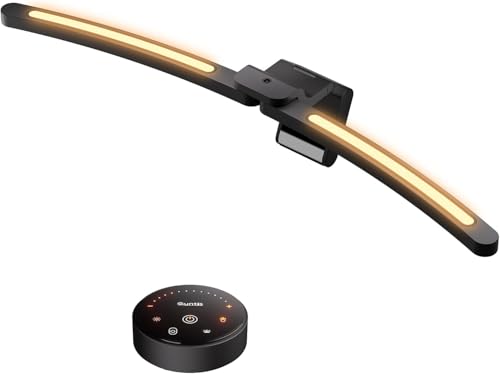
8. LYMAX Curved Monitor Light Bar
The LYMAX Curved Monitor Light Bar is another excellent specialized tool designed for the growing market of curved display enthusiasts. It features a rugged alloy construction and an adjustable clip that can fit almost any curved monitor brand on the market.
The aesthetic is bold and modern, featuring integrated RGB accents that can be turned off for a purely professional look. This bar is designed to be a centerpiece of your setup, providing both functional light and atmospheric depth to your workspace.
Performance wise, the LYMAX bar uses a high density LED array that provides flicker free illumination across the entire desk surface. The color temperature range is quite broad, allowing you to find the exact hue that keeps your eyes feeling fresh.
The wireless controller is a highlight, featuring a large surface area that is easy to navigate without looking away from your work. It also boasts impressive battery life, meaning you will rarely need to worry about maintenance or power issues.
This light bar is best for power users who have invested in a premium curved monitor and want a matching lighting solution. It effectively neutralizes the glare that curved glass often catches from standard overhead room lights.
The price is slightly higher than some generic alternatives, but the specialized design for curved screens makes it a worthy investment. It ensures that your ergonomic setup is complete and that your eyes are protected regardless of your screen type.

Comparison of Top Monitor Light Bars
The following table provides a quick overview of the essential features and best use cases for each light bar in our list.
| Product Name | Key Feature | Best For | Price Range |
|---|---|---|---|
| BenQ ScreenBar Halo | Wireless Dial & Backlight | Premium Professional Sets | High |
| BenQ ScreenBar Plus | Wired Desktop Dial | Reliability Seekers | High |
| Quntis Monitor Lamp Pro | Auto Dimming Sensor | Value Conscious Users | Budget |
| Baseus iWok Series | Gravity Pivot Mount | Students & Small Desks | Entry |
| Yeelight Light Bar Pro | RGB Gaming Sync | Gamers & Smart Homes | Mid Range |
| Xiaomi Mi Light Bar | Magnetic Rotation | Minimalist Enthusiasts | Mid Range |
| Melifo Curved Bar | Arc Shaped Design | Curved Monitor Owners | Mid Range |
| LYMAX Curved Bar | Wide Curve Coverage | Ultra Wide Monitors | Mid Range |
Final Verdict on Eye Strain Solutions
After a rigorous evaluation of design, optical performance, and user convenience, the BenQ ScreenBar Halo remains the undisputed champion for home office enthusiasts in 2026. Its combination of a wireless control dial, integrated backlighting, and superior asymmetric optics creates a viewing environment that is truly unparalleled for long term visual health.
While the initial cost is higher than other models, the investment pays off through its exceptional build quality and the tangible reduction in daily eye fatigue. If you are looking for the most effective way to optimize your workspace and protect your vision, the BenQ Halo is the ultimate lighting solution for any serious professional setup.
For those who are working with a more modest budget but still want to prioritize their ergonomic health, the Quntis Computer Monitor Lamp Pro is our secondary recommendation. It provides the essential asymmetric lighting required to eliminate glare without the premium price tag of the wireless models.
Both of these products excel at their specific price points, ensuring that every user can find a way to improve their productivity and comfort. Choosing any of the best monitor light bars for reducing eye strain from this list will immediately transform your computing experience for the better.