

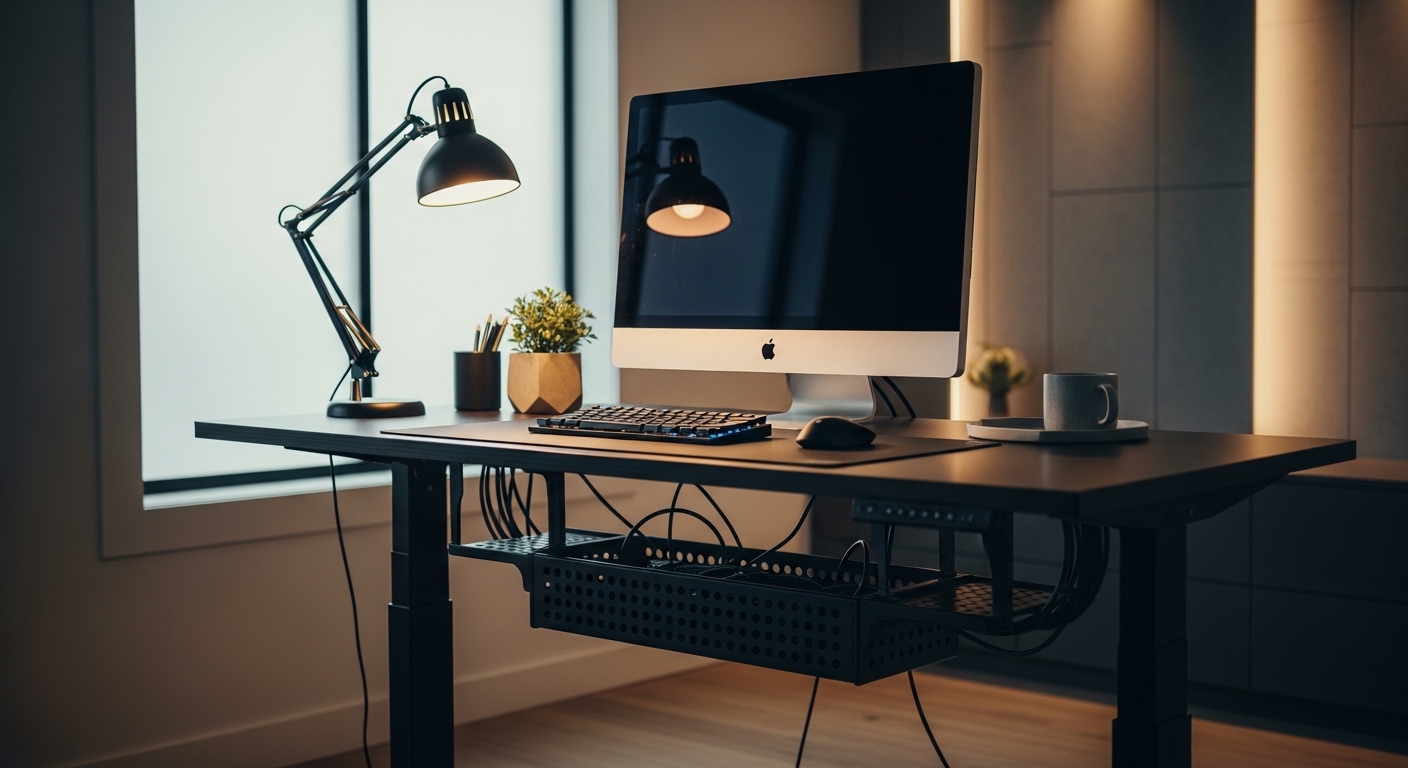
The Importance of Cable Management in a Modern Office
Welcome to The Home Office Lab, where we focus on creating the ultimate workspace for productivity and health. If you have recently upgraded to a height adjustable workstation, you likely realized that wires are your greatest enemy.
The transition from sitting to standing creates a dynamic environment that static desks simply do not face. You must learn how to organize cables under a standing desk to prevent damage and maintain a professional look.
A cluttered desk leads to a cluttered mind, which can significantly hinder your daily output. By investing time into a proper setup, you ensure that your electronics remain safe during every transition.
In this massive guide, we will explore every technical detail required to master your wire layout. We will cover everything from the initial audit of your hardware to the final aesthetic touches.
Proper organization is not just about looks, as it also protects your expensive equipment from tension and fraying. Let us begin this journey toward a cleaner workspace today for a better tomorrow.
Understanding the Unique Challenges of Standing Desks
Standard desks allow you to zip tie wires to a leg and forget about them forever. Standing desks require a much more flexible approach to wiring because the distance between the floor and the desktop changes constantly.
If your wires are too short, they will pull on your computer ports when the desk rises. This can lead to broken pins, damaged sockets, or even your expensive monitor falling over.
Conversely, if the wires are too long and unmanaged, they will bunch up on the floor when the desk is lowered. This creates a tripping hazard and attracts dust or pet hair into your connections.
The goal is to create a service loop of slack that allows the desk to move freely without tension. This requires a strategic calculation of cable length and anchor points along the desk frame.
As we look toward tech trends in 2026, the number of devices on our desks continues to increase. Managing this growing number of peripherals requires a systematic and disciplined method.
Step One: The Hardware Audit and Planning Phase
Before you touch a single wire, you must perform a comprehensive audit of every device you own. List every monitor, keyboard, mouse, and external drive that requires a connection to power or data.
Measure the length of each cable to ensure it can reach its destination while the desk is at its maximum height. It is always better to have a cable that is too long than one that is too short.
- Identify which cables move with the desk.
- Determine which cables stay connected to the wall.
- Group devices by their power requirements.
- Check for bulky power bricks that need special mounting.
Draw a basic map of your desk surface to visualize where the main exit point for your wires will be. Most people prefer a centralized cable spine that travels down a single leg of the desk.
Decide if you want your power strip mounted to the underside of the desk or sitting on the floor. Mounting the power strip under desk is usually the most effective way to reduce the number of wires traveling to the floor.
Essential Tools for Effective Cable Control
To achieve a professional result, you will need a variety of cable management tools. These items do not have to be expensive, but they must be durable enough to withstand constant vertical movement.
Cable trays are the backbone of any standing desk setup as they hide the mess of power bricks and extra wire length. These trays usually screw into the bottom of the wood or metal frame.
- Velcro wraps for adjustable bundling.
- Adhesive cable clips for precision routing.
- Expandable braided sleeves for a clean look.
- Under desk cable trays for bulk storage.
- Cable snakes or vertebrae for floor transitions.
Avoid using plastic zip ties because they are permanent and can pinch delicate data lines if tightened too much. Velcro straps are superior because they allow you to add or remove wires as your setup evolves.
Adhesive clips are great for guiding thin wires, but they can sometimes lose their grip over time. Consider using clips that have a screw in option for a more permanent and secure hold.
Mounting the Power Strip for Maximum Efficiency
The most important rule for standing desks is to move the power source onto the desk itself. By mounting a heavy duty power strip to the underside, you ensure that only one main cord needs to reach the wall outlet.
This single cord is much easier to manage than ten individual wires hanging down. Use high strength mounting tape or screws to secure the power strip near the back edge of the desk.
Make sure the power strip has enough outlets for all your current gear plus a few extras for future upgrades. Surge protection is mandatory to keep your expensive computer hardware safe from electrical spikes.
Position the strip so that you can still reach the power switch in case of an emergency. If your desk has a metal support beam, you might be able to use magnetic mounts to hold the strip in place.
Once the strip is mounted, plug in your largest power bricks first to see how much space they consume. You may need to use short extension stubs for bricks that are too wide for standard outlet spacing.
Utilizing Cable Trays and J Channels
Cable trays act like a hidden shelf for your electrical clutter. They are usually installed at the very back of the desk to catch every wire coming from the monitors and peripherals.
J channels are another excellent option for routing wires horizontally across the length of the desk. These are long plastic strips shaped like the letter J that allow you to drop wires inside easily.
When installing these, leave a small gap between the tray and the desk surface to allow for easier access. This makes it much simpler to swap out a mouse or keyboard without taking the whole system apart.
If your desk is made of solid wood, you can easily screw these trays directly into the bottom. For desks with glass or metal tops, you will need to rely on heavy duty industrial adhesives.
The goal is to have no visible wires when looking at the desk from a standing position. Every wire should disappear into the tray or channel as soon as it leaves the device.
Managing Monitor Wires and Peripheral Lines
Monitors are usually the biggest source of cable mess because they require both power and video signals. If you use a monitor arm, run the cables inside the built in channels of the arm itself.
This keeps the wires tight against the support structure and prevents them from dangling behind the screen. Ensure there is enough slack at the hinges of the arm so the monitor can rotate freely.
For keyboards and mice, consider using a small hole or grommet in the desk surface. If your desk does not have a hole, route the wires forward toward the center before tucking them under the edge.
Group the monitor cables together using a braided sleeve to create a single, thick cord. This unified cable bundle looks much better than multiple thin wires running in different directions.
Use adhesive clips to pull the wires toward the center of the desk before they enter the main tray. This prevents them from peeking out the sides of your workstation.
Creating the Perfect Service Loop
The service loop is the section of cable that bridges the gap between the moving desk and the stationary floor. This is the most critical point of failure in any standing desk cable management system.
To create a loop, move the desk to its highest possible setting. Connect your main power cable to the wall and leave just enough slack so it is not pulling on the outlet.
Secure the cable to the desk leg at the highest point using a sturdy clip or wrap. Now, lower the desk to its lowest sitting position and observe how the cable behaves.
The wire should curve naturally without kinking or getting caught in the desk motor mechanism. You can use a weighted cable base on the floor to keep the loop from wandering under your feet.
A cable spine, often called a cable vertebrae, is a plastic housing that protects the loop. It provides a structured path for wires to follow as they expand and contract with the desk movement.
Cable Management for Minimalist Aesthetics
Some users prefer a completely invisible look where no wires are seen from any angle. This requires routing cables through legs if your desk frame is designed with hollow supports.
If your frame is solid metal, you can use magnetic cable rings to snap the wires to the inside of the leg. This keeps the profile extremely slim and prevents the wires from being seen from the front of the room.
Color coordination also plays a role in how clean your setup looks. Try to use black cable sleeves for dark frames and white or silver sleeves for lighter setups.
If you have a lot of extra wire length, do not just bunch it up into a ball. Coil the excess into neat circular loops and secure them with a single Velcro strap inside your tray.
The cleaner the underside of your desk looks, the easier it will be to clean and maintain over time. A minimalist cable approach also improves airflow and keeps your electronics running cooler.
Safety Considerations and Potential Hazards
Managing wires is not just about beauty, as it is also about preventing electrical fires and mechanical failures. Never daisy chain power strips together as this can overload your home circuits.
Ensure that no cables are resting against moving parts of the desk motor or the lifting columns. If a wire gets caught in the gears, it could be sliced open or cause the desk to tilt and collapse.
- Keep liquids away from the power tray.
- Do not overstuff cable channels.
- Check for warm cables that may indicate an overload.
- Ensure ground wires are properly connected.
- Avoid sharp bends in fiber optic cables.
If you use a heater or a high powered fan, plug it directly into a wall outlet rather than the desk strip. These devices draw massive amounts of current that can trip your surge protector or melt thin wires.
Regularly inspect your cables for signs of wear or damage caused by the desk movement. Replace any frayed wires immediately to prevent shocks or short circuits in your expensive tech.
Labeling and Future Proofing Your Setup
Once everything is tucked away and beautiful, you might forget which wire goes to which device. Use a label maker or tape to mark both ends of every cable before you hide them.
This saves hours of frustration when you need to troubleshoot a flickering monitor or a dead peripheral. You can label by device name or use a color coding system for different types of connections.
Leave a little bit of extra room in your trays for future additions. You might add a webcam or a desktop microphone in the coming months, so plan for that expansion now.
If you use USB hubs, mount them in an accessible spot under the front edge of the desk. This allows you to plug in flash drives without crawling under the furniture every time.
The goal is to create a system that is both rigid enough to stay organized and flexible enough to adapt. A well planned office is one that can grow alongside your professional career and hobbies.
The Final Inspection and Fine Tuning
With all the components in place, it is time for the final stress test of your organization system. Run the desk all the way up and then all the way down multiple times.
Watch the wires closely to see if they snag on any screws, brackets, or the desk frame itself. Listen for any straining or clicking sounds that suggest a wire is being pulled too tight.
If you notice a problem, adjust the anchor points or add more slack to the service loop. It is better to fix these issues now than to have a cable snap during a busy workday.
Take a photo of the underside of your desk once you are finished. This acts as a reference for the future if you ever need to move the desk or replace a part.
Finally, sit at your desk and make sure no wires are touching your knees or feet. Perfect leg room is the ultimate reward for a job well done in cable management.
Frequently Asked Questions
Can I use zip ties for cable management?
While zip ties work, they are not recommended for standing desks because they lack flexibility and can be difficult to remove. Velcro is much better for most home office applications.
How much slack do I need for a standing desk?
You should measure the distance from the floor to the desk at its highest point and add about 6 to 10 inches of extra length. This ensures the cable remains relaxed even at full height.
Is it safe to mount a power strip under the desk?
Yes, as long as you use secure mounting hardware and do not exceed the power rating of the strip. Avoid heavy appliances like space heaters on these strips for maximum safety.
What is a cable spine?
A cable spine is a flexible, segmented tube that guides wires from the desk to the floor. It prevents tangled or messy loops and protects the cables from being stepped on.
Conclusion
Learning how to organize cables under a standing desk is a rite of passage for any serious remote worker. It transforms a chaotic mess into a streamlined productivity machine that looks as good as it functions.
By following the steps in this guide, you have secured your equipment and created an ergonomic environment. Remember that consistency is the key to maintaining a clean workspace over the long term.
Periodic checks and small adjustments will keep your setup looking fresh for years to come. Thank you for visiting The Home Office Lab, and we hope your newly organized desk brings you clarity and success.