

The Importance of Professional Illumination
First impressions in a virtual environment happen within the first few seconds of a meeting starting. If your face is obscured by shadows or washed out by glare, your professional presence suffers significantly.
Modern communication relies heavily on nonverbal cues and facial expressions that require clear visibility. Investing time in choosing video call lighting for your home office ensures your message remains the focus.
A well lit workspace does more than just make you look better on camera. It reduces eye strain and helps maintain energy levels throughout long work days.
Many remote professionals rely on overhead lights which create harsh shadows under the eyes and nose. This guide will explore how to upgrade your environment using professional lighting principles.
Understanding Color Temperature and Mood
Color temperature is measured in Kelvin and determines whether your light appears warm or cool. Standard indoor lighting typically sits around 3000K while daylight is closer to 5600K.
When you are selecting equipment, you should look for adjustable color temperature settings. This allows you to match your artificial light with the natural light coming through your windows.
The Impact of Kelvin Ranges
Lower Kelvin values produce a yellow or orange glow that feels cozy but sometimes looks unprofessional. Higher Kelvin values produce a blue or white light that mimics midday sun.
Most experts recommend a setting between 4000K and 5000K for video calls. This range provides a clean and neutral appearance that looks natural to most webcams.
- Warm light creates a relaxed and intimate atmosphere for casual chats
- Neutral light offers the most professional look for formal presentations
- Cool light provides high energy vibes often used in tech environments
The Significance of Color Rendering Index
The Color Rendering Index or CRI is a quantitative measure of a light source to reveal colors faithfully. On a scale of 0 to 100, a higher number indicates better color accuracy.
For video calls, you should aim for a CRI rating above 90 whenever possible. Low CRI lights can make your skin look gray, green, or unnaturally pale.
Professional grade lights prioritize high CRI to ensure that skin tones look vibrant and healthy. This is especially important if you are presenting products or visual materials during your calls.
High quality LEDs are designed to provide a full color spectrum that mimics the sun. Cheaper alternatives often skip certain wavelengths, which leads to a muddy or flat image quality.
Soft Light versus Hard Light
The size of the light source relative to the subject determines the softness of the shadows. A small light source creates hard edges and deep shadows which can be distracting.
A large or diffused light source creates soft shadows and a flattering glow across the face. This is why diffusion panels are critical for any home office setup.
How to Achieve Soft Diffusion
Many LED panels come with built in frosted covers to scatter the light rays. If your light is too harsh, you can use a dedicated softbox or even a simple piece of white silk.
Bouncing light off a white wall is another effective way to create a soft source. This indirect lighting method prevents hot spots on your forehead and cheeks.
- Diffusion layers help minimize the appearance of skin imperfections
- Soft lighting reduces the intensity of reflections on eyeglasses
- Large light sources create a more natural and inviting look
Comparing Popular Lighting Types
There are several types of hardware available for home offices, each with specific advantages. Understanding these differences is key to making a wise investment.
Ring lights have become the most popular choice for beginners due to their unique shape. They provide a circular catch light in the eyes which adds a sense of life to the subject.
The Rise of LED Panels
LED panels are often preferred by seasoned professionals because they offer more control. These rectangular lights can be positioned to create more dramatic or structured looks.
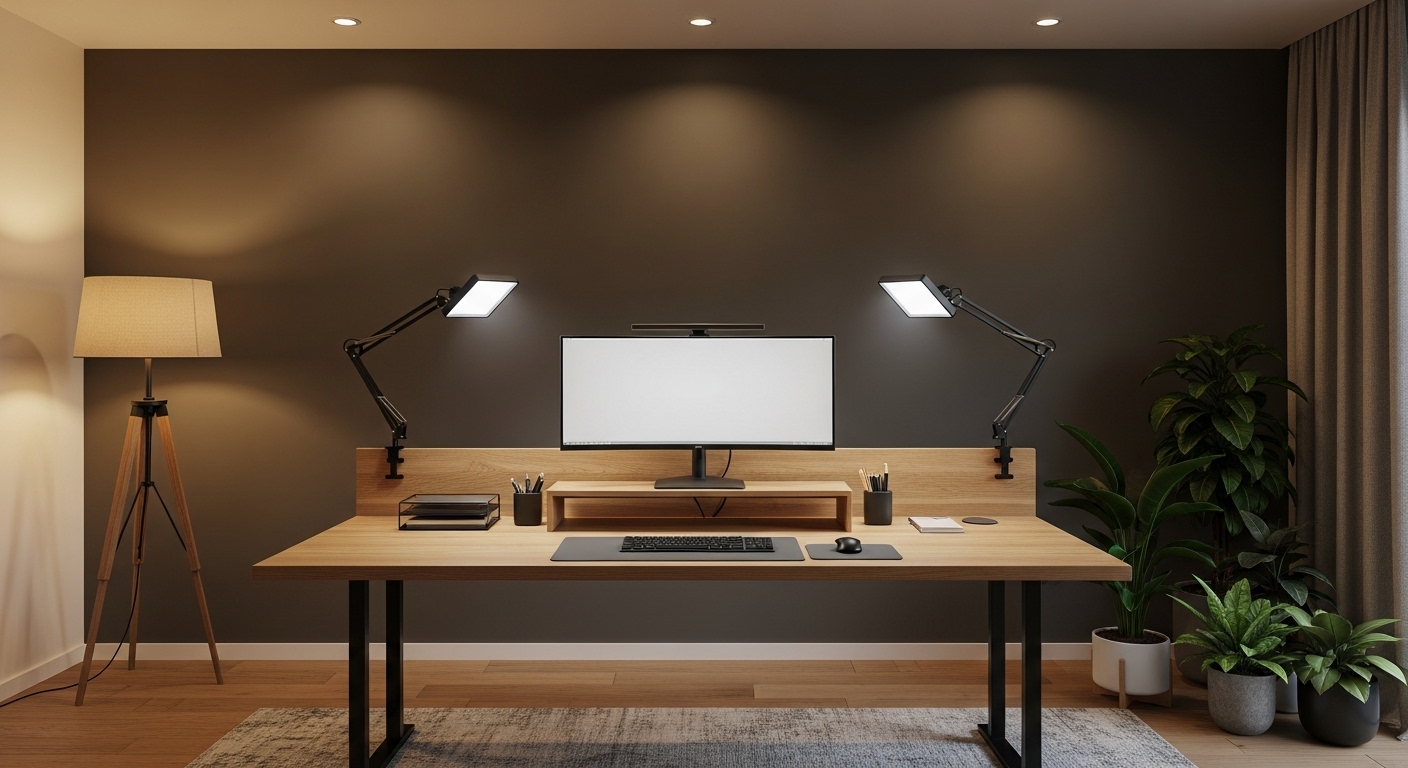
Panels are usually thinner and easier to mount on desk arms compared to bulky ring lights. They often feature advanced digital controls for precise brightness and temperature adjustments.
Key lights are the primary source of illumination and should be the most powerful. Fill lights are secondary and serve to soften the shadows created by the key light.
The Three Point Lighting Concept
Classic cinematography uses three lights to create a three dimensional look on a flat screen. While you may not need three lights, the principles remain highly relevant.
The key light should be placed at a forty five degree angle from your camera. This provides the main illumination for your face while creating a subtle shadow for depth.
The fill light sits on the opposite side and is typically set to half the brightness. This balances the facial features without making the image look flat.
Finally, a back light or hair light points at the back of your head from above. This separates you from the background and prevents you from looking like a floating head.
Simplifying for Small Spaces
If you have limited space, a single light placed slightly above the camera can work wonders. This overhead frontal placement mimics the natural position of the sun.
- Positioning lights slightly above eye level prevents glare in glasses
- Side lighting adds professional depth and texture to the frame
- Background lighting can help define the room and add character
Brightness and Lumens Requirements
Brightness is measured in Lumens and is a crucial factor when choosing your gear. You need enough power to overcome any competing light sources in your room.
If you work in a room with a large window, you need a high output light. Without sufficient brightness and intensity, the window light will turn you into a dark silhouette.
Dimmable lights are essential because your needs will change throughout the day. In the evening, you will likely need to lower the brightness levels to prevent overexposure.
Look for lights that offer a wide range of dimming, ideally from one percent to one hundred percent. This flexibility allows you to fine tune your appearance as the sun sets in 2026.
Mounting and Ergonomic Integration
How you mount your lights is just as important as the lights themselves. Floor stands can be bulky and create trip hazards in a small home office.
Desk mounts with articulating C clamps are often the best solution for permanent setups. They save valuable floor space and allow for quick height adjustments.
Choosing the Right Stand
Heavy duty arms provide stability and prevent your lights from wobbling during a call. If you use a standing desk, ensure your cables are long enough to reach the floor.
Suction mounts can be used for portable setups but are generally less reliable. A stable mounting solution ensures your frame remains consistent every time you log on.
- Ball heads allow for precise tilting and rotation of the light
- Telescoping poles provide height flexibility for different desk heights
- Cable management clips keep the workspace looking neat and professional
Controlling Reflections on Eyeglasses
Glasses wearers face a unique challenge when setting up their video call lighting. Large light sources often reflect directly in the lenses, which hides the eyes from view.
To fix this, you should raise your lights higher and tilt them downward. This angle of incidence ensures the reflection bounces toward your desk instead of the camera.
Using two lights at the sides rather than one in the center also helps. Moving the lights further apart reduces the chance of direct reflection into the camera lens.
Anti reflective coatings on your glasses can also mitigate the problem significantly. However, proper light placement remains the most effective tool for visual clarity.
Budget Considerations for Home Offices
Professional lighting can range from very affordable to quite expensive. You do not always need to spend a fortune to achieve a great result.
Entry level options often consist of small USB powered ring lights. These are convenient for travel but may lack the brightness needed for bright rooms.
Mid Range and High End Choices
Mid range options usually include larger LED panels with better color accuracy. These often come with dedicated remote controls or smartphone apps for easy adjustment.
High end lights offer the best build quality and most accurate color rendering. They are designed for continuous daily use and will last for many years without flickering.
- Basic setups are great for those starting their remote journey
- Mid range gear offers the best balance of price and performance
- Premium lights provide professional reliability and advanced features
Power Sources and Connectivity
You should consider how your lights will be powered before making a purchase. Some lights rely on internal batteries while others require a wall outlet.
Battery powered lights are great for portability but may die during long meetings. For a home office, a continuous AC power supply is always the preferred option.
USB powered lights are convenient but sometimes lack the power to reach high brightness. Using a dedicated power adapter ensures your light remains consistent and bright.
Advanced lights may also offer Wi-Fi or Bluetooth connectivity for remote control. This allows you to adjust your settings directly from your computer desktop during a meeting.
Aesthetics and Background Lighting
While lighting your face is the priority, the background should not be ignored. A dark or messy background can detract from your professional presence.
Using practical background lights like small lamps can add depth to your room. This creates a more inviting and visually interesting environment for your viewers.
Accent lights can be used to highlight bookshelves or plants behind you. This layering of light makes your home office look like a professional studio.
Be careful not to make the background brighter than your face. The goal is to create visual separation and interest without causing a distraction.
Maintaining Eye Health
Poor lighting can lead to digital eye strain and headaches over time. Harsh blue light or flickering LEDs can be particularly damaging to your comfort.
Choosing lights with flicker free technology is essential for long term health. High quality drivers ensure the light remains steady even at low brightness levels.
Positioning your lights correctly also reduces the need for your eyes to constantly adjust. A balanced light environment creates a more comfortable work day.
Regularly cleaning your light diffusers will ensure the output remains soft and even. Dust buildup can sometimes cause the light to become slightly warmer or dimmer over time.
Conclusion
Selecting the right equipment is a transformative step for any remote professional. By focusing on choosing video call lighting for your home office, you elevate every digital interaction.
Focus on color accuracy, diffusion, and placement to achieve the best results. A small investment in your visual presentation can lead to significant gains in professional credibility.
Start with the basics and gradually build a setup that fits your specific space. Your colleagues will certainly notice the difference in your video quality and presence.