

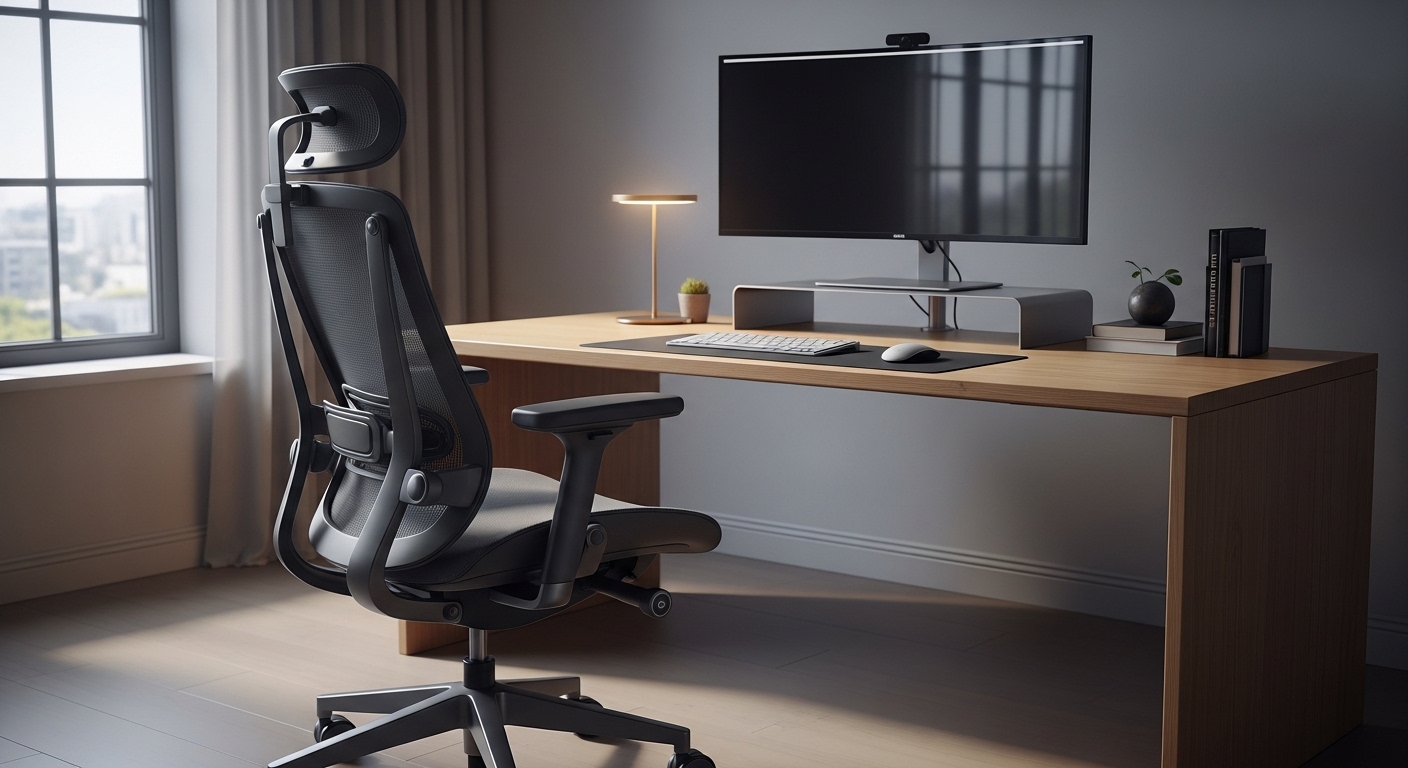
The Importance of Professional Seating
Creating a productive work environment starts with the foundation of your seating arrangement. Many professionals spend over eight hours every day sitting at their desks without considering the impact on their bodies.
Finding a solution that supports your anatomy is vital for maintaining focus and physical health. This guide focuses on choosing the best ergonomic chair for long hours to transform your workspace experience.
Investing in your health today prevents chronic pain in the future. A well designed chair acts as a silent partner in your career success.
Proper posture is not just about sitting straight for a few minutes. It involves constant support that adapts to every movement you make during the day.
The Science of Spinal Support
The human spine has a natural S curve that needs consistent reinforcement. Without proper lumbar support, the lower back flattens against the chair backrest.
This misalignment leads to strain on the intervertebral discs and surrounding muscles. You must look for adjustable lumbar support that moves both vertically and horizontally.
Everyone has a unique spinal curvature based on their height and weight. A chair that offers fixed support might actually cause more harm than good for some users.
When you sit, the weight of your upper body should be distributed evenly. This prevents pressure points that lead to fatigue after only a few hours of work.
Lumbar Depth and Height Mechanics
Depth adjustment allows you to control how much the support pushes against your lower back. This is crucial for users who prefer a more pronounced curve or a flatter feel.
Height adjustment ensures the support hits the exact small of your back. This specific area requires the most significant reinforcement to prevent slouching.
Most premium models offer a knob or a sliding mechanism to fine tune this setting. Testing these adjustments helps you find a neutral position for your spine.
A neutral position reduces the energy your muscles spend just staying upright. This saved energy translates into better mental performance and less physical exhaustion.
Understanding Seat Pan Depth and Width
The seat pan is the horizontal part of the chair where you actually sit. Its dimensions play a massive role in circulation and leg comfort during the day.
If a seat is too deep, it will press against the back of your knees. This pressure restricts blood flow and can cause swelling or numbness in the legs.
Conversely, a seat that is too shallow leaves your thighs unsupported. This creates a sensation of sliding out of the chair and increases pressure on your sit bones.
Ideally, you should have a gap of two or three fingers between the seat edge and your knees. This optimal spacing ensures your legs remain comfortable and energized.
The Waterfall Edge Design
Many high quality chairs feature a sloping front edge known as a waterfall design. This curve helps to reduce the pressure on the underside of your thighs.
By tapering the front, the chair encourages better blood flow to the lower extremities. This is a critical feature for anyone prone to circulation issues or leg cramps.
The width of the seat should also accommodate your frame with room to move. You should not feel restricted or squeezed by the armrest supports on the sides.
Ample width allows for slight changes in posture throughout the long working day. This freedom of movement is essential for joint health and comfort.
The Mechanics of Movement and Tilt
Static sitting is the enemy of ergonomic health in 2026. Your body is designed to move, even when you are focused on a computer screen.
Advanced tilt mechanisms allow the chair to follow your body as you lean back. This dynamic movement keeps your core engaged and your blood flowing.
Synchro tilt is one of the most advanced features available in modern office seating. In this system, the backrest and the seat move at different ratios when you recline.
Typically, the backrest moves two degrees for every one degree the seat moves. This keeps your feet flat on the floor while opening up your torso.
Tension Control and Locking Positions
A tilt tension knob allows you to adjust how much force is needed to recline. Heavier users require more resistance, while lighter individuals need a smoother and easier movement.
You should be able to recline without feeling like you are falling backward. Similarly, you should not have to fight the chair to lean back slightly.
Some people prefer to lock their chair in a specific angle for deep work. Most ergonomic models offer multiple locking positions to suit different tasks.
For example, a more upright position is better for typing and data entry. A slight recline is often preferred for reading or participating in video conferences.
Material Science: Mesh vs Upholstery
The material of your chair affects both comfort and temperature regulation. Mesh has become a standard for breathability in modern home offices.
High quality mesh allows air to circulate around your back and thighs. This prevents the buildup of heat and moisture during intense summer months.
However, not all mesh is created equal in terms of durability and support. Some cheap mesh can stretch over time, leading to a sagging seat that loses its shape.
Look for elastomeric materials that provide a firm yet flexible surface. These materials distribute weight effectively while retaining their original tension for years.
The Comfort of Fabric and Leather
Traditional upholstery offers a different kind of support that many people find more luxurious. Fabric chairs often feature multi layered foam cushions for maximum softness.
High density foam is better than soft foam because it supports you without bottoming out. It keeps its shape even after years of consistent daily use.
Leather and synthetic alternatives offer a premium aesthetic and are very easy to clean. They do not breathe as well as mesh but provide a classic executive look.
In a climate controlled room, the breathability issue becomes less of a primary concern. The choice between mesh and fabric often comes down to personal tactile preference.
Armrest Ergonomics and Adjustability
Armrests are often overlooked, but they are vital for shoulder and neck health. They should support the weight of your arms so your shoulders can stay relaxed.
If armrests are too high, they cause your shoulders to shrug. If they are too low, you will lean to one side, which distorts your spinal alignment.
The most versatile options are known as 4D armrests. These can move up and down, forward and back, side to side, and pivot inward or outward.
Pivoting armrests are particularly useful for those who type on narrow keyboards or use tablets. They bring the support closer to your body and reduce reach strain.
- Height adjustment ensures the elbows stay at a ninety degree angle.
- Width adjustment accommodates different shoulder breadths for a natural fit.
- Depth adjustment prevents the armrests from hitting the desk edge.
- Pivot options support the arms during different tasks like mobile browsing.
The Impact on Neck Strain
Proper arm support directly reduces the tension in your trapezius muscles. This tension is a leading cause of headaches and neck stiffness after long shifts.
When your arms are supported, your neck does not have to work as hard to stabilize your head. This creates a much more comfortable environment for deep focus.
Some users prefer no armrests to allow for more freedom of movement. However, for choosing the best ergonomic chair for long hours, armrests are highly recommended.
They provide a place to rest during breaks and help you maintain a centered position. Just ensure they are soft enough to avoid irritating your elbows.
Headrests and Cervical Support
A headrest is an optional but highly beneficial feature for many office workers. It provides support for the cervical spine when you lean back to rest.
While you should not use a headrest while typing, it is excellent for passive tasks. It helps to prevent the forward head posture often called tech neck.
The headrest must be adjustable in height to align with the curve of your neck. It should not push your head forward uncomfortably while you are sitting upright.
Some models offer a tilting headrest that follows the angle of your skull. This level of customization ensures comfort regardless of your seated position.
Base Quality and Caster Selection
The base is the literal foundation of your ergonomic experience. A five star base is the industry standard for stability and safety.
Materials like polished aluminum or reinforced nylon are preferred for their strength. They can support heavy loads without flexing or breaking under pressure.
Casters should be chosen based on the type of flooring in your home office. Hard casters are designed for carpeted floors to provide smooth movement.
Soft casters or rubberized wheels are better for hardwood, tile, or laminate. They provide better grip and prevent scratches on your expensive flooring surfaces.
- Check the weight capacity of the base before making a purchase.
- Ensure the casters rotate three hundred and sixty degrees freely.
- Look for a smooth gas lift for effortless height changes.
- Choose a base diameter that provides stability without taking too much space.
The Role of the Gas Lift
The gas lift allows for smooth height adjustment with the pull of a lever. You should look for a class four gas lift for the highest level of durability.
Lower quality cylinders can leak over time, causing the chair to sink slowly. A high quality lift stays at the exact height you set for years to come.
Height adjustment is essential for aligning your eyes with your monitor. This prevents you from looking up or down, which strains the neck.
Your feet should always be flat on the ground when the height is correct. This completes the ergonomic circuit for your entire body.
Budget Considerations and Long Term Value
Ergonomic chairs vary wildly in price, from budget models to high end designer pieces. It is important to view this purchase as an investment in your health.
Cheap chairs often use low quality foam and limited adjustment mechanisms. They may feel comfortable for twenty minutes but fail over an eight hour day.
Premium chairs often come with warranties that last ten years or more. This long term protection justifies the higher initial cost for many professionals.
When you calculate the cost per day over a decade, a premium chair is very affordable. Your comfort and lack of pain are worth the extra investment.
Where to Save and Where to Splurge
If you must choose where to spend your money, prioritize the seat and lumbar support. These are the most critical components for daily physical wellness.
Aesthetics and brand names are secondary to the actual adjustment features provided. Focus on the mechanical specifications rather than just the visual design.
Try to sit in a chair before buying if possible, as every body is different. However, reading detailed technical specs can also guide a successful online purchase.
Look for reputable manufacturers who specialize in office furniture specifically. They have the engineering expertise to create products that truly support the human form.
Assembly and Maintenance
Most ergonomic chairs require some level of assembly when they arrive at your home. A well designed unit should have clear instructions and tools included.
Pay close attention to the tightness of the bolts during the assembly process. Loose parts can lead to squeaking or instability after a few weeks of use.
Maintenance is relatively simple but important for the longevity of the product. Periodically check and tighten the screws to ensure continued stability.
Clean the mesh or fabric according to the manufacturer instructions to prevent stains. Vacuuming the seat pan helps to remove dust and debris from the fibers.
Evaluating the Warranty
A strong warranty is a sign of a manufacturer who trusts their product. Look for coverage that includes the gas lift and the tilt mechanism.
These are the parts most likely to wear out over several years of use. Having a replacement guarantee gives you peace of mind for your home office lab.
Some brands offer on site repair services for their high end models. This level of service is rare but extremely valuable for busy professionals.
Always keep your proof of purchase in a safe place for future claims. A good chair should be a one time purchase for a very long period.
Conclusion
Choosing the right chair is the most impactful decision you can make for your workspace. It dictates your energy levels and physical health every single day.
By focusing on lumbar support, material quality, and adjustability, you ensure a better work life balance. You will finish your day feeling refreshed rather than exhausted.
Remember that the goal is to support your natural anatomy throughout the day. Your chair should adapt to your body, not the other way around.
Take your time to research the features that matter most to your specific needs. The perfect seat is waiting to revolutionize your productivity and comfort.