

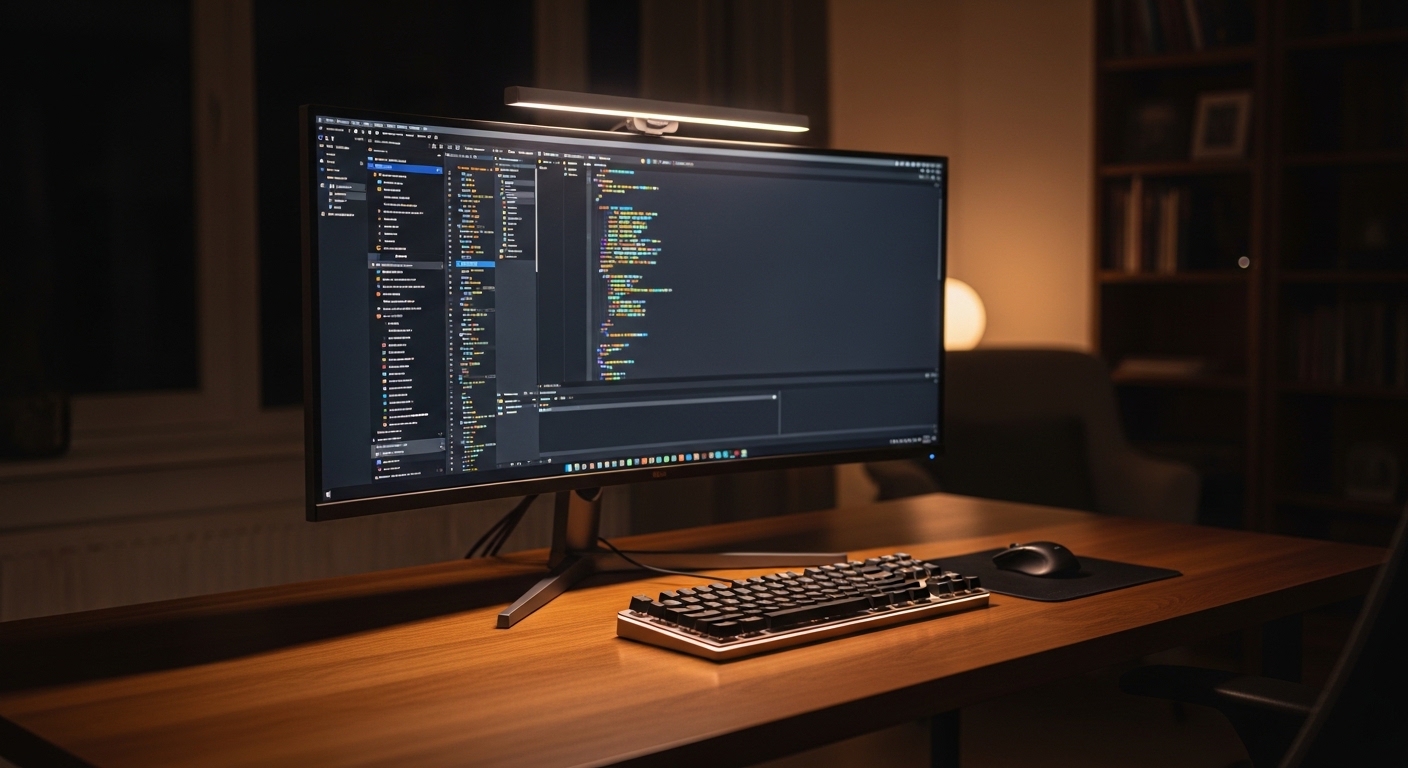
The Evolution of Modern Workspace Illumination
Creating a healthy workspace requires more than just a comfortable chair or a fast computer. Lighting plays a fundamental role in how we perceive information and maintain our physical long term health.
Modern professionals spend a staggering amount of time looking at digital displays. This constant exposure often leads to significant discomfort known as digital eye strain.
At The Home Office Lab, we focus on tools that improve your daily life. One of the most effective solutions is the monitor light bar.
These devices sit atop your screen to provide targeted illumination. They address the specific challenges created by bright computer monitors.
As we transition into more remote work environments, understanding these tools becomes essential. Proper lighting can transform a tiring workday into a highly productive session.
Defining the Monitor Light Bar Concept
A monitor light bar is a specialized lamp designed to clip onto the top of a computer screen. Unlike traditional lamps, it focuses light downwards and across the entire desk surface.
This design ensures that the light does not shine directly into your eyes. It also avoids reflecting off the screen, which is a common lighting problem.
Most models utilize a gravity hinge or a simple clamp for installation. This allows them to fit on almost any modern display panel.
The power source is usually a simple USB connection to your computer. This makes them incredibly convenient for minimalist office setups.
By placing the light source above the monitor, you eliminate shadows. This creates a uniform field of light that helps you see printed documents.
The sleek profile also ensures that your desk remains uncluttered. You gain valuable space that a traditional base would otherwise occupy completely.
Exploring the Benefits of Monitor Light Bars for Eye Strain
One of the primary benefits of monitor light bars for eye strain is the reduction of glare. Glare occurs when light bounces off the glossy surface of a computer screen panel.
This reflection forces your eyes to work harder to see the text. Over time, this results in fatigue and noticeable physical headaches.
Monitor light bars use an asymmetrical optical design to solve this. The light is directed at an angle that avoids the screen.
This means the light hits your keyboard and papers instead of the glass. You get a clear view of your workspace without any distracting light reflections.
Furthermore, these bars help balance the brightness between the screen and the room. Looking at a bright screen in a dark room is bad for eyes.
Your pupils must constantly adjust to the high contrast between the display and the darkness. A light bar provides the necessary ambient background light.
The Science of Asymmetrical Lighting Design
Standard desk lamps scatter light in every direction, which causes issues. This scattered light often hits the monitor and creates a veiling reflection effect.
Asymmetrical lighting is the core technology behind the best light bars. It uses internal reflectors to guide the light beam towards the user.
The beam is cut off precisely so it does not touch the monitor surface. This precision prevents the hazy look often seen with cheap desk lamps.
When your screen is free of glare, your eye muscles relax. This allows you to focus on complex tasks for longer work periods.
This optical engineering is what sets these devices apart from generic LEDs. It is a calculated approach to improving visual comfort.
Effective lighting reduces the need for squinting or leaning forward. This also promotes better posture while you sit at your standing desk setup.
A clean workspace is also vital for focus. You can find guidance on how to organize cables under a standing desk in 2026 to complement your new lighting.
Optimizing Color Temperature for Daily Productivity
Not all light is created equal when it comes to focus. Different times of the day require different types of artificial light color.
Most monitor light bars offer adjustable color temperatures. This usually ranges from warm orange tones to cool blue light.
Cool light is excellent for morning tasks and high concentration. It mimics natural daylight and helps keep you alert and awake.
As the evening approaches, you should switch to warmer tones. Warm light reduces the amount of blue light exposure before your sleep cycle.
Excessive blue light at night can suppress melatonin production. This hormone is crucial for getting a restful night sleep.
By using a light bar, you can manually or automatically adjust these settings. This flexibility supports your natural circadian rhythm health.
Consistent lighting quality also improves your mood throughout the day. A well lit room feels more inviting and less mentally draining.
Improving Workspace Contrast and Visual Clarity
Visual clarity depends heavily on the contrast between your environment and your task. If your desk is too dark, the screen feels painfully bright indeed.
A light bar fills the immediate area with a soft and even glow. This reduces the harshness of the digital display light.
Better contrast makes it easier for your brain to process images. You will find that reading small fonts becomes much less of a chore.
This is particularly important for professionals like coders or writers. These roles involve intense focus on fine visual details.
The light bar ensures that your physical documents are as bright as your screen. This creates a seamless transition for your visual focus points.
Moving your eyes between a dark desk and a bright screen causes strain. Uniform lighting eliminates this constant and taxing pupil adjustment.
Maximizing Desk Space with Slim Designs
Traditional desk lamps often have large, heavy bases that occupy space. In a small home office, every inch of desk real estate matters.
The monitor light bar solves this by utilizing the top of the monitor. It effectively uses air space that would otherwise go unused.
This allows you to place more important tools directly in front of you. You can keep your mouse, keyboard, and notepad in the optimal working zone.
The minimalist aesthetic also contributes to a calmer work environment. A cluttered desk often leads to a cluttered mental state.
Most light bars are incredibly thin and barely noticeable once installed. They blend into the frame of your monitor for a clean look.
This architectural integration is a favorite for fans of modern design. It provides high performance without sacrificing the beauty of your office.
The Importance of High Color Rendering Index
When choosing a light bar, the Color Rendering Index or CRI is vital. CRI measures how accurately a light source reveals true object colors.
Higher CRI values mean colors look natural and vibrant under the light. This is essential for designers and visual creative professionals.
Many monitor light bars feature a CRI of ninety or higher. This ensures that the colors on your desk match the real world.
Low quality lights can make everything look dull or slightly greenish. This can cause additional mental fatigue as your brain compensates for colors.
High CRI lighting makes your workspace feel more alive and professional. It enhances the appearance of wood grain and metal desk accessories.
Quality illumination is not just about brightness but about quality. Investing in good CRI is a commitment to better visual health.
Easy Installation and Universal Compatibility
Setting up a monitor light bar is a quick and simple process. Most designs use a weighted clip that balances on the screen top edge.
There are no screws or complicated brackets required for the installation. This means you can move it between monitors with almost no effort.
They are compatible with both flat and curved monitor panels. Special mounting pads ensure the light stays stable even on very thin screens.
The USB power requirement means you do not need an extra wall outlet. You can plug it directly into a hub or your computer tower port.
This portability is great for people who travel or change offices. You can bring your preferred lighting setup to any new work environment.
Modern light bars also feature touch controls or wireless remotes. Adjusting brightness is as simple as a single finger tap.
Automatic Dimming and Ambient Light Sensors
The most advanced light bars include built in ambient light sensors. These sensors detect the brightness levels of your surrounding office room.
The light bar then automatically adjusts its output to match the environment. This ensures that you always have the perfect light level.
You no longer have to manually change settings as the sun sets. The device handles the transition for you to maintain constant eye comfort.
This feature prevents you from working in a room that is too bright. It also ensures you are never left in the dark during evenings.
Automation takes the guesswork out of ergonomic lighting management. It allows you to focus entirely on your important daily projects.
Smart lighting is a cornerstone of the modern and efficient home office. It represents a merge of technology and human centric design.
Comparing Light Bars to Traditional Lamps
Traditional desk lamps often create harsh shadows across your workspace. Because the light comes from the side, your hand might block the light.
Monitor light bars provide top down illumination that covers the whole desk. This creates a shadow free zone for writing or reading physical books.
Desk lamps also take up space near your hands and mouse. A light bar stays out of the way of your natural arm movements.
Many traditional bulbs also flicker, which causes subtle eye irritation. LED light bars are designed to be entirely flicker free.
The focused beam of a light bar also prevents light spill. This is helpful if you share a room with a partner or spouse.
You can light up your desk without illuminating the entire bedroom. This makes it a very considerate choice for late night workers.
Practical Tips for Reducing Digital Eye Strain
While a light bar is helpful, you should use it correctly. Position the bar so the light beam does not hit your actual eye level.
The edge of the light should fall just in front of the monitor. This maximizes desk coverage while keeping the screen surface dark.
Combine your lighting with the twenty twenty twenty rule. Every twenty minutes, look at something twenty feet away for exactly twenty seconds.
This gives your internal eye muscles a much needed break from focusing. It is a simple habit that works well with quality office lighting.
Ensure your monitor is at the correct height and distance too. Your eyes should be level with the top of the computer screen frame.
Keep your screen clean of dust and finger prints. Smudges can catch light and create distracting spots that increase eye fatigue.
Regularly blink to keep your eyes moist while working intensely. Digital work often leads to a reduced blink rate and resultant dry eyes.
Adjust the brightness of your monitor to match your light bar. Neither should be significantly brighter than the other for optimal visual comfort.
Frequently Asked Questions
- Will a monitor light bar damage my computer screen? No, the mounting clips use soft pads to protect the glass and the bezel of your monitor.
- Can I use a light bar on a laptop? Yes, there are smaller versions designed specifically for laptop screens that are lighter and more compact.
- Do these lights work with curved monitors? Most modern light bars are designed with flexible mounts that accommodate the curve of professional displays.
- How much power do they use? They typically consume very little power and can run easily from a standard USB two or three port.
- Are they better than bias lighting? Bias lighting goes behind the screen, while light bars illuminate the desk, making them better for task work.
- Can the light bar cause glare on my keyboard? Because the light is directed downwards, it illuminates the keys clearly without causing harsh reflections.
- Is the color temperature really important? Yes, switching to warm light in the evening is proven to help with sleep and eye relaxation.
Conclusion and Final Thoughts
Investing in your workspace is an investment in your health. The benefits of monitor light bars for eye strain are clear and backed by science.
By reducing glare and balancing contrast, you protect your vision. This leads to more comfort and fewer headaches during long work days.
A light bar is a simple addition that offers massive ergonomic returns. It saves space, looks great, and improves your daily productivity levels.
We hope this guide helps you create a better environment. Your eyes will certainly thank you for the improved lighting quality.